ProjectTableView (Content Plugin)
The plug-in allows to view the project children in a project table and to call functions on a selected sub-project.
-
Access the plug-in via Mandators → <Mandator name> → Content plug-ins → ProjectTableView
Make sure that you have at least one of the following plug-ins available:
✓ Content plug-in “FSDetail” of the object type project
✓ Content plug-in “FSTable” of the object type project
Make sure that you have the following prerequisites ready:
✓ The option Allow linked products must be activated for the corresponding project type within the configuration of project types
(Application modules → Projects → Project types → Hierarchy) otherwise the linking of products to projects will not be possible.
You can use the plug-in as follows:
-
Page plug-in “Project Types”
Here you can see how the configuration of ProjectTableView content plugin looks like:
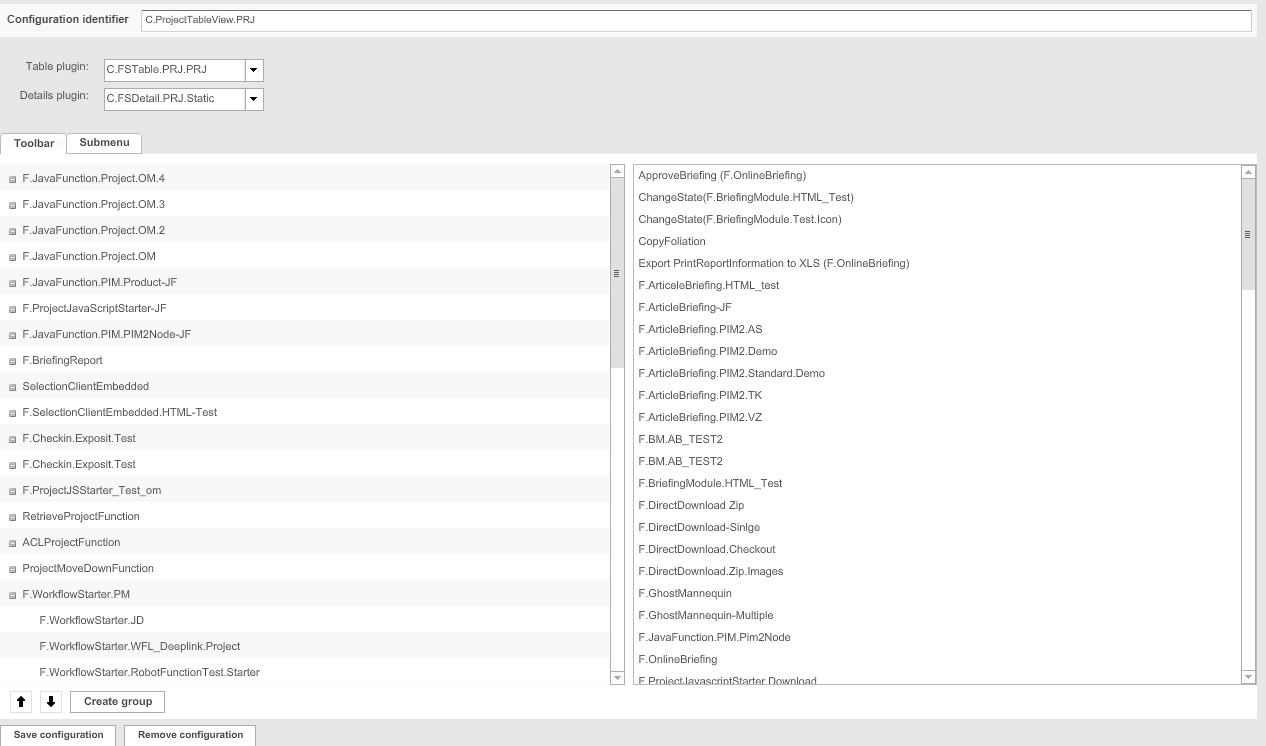
| Field | Description | Notice |
|---|---|---|
Table plugin |
For choosing a suitable table view |
|
Details plugin |
For choosing a suitable detail view |
If no project details shall be shown in the Frontend, choose the entry “none” |
Toolbar |
>> Activate the checkbox to add functions to the toolbar in the Frontend |
|
Submenu |
>> Activate the checkbox to add functions to the sub-menu in the Frontend |
This option is not supported for HTML5 Frontend |