Notification functionality integration into camunda wfls
Goal
As a User and Admin I want to get notified in OMN Message Client when Workflows fail or succeed
Acceptance criteria
A notification component should be introduced which accepts the following config keys
-
ext.notification.default.level (defines for which type of event notification will be sent)
-
ERROR, WARN, INFO
-
Default: WARN
-
-
ext.notification.default.from.application
-
The "Sender Application" or "Sender Programm"
-
Default: Camunda
-
-
ext.notification.default.from.plugin
-
The "Sender Plugin"
-
Default: The ProcessDefinition Key (e.g. "ai-imagetagging")
-

-
-
ext.notification.default.to.users (user)
-
define 1.. n user which will get the message in messageclient
-
can be combined with roles
-
Default: The username which started the workflow
-
-
ext.notification.default.to.roles (role)
-
define 1.. n roles which will get the message in messageclient
-
can be combined with users
-

-
Default: empty
-
-
ext.notification.default.subject.error
-
defines the subject of the error message
-
can work with placeholders (see placeholders)
-
Default: %processDefinitionName failed
-
-
ext.notification.default.subject.success
-
defines the subject of the success message
-
can work with placeholders (see placeholders)
-
Default: %processDefinitionName failed
-
-
ext.notification.default.body.error
-
defines the body of the error message
-
can work with placeholders (see placeholders)
-
Default: see here: https://apollon-cloud.atlassian.net/wiki/spaces/OPD/pages/92210263/Camunda+Notifications
-
Note: Should be of type "CLOB" and be configured in "UI Admin" (enable read/write). Otherwise newlines will not be possible.
-
-
ext.notification.default.body.success
-
defines the body of the success message
-
can work with placeholders (see placeholders)
-
Default: see here: https://apollon-cloud.atlassian.net/wiki/spaces/OPD/pages/92210263/Camunda+Notifications
-
Note: Should be of type "CLOB" and be configured in "UI Admin" (enable read/write). Otherwise newlines will not be possible.
-
-
ext.notification.default.parameters
-
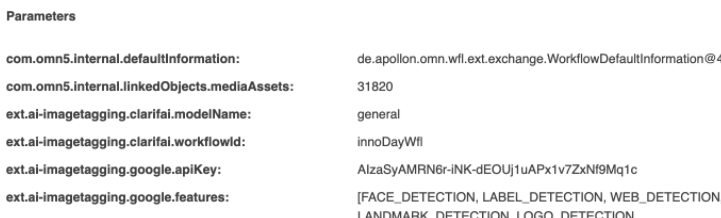
list of config parameter keys which should be included as parameters in the message. These will be listed in separate "Parameters" View of MessageClient
-
Default: empty
-
Replace ".default." by any other string to introduce a new notification config.
Placeholders (for subject and body)
-
%relatedObjects (in case of asset list of related asset file names, in case of products list or related product names
-
%processDefinitionName
-
%processDefinitionKey
-
%processDefinitionId
-
%processDefinitionVersion(Camunda version number which increase for every deployment of the same BPMN)
-
%processDefinitionVersionTag (Our VersionTag string set in BPMN XML, e.g. "5.10.0")
-
%processInstanceStartDate
-
%processInstanceEndDate (will be "NA" for now as our instance is not yet completely finished when we send the message, means: our listener which sends the message is invoked shortly before the WFL is completely finished)
-
%processInstanceDuration (will be "NA" for now as our instance is not yet completely finished when we send the message, means: our listener which sends the message is invoked shortly before the WFL is completely finished)
-
%technicalMessage (the message from thrown exception)
Message parameters
-
only message parameters which are listed in "ext.notification.parameters"
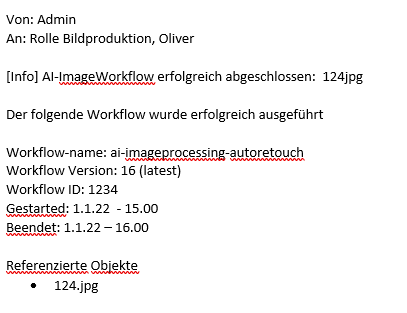
-
Example for message (success) - example workflow AI - Image
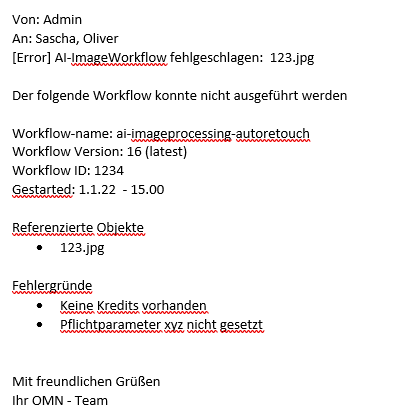
-
Example for message (error) - example workflow AI - Image
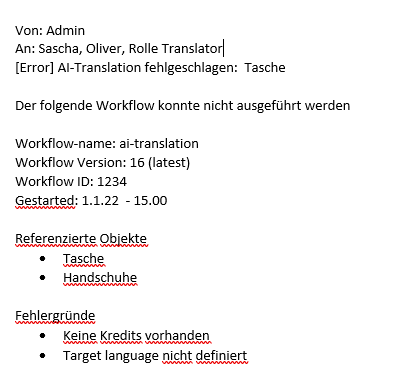
-
Example for message (error) - example workflow AI - Translation
Usecases
-
the user is going to be notified if a camunda process was executed successfully (especially relevant for async processes)
-
eg. AutoRetouch delivers result after several minutes
-
-
the user is going to be informed if camunda process is running into error (user understands the reason) eg
-
invalid api key
-
not enough credits
-
file format not supported
-
etc
-
Notes
With this feature every asynchronous workflow should by default send an error notification in case of an error. Asynchronous means: you get a green toaster in UI immediately but the workflow is not yet finished (continous processing asynchronously in background). You can for example trigger an error by trying to execute AutoRetouch on a PSD file (which is not supported) or by removing a required configuration key. To enable notifications in case a workflow completed successfully you need to set the 'ext.notification.defaut.level' to INFO.