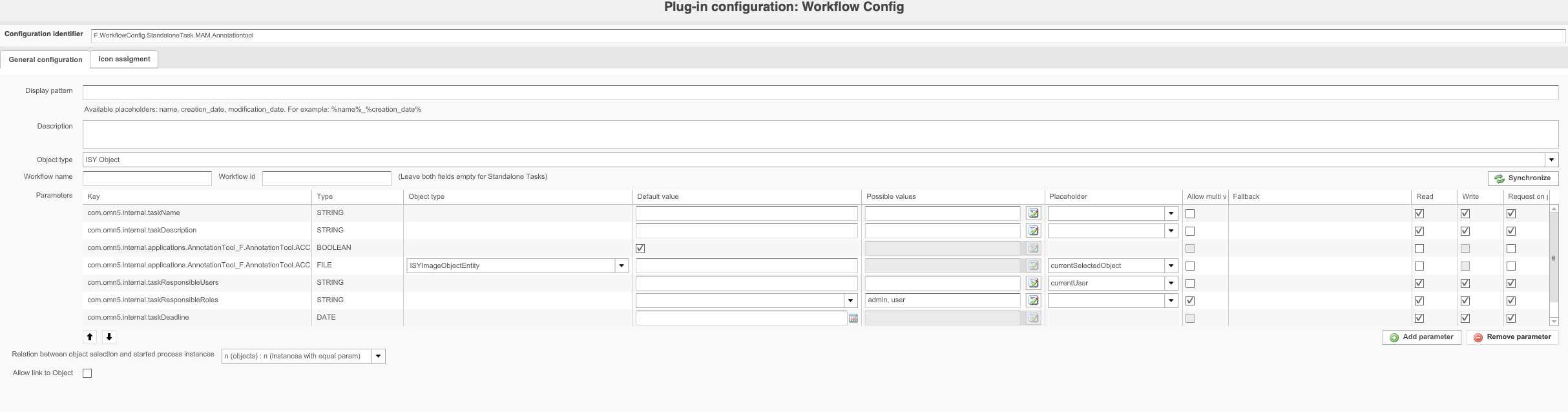
This chapter is about how to use workflow configuration plugin in context of camunda standalone-tasks.
About:
The workflow config plugin is used in the context of camunda integration. In general, in this use case it is used to start a camunda standalone-task.
In relation to an omn object or with defined parameters and values
All not mentioned options are similar from usage point and can be checked here
Configuration:
-
Workflow name - has to be empty, to start a standalone-task
-
Workflow ID - has to be empty, to start a standalone-task
-
Parameters - define the provided parameters for the started instance, there are some special parameters for standalone tasks
Keys of the special parameters are
- com.omn5.internal.taskName
-- will be shown on expression "camunda:task.name" in frontend
- com.omn5.internal.taskDescription
-- will be shown on expression "camunda:task.description" in frontend
- com.omn5.internal.taskDeadline
-- will be used on expression "camunda:task.deadline" in frontend, additionally used for deadline filteration and visualization
- com.omn5.internal.taskResponsibleUsers
-- will be used as candidate users, needs to be provided as single string objects
- com.omn5.internal.taskResponsibleRoles
-- will be used as candidate groups, needs to be provided as single string objects
Function usage - example for Annotation tool with identifier "F.AnnotationTool.ACC"
-
com.omn5.internal.applications.AnnotationTool_F.AnnotationTool.ACC_OpenAnnotationToolFunction.enabled
-
Value has to be set to "true", boolean
-
-
com.omn5.internal.applications.AnnotationTool_F.AnnotationTool.ACC_OpenAnnotationToolFunction.parameters.assetId
-
Value has to be set with the object (asset) the user would like to open
-
You can use placeholders to create a selection related configuration
-