CMIS Server
Abstract
The CMIS Server can provide multiple CMIS 1.1 OMN based repositories.
OMN based repositories are CMIS repositories which are connected to the OnlineMediaNet DAM solution offered by apollon GmbH+Co. KG. They provide a subset of the OMN domain model. Generally spoken all types managed by OMN could be transferred via CMIS (like Files, Products, Projects, Workflows and configurations). But for now we will only support CMIS OMN repositories of type 'OMN File' that provide OMN MAM Assets which are fileable objects in general. This document deals with the OMN metadata type model and how it is mapped to the CMIS domain. It is aimed to give an overview of how the OMN CMIS interface looks like and what you need to consider when creating an own CMIS backed client implementation for OMN.
It is expected that the reader is familiar with the CMIS 1.1 specification:
Metadata Mapping
In order to understand the OMN → CMIS mapped domain model we need to take a brief look at the OMN Metadata hierarchy.
OMN Domain Model
In OMN the following metadata types exists per default:
-
ISY Object
-
ISY Directory
-
ISY File
-
ISY Layout
-
CM Layout
-
ISY Product
-
ISY Document
-
ISY MSOffice Document
-
ISY PDF Document
-
ISY PrePress Document
-
ISY PS Document
-
ISY Image
-
ISY Video
These types all have default attributes like creationDate, modificationDate etc. In terms of CMIS these are the 'attributes' of the metadata types. Next to these attributes the customer can configure additional 'properties' like articleNumber, status etc.
Additional/customized properties of the following types are provided via CMIS:
-
Boolean
-
Date
-
Number
-
String
-
Clob
-
Enumeration
The hierarchy of the OMN metadata domain model is shown in the following diagram:
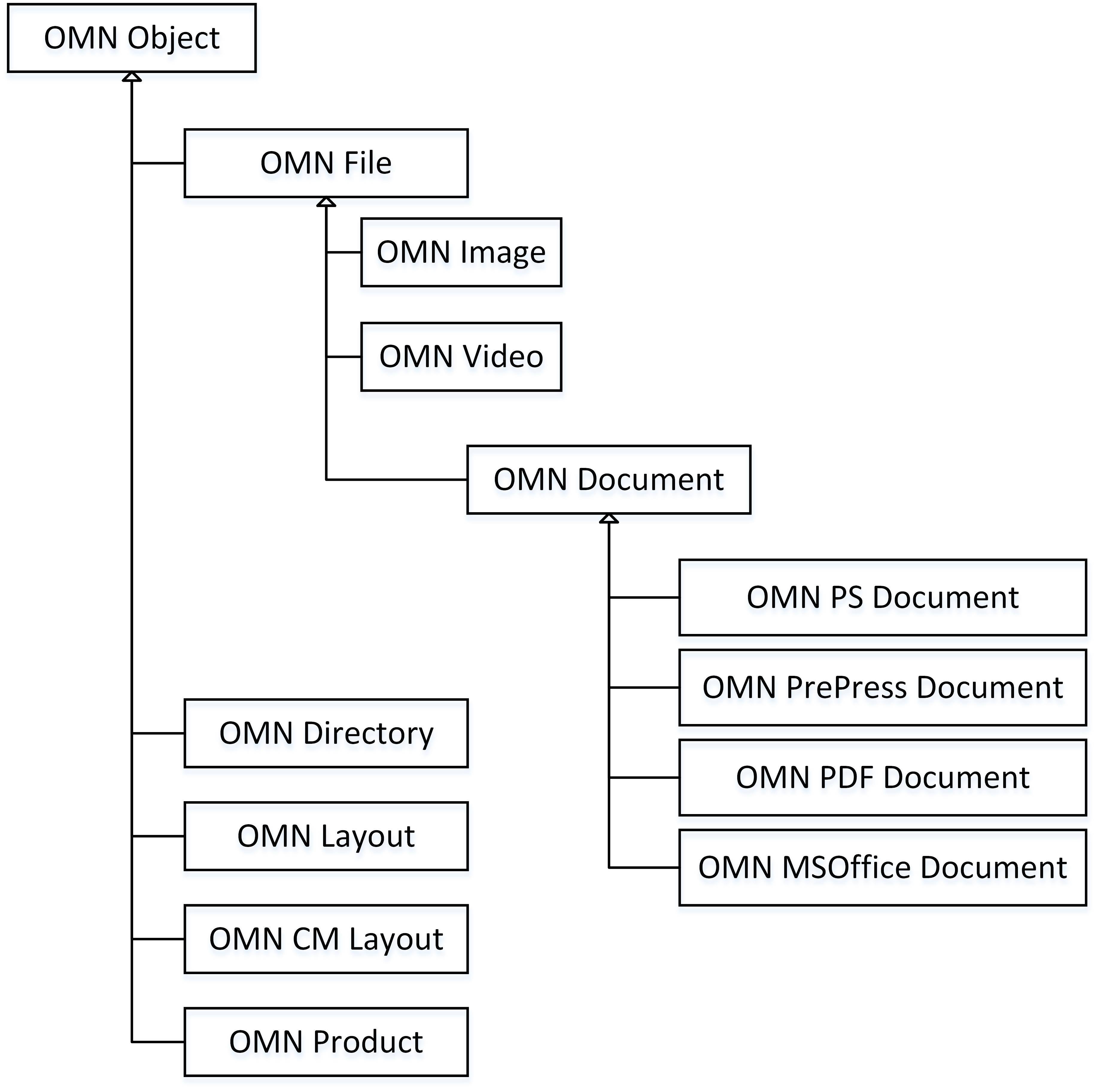
Next to these default metadata types a customer can configure additional types in OMN called '(non-default) specializations'. A specialization can be hooked into every level of the metadata type hierarchy and it automatically extends all the properties from its parent types. Also additional properties can be configured for specializations. But no other type can extend from a specialization (except for OMN type 'ISY Product' where you can specify a parent specialization to extend from).
CMIS Mapped Domain Model
In OMN the upmost level type is Object and in CMIS the upmost level consists of six types cmis:folder, cmis:document, cmis:item, cmis:policy, cmis:secondary and cmis:relationship. Therefore the properties of a default OMN Object type are currently inherited to their mapped CMIS equivalents cmis:folder and cmis:directory.
The mappings of OMN default types are shown in the following table:
OMN Metadata Type |
CMIS Base Metadata Type |
CMIS Metadata Type ID |
CMIS Parent Metadata Type ID |
|
ISY Object |
- |
- |
- |
|
ISY Directory |
cmis:folder |
omn:directory |
cmis:folder |
|
ISY File |
cmis:document |
omn:file |
cmis:document |
|
ISY Document |
cmis:document |
omn:document |
omn:file |
|
ISY MSOffice Document |
cmis:document |
omn:msoffice |
omn:document |
|
ISY PDF Document |
cmis:document |
omn:pdf |
omn:document |
|
ISY PrePress Document |
cmis:document |
omn:prepress |
omn:document |
|
ISY PS Document |
cmis:document |
omn:ps |
omn:document |
|
ISY Image |
cmis:document |
omn:image |
omn:file |
|
ISY Video |
cmis:document |
omn:video |
omn:file |
This results to the following metadata type hierarchy in our CMIS repositories:
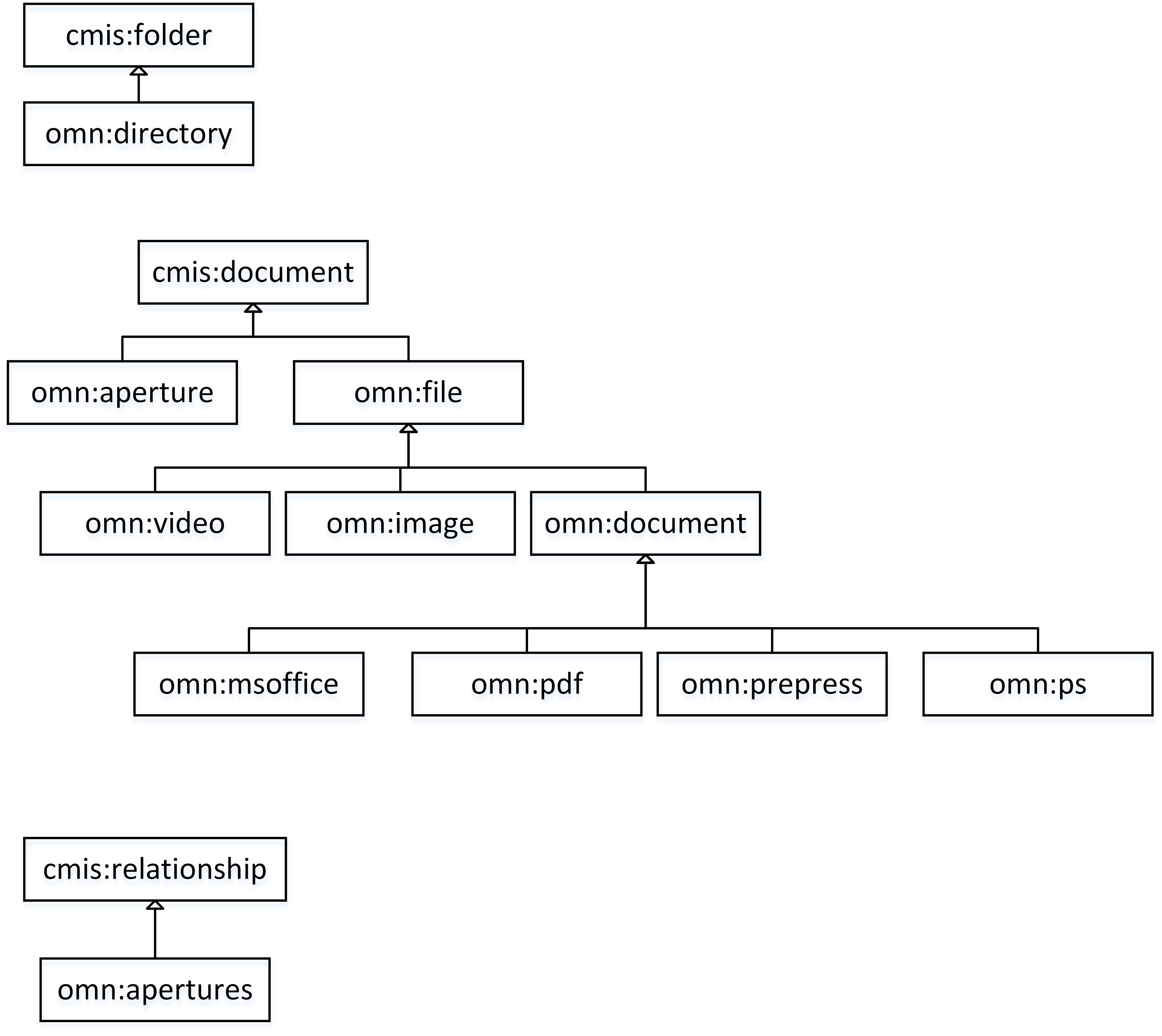
For OMN specializations new corresponding CMIS types are created due to the following rules:
OMN Specialization Metadata Type |
CMIS Base Metadata Type |
CMIS Metadata Type ID |
CMIS Parent Metadata Type ID |
|
ISY Object |
cmis:foldercmis:document |
omn:directory:<specialization_identifer>omn:file:<specialization_identifier>omn:document:<specialization_identifier>omn:image:<specialization_identifier>omn:video:<specialization_identifier>omn:msoffice:<specialization_identifier>omn:pdf:<specialization_identifier>omn:prepress:<specialization_identifier>omn:ps:<specialization_identifier> |
omn:directoryomn:fileomn:documentomn:imageomn:videoomn:msofficeomn:pdfomn:prepressomn:ps |
|
ISY Directory |
cmis:directory |
omn:directory:<specialization_identifier> |
omn:directory |
|
ISY File |
cmis:document |
omn:file:<specialization_identifier>omn:document:<specialization_identifier>omn:image:<specialization_identifier>omn:video:<specialization_identifier>omn:msoffice:<specialization_identifier>omn:pdf:<specialization_identifier>omn:prepress:<specialization_identifier>omn:ps:<specialization_identifier> |
omn:fileomn:documentomn:imageomn:videoomn:msofficeomn:pdfomn:prepressomn:ps |
|
ISY Document |
cmis:document |
omn:document:<specialization_identifier>omn:msoffice:<specialization_identifier>omn:pdf:<specialization_identifier>omn:prepress:<specialization_identifier>omn:ps:<specialization_identifier> |
omn:documentomn:msofficeomn:pdfomn:prepressomn:ps |
|
ISY MSOffice Document |
cmis:document |
omn:msoffice:<specialization_identifier> |
omn:msoffice |
|
ISY PDF Document |
cmis:document |
omn:pdf:<specialization_identifier> |
omn:pdf |
|
ISY PrePress Document |
cmis:document |
omn:prepress:<specialization_identifier> |
omn:prepress |
|
ISY PS Document |
cmis:document |
omn:ps:<specialization_identifier> |
omn:ps |
|
ISY Image |
cmis:document |
omn:image:<specialization_identifier> |
omn:image |
|
ISY Video |
cmis:document |
omn:video:<specialization_identifier> |
omn:video |
For every OMN Object specialization (first row in upper table) two CMIS metadata types are created and they are hooked above the corresponding OMN default types. For example for an OMN object specialization a type omn:directory:<specialization_identifier> is created with parent id cmis:folder and not omn:directory. This is necessary because this specialization does not inherit the properties of omn:directory. But if in OMN an explicit specialization of type 'ISY Directory' exists then for this specialization a new CMIS type omn:directory:<spec_identifier> with parent omn:directory is created. In this case this specialization inherits all properties from default OMN Directory type.
Example
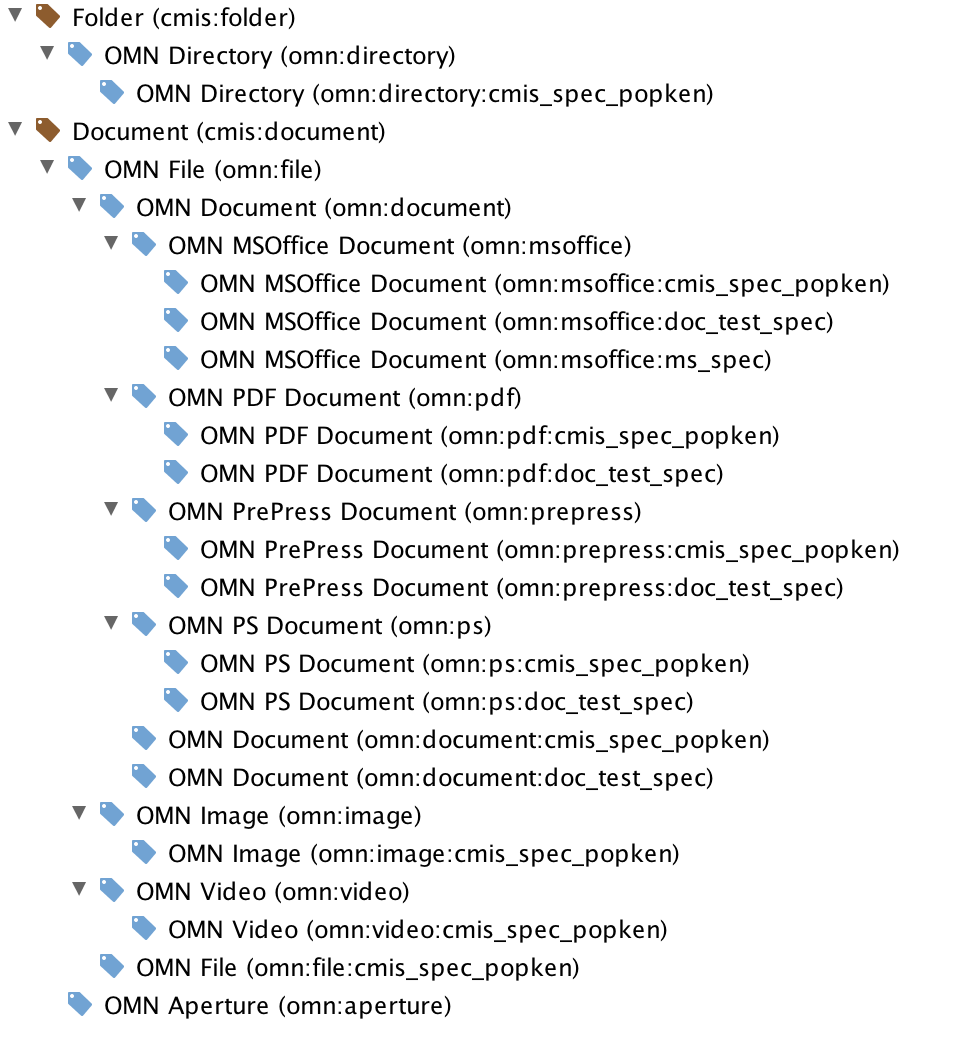
As an example lets assume we have the following OMN Metadata Type Configuration:
Object type |
Specialization |
|
ISY Object |
<default> |
|
ISY Object |
cmis_spec_popken |
|
ISY File |
<default> |
|
ISY Image |
<default> |
|
ISY Document |
<default> |
|
ISY Document |
doc_test_spec |
|
ISY MS Office Document |
<default> |
|
ISY MS Office Document |
ms_spec |
This would result to the following CMIS Metadata Type Hierarchy:
| The OMN → CMIS Metadata Mapping might change in future so it is highly recommended to not statically buffer or hardcode the CMIS type definitions long-term (days or weeks). Instead the Types should be dynamically retrieved from the CMIS Repository Service via 'getTypeChildren', 'getTypeDescendants' etc. |
Due to performance considerations the type hierarchy is read and cached from OMN database at startup. This means if you adjust the metadata configuration at OMN this change is not immediately visible by the CMIS server. You either need to restart the server or better just update the corresponding OSGi bundle via WebConsole or Telnet (or just touch the *.cfg file monitored by Felix FileInstall).
Anyway metadata types are mostly created/adjusted only at the beginning when introducing or setup the OMN into a company structure. So in the wild this should not be a big deal.
OMN File Repository
The CMIS Repositories of type 'OMN File' provide OMN MAM assets in the same structure as they exist in OMN 'Root Node Configurations' (RNC).
Storage in OMN is structured by RNC. An RNC simply represents a mount point on the hard drive and serves as storage entry point for the OMN system.
An OMN system can have multiple RNCs and mandators configured.
An OMN File CMIS repository provides the content of one RNC and mandator. Anyway it is possible to configure the CMIS server to provide multiple repositories of type 'OMN File' whereby each repository maps to an RNC either from root directory or from a subfolder.
The OMN File repository uses the metadata type hierarchy described above. The main object types used in here are omn:directory, omn:file and their subtypes.
Supported CMIS Services
At current stage of development the following CMIS services are supported ('NA' means that the service or the service parameter is not yet available):
| CMIS Service | CMIS Service Method | Supported | Paging | Filter | Rendition Filter | Order By | ACL | Policies | Description of CMIS Service |
|---|---|---|---|---|---|---|---|---|---|
Repository Service |
The Repository Services are used to discover information about the repository, including information about the repository and the object-types defined for the repository. Furthermore, it provides operations to create, modify and delete object-type definitions if that is supported by the repository |
||||||||
getRepositories |
Returns a list of CMIS repositories available from this CMIS service endpoint |
||||||||
getRepositoryInfo |
Returns information about the CMIS repository, the optional capabilities it supports and its access control information if applicable |
||||||||
getTypeChildren |
Returns the list of object-types defined for the repository that are children of the specified type |
||||||||
getTypeDescendants |
Returns the set of the descendant object-types defined for the Repository under the specified type |
||||||||
getTypeDefinition |
Gets the definition of the specified object-type. |
||||||||
createType |
Creates a new type definition that is a subtype of an existing specified parent type |
||||||||
updateType |
Updates a type definition |
||||||||
deleteType |
Deletes a type definition |
||||||||
Navigation Service |
The Navigation Services are used to traverse the folder hierarchy in a CMIS repository, and to locate documents that are checked out |
||||||||
getChildren |
Gets the list of child objects contained in the specified folder |
||||||||
getDescendants |
(incl. Depth) |
Gets the set of descendant objects contained in the specified folder or any of its child-folders |
|||||||
getFolderTree |
(incl. Depth) |
Gets the set of descendant folder objects contained in the specified folder |
|||||||
getFolderParent |
Gets the parent folder object for the specified folder object |
||||||||
getObjectParents |
Gets the parent folder(s) for the specified fileable object |
||||||||
getCheckedOutDocs |
Gets the list of documents that are checked out that the user has access to |
||||||||
Object Service |
CMIS provides id-based CRUD (Create, Retrieve, Update, Delete) operations on objects in a repository |
||||||||
createDocument |
Creates a document object of the specified type (given by the cmis:objectTypeId property) in the (optionally) specified location. |
||||||||
createDocumentFromSource |
Creates a document object as a copy of the given source document in the (optionally) specified location |
||||||||
createFolder |
Creates a folder object of the specified type in the specified location |
||||||||
createRelationship |
Creates a relationship object of the specified type |
||||||||
createPolicy |
Creates a policy object of the specified type |
||||||||
createItem |
Creates an item object of the specified type |
||||||||
getAllowableActions |
Gets the list of allowable actions for an object (see section for allowable actions in spec) |
||||||||
getObject |
Gets the specified information for the object |
||||||||
getProperties |
Gets the list of properties for the object |
||||||||
getObjectByPath |
Gets the specified information for the object |
||||||||
getContentStream |
Gets the content stream for the specified document object, or gets a rendition stream for a specified rendition of a document or folder object |
||||||||
getRenditions |
Gets the list of associated renditions for the specified object. Only rendition attributes are returned, not rendition stream.Due to spec this service is only available for WebService-, Browser- and Local-Binding |
||||||||
updateProperties |
Updates properties and secondary types of the specified object |
||||||||
bulkUpdateProperties |
Updates properties and secondary types of one or more objects |
||||||||
moveObject |
Moves the specified file-able object from one folder to another |
||||||||
deleteObject |
Deletes the specified object |
||||||||
deleteTree |
Deletes the specified folder object and all of its child- and descendant-object |
||||||||
setContentStream |
Sets the content stream for the specified document object |
||||||||
appendContentStream |
Appends to the content stream for the specified document object |
||||||||
deleteContentStream |
Deletes the content stream for the specified document object |
||||||||
Versioning Service |
The Versioning services are used to navigate or update a document version series (see spec section 2.1.13 Versioning) |
||||||||
checkOut |
Create a private working copy (PWC) of the document (see spec section 2.1.13.5.1 Checkout.) |
||||||||
cancelCheckOut |
Reverses the effect of a check-out (checkOut). Removes the Private Working Copy of the checked-out document, allowing other documents in the version series to be checked out again. If the private working copy has been created by createDocument, cancelCheckOut MUST delete the created document (see spec section 2.1.13.5.3 Discarding Check out) |
||||||||
checkIn |
Checks-in the Private Working Copy document (see spec section 2.1.13.5.4 Checkin) |
||||||||
getObjectOfLatestVersion |
Get the latest document object in the version series |
||||||||
getPropertiesOfLatestVersion |
Get a subset of the properties for the latest document object in the version series |
||||||||
getAllVersions |
Returns the list of all document objects in the specified version series, sorted by cmis:creationDate descending |
||||||||
Discovery Service |
The Discovery Services are used to search for query-able objects within the repository |
||||||||
query |
Executes a CMIS query statement against the contents of the repository. "searchAllversions" must be set to false, "includeRelationships" to none, "renditionFilter" and "allowableActions" is not yet supported (renditions(actions will not be passed as a query-result). |
||||||||
getContentChanges |
Gets a list of content changes. This service is intended to be used by search crawlers or other applications that need to efficiently understand what has changed in the repository (see spec section 2.1.15 Change Log). Necessary for CmisSync UseCase! |
||||||||
Multi-filing Service |
The Multi-filing services are supported only if the repository supports the multifiling or unfiling optional capabilities (capabilityMultifiling). The Multi-filing Services are used to file/un-file objects into/from folders.This service is NOT used to create or delete objects in the repository |
||||||||
addObjectToFolder |
Adds an existing fileable non-folder object to a folder |
||||||||
removeObjectFromFolder |
Removes an existing fileable non-folder object from a folder |
||||||||
Relationship Service |
The Relationship Services are used to retrieve the dependent relationship objects associated with an independent object |
||||||||
getObjectRelationships |
Gets all or a subset of relationships associated with an independent object |
||||||||
Policy Service |
The Policy Services are used to apply or remove a policy object to a controllablePolicy object |
||||||||
applyPolicy |
Applies a specified policy to an object |
||||||||
removePolicy |
Removes a specified policy from an object |
||||||||
getAppliedPolicies |
Gets the list of policies currently applied to the specified object |
||||||||
ACL Service |
The ACL Services are used to discover and manage Access Control Lists |
||||||||
applyACL |
Adds or removes the given ACEs to or from the ACL of an object |
||||||||
getACL |
Get the ACL currently applied to the specified object |
||||||||
Metadata Description
The following table describes the default CMIS attributes which are available at all types:
CMIS ID |
CMIS Name |
Description |
Corresponding OMN MAM Property |
|
cmis:baseTypeId |
Base Typ Id |
The id of the base type of this object (will always be 'cmis:document' for CMIS document types) |
- |
|
cmis:objectId |
Object Id |
The unique id of the object.This Object ID has the following structure:<Object: Identity>_<Type_Id>_<CMIS_Base_Type_Id>For Aperture Documents and Apertures Relationship a <Source_Identity>_<Target_identity> is used instead of <Object: Identity>. |
||
cmis:objectTypeId |
Object Type Id |
The id of the type of this object (for example omn:image) |
- |
|
cmis:name |
Name |
The name of the asset as it exists in OMN |
Object: Name |
|
cmis:createdBy |
Created By |
The user who created the object. |
- |
|
cmis:creationDate |
Creation Date |
The date when the object was created |
Object: Creation date |
|
cmis:lastModifiedBy |
Last Modified By |
The user who last modified the object |
- |
|
cmis:lastModificationDate |
Last Modification Date |
The date when the object was last modified |
Object: Modification date |
|
cmis:description |
Description |
A description of the object |
- |
|
cmis:isImmutable |
Is Immutable |
Indicates if the object can be modified |
- |
|
cmis:contentStreamFileName |
Filename |
The file name of the content stream |
File: Name |
|
cmis:contentStreamId |
Content Stream Id |
The id of the content stream |
- |
|
cmis:contentStreamLength |
Content Stream Length |
The length of the content stream in bytes |
File: Size |
|
cmis:contentStreamMimeType |
MIME Type |
The MIME Type of the content stream (e.g. 'application/jpg') |
- |
|
cmis:changeToken |
Change Token |
The change token of this object which can be used for optimistic locking and concurrency checking |
- |
|
cmis:checkinComment |
Checkin Comment |
A comment which describes this version of the object. (Usually not set because versioning is not yet supported) |
- |
|
cmis:isLatestVersion |
Is Latest Version |
Indicates if this is the version with the most recent last modification date. (Usually true because versioning is not yet supported) |
- |
|
cmis:isMajorVersion |
Is Major Version |
Indicates if this is a major version of this object. (Usually true because versioning is not yet supported) |
- |
|
cmis:isLatestMajorVersion |
Is Latest Major Version |
Indicates if this is the major version of this object with the most recent last modification date.(Usually true because versioning is not yet supported) |
- |
|
cmis:isPrivateWorkingCopy |
Is Private Working Copy |
Indicates if this object is a private working copy (PWC). That means if this object was checked out.(Usually false because versioning is not yet supported) |
- |
|
cmis:isVersionSeriesCheckedOut |
Is Version Series Checked Out |
Indicates if there exists a private working copy for this object (PWC).(Usually false because versioning is not yet supported) |
- |
|
cmis:versionLabel |
Version Label |
A textual representation of the version of this object. (Usually not set because versioning is not yet supported) |
- |
|
cmis:versionSeriesCheckedOutBy |
Version Series Checked Out By |
The user who checked out the object (created the PWC). (Usually not set because versioning is not yet supported) |
- |
|
cmis:versionSeriesCheckedOutId |
Version Series Checked Out Id |
The object id of the checked out object (PWC). (Usually not set because versioning is not yet supported) |
- |
|
cmis:versionSeriesId |
Version Series Id |
The id of the version series of the object. (Usually set to cmis:objectId because versioning is not yet supported) |
- |
|
cmis:secondaryObjectTypeIds |
Secondary Object Type Ids |
The ids of the CMIS secondary types applied to this object. (Usually not set because secondary types not yet supported) |
- |
OMN Specific Properties
OMN System Properties
All non-customized metadata have the namespace omn.
For all types omn:directory and omn:file and its specializations and all its subtypes the following properties exists:
CMIS ID |
CMIS Name |
Description |
Type |
Corresponding OMN MAM Property |
|
omn:path |
Path of OMN asset |
This property is used for synchronization of files on client side.Note that this property is deprecated and might be removed in future versions. |
String value |
- |
For type omn:file, its specializations and all its subtypes the following properties exist:
CMIS ID |
CMIS Name |
Description |
Type |
Corresponding OMN MAM Property |
|
omn:keyword |
Keywords for OMN asset |
Contains the associated keywords |
String-Enumeration |
Object: Keyword |
For type omn:image and its specializations the following additional properties exist:
CMIS ID |
CMIS Name |
Description |
Type |
Corresponding OMN MAM Property |
|
omn:height |
Height |
Height of asset in specified unit (see xresolution_id) |
Decimal value |
Image: Height |
|
omn:width |
Width |
Width of asset in specified unit (see yresolution_id) |
Decimal value |
Image: Width |
|
omn:heightinmm |
Height in mm |
Height of asset in mm |
Decimal value |
- |
|
omn:widthinmm |
Width in mm |
Width of asset in mm |
Decimal value |
- |
|
omn:heightinpx |
Height in px |
Height of asset in pixel |
Integer value |
Image: Height in pixel |
|
omn:widthinpx |
Width in px |
Width of asset in pixel |
Integer value |
Image: Width in pixel |
|
omn:xresolution_value |
X Resolution |
X resolution in specified unit (see xresolution_id) |
Decimal value |
Image: X Resolution |
|
omn:yresolution_value |
Y Resolution |
Y resolution in specified unit (see yresolution_id) |
Decimal value |
Image: Y Resolution |
|
omn:xresolution_id |
X Resolution Unit |
Resolution unit of x resolution |
String-Enumeration: (can be: DPI, DPCM, DPMM, UNKNOWN) |
- |
|
omn:yresolution_id |
Y Resolution Unit |
Resolution unit of y resolution |
String-Enumeration: (can be: DPI, DPCM, DPMM, UNKNOWN) |
- |
|
omn:colorspace |
Colorspace |
Name of colorspace of asset |
String value |
Image: Colorspace |
|
omn:iccprofile |
ICC Profile |
Name of ICC profile of asset |
String value |
Image: ICC Profile |
Supported Previews/Renditions
Currently the standard three OMN Previews are provided: omn:thumbnail, omn:coarse and omn:original.
The resolutions are as follows:
Preview Type |
Scale |
Description |
|
omn:thumbnail |
40/40 px |
The largest dimension is set to 40 px while the other dimension is set accordingly to keep aspect ratio of original asset |
|
omn:coarse |
480/480 px |
The largest dimension is set to 480 px while the other dimension is set accordingly to keep aspect ratio of original asset |
|
omn:original |
limited to X/Y dpi |
X and Y is configurable at OMN Backend at Helios Rootnode FileSystems Administration at Limit original preview by resolution.Dimensions are scaled by ratio of configured X/Y DPI and X/Y DPI of original asset. |
Also the width/height and mime type of the OMN previews are provided. For OMN previews thumbnail, coarse and original the mime type is always "image/jpeg".
Performance considerations
It is highly recommended to use paging for getting children/descendants/trees. This does not only reduce amount of traffic but more important it is faster on server side.
On server side we need to join over multiple tables for collecting all the necessary metadata. The more assets the server needs to deliver the longer takes the SQL query to finish.
Filter and OrderBy params are not yet fully supported but in future when they are supported they should reduce the amount of time for collecting the data. So it is recommended to use them and to filter by the data which is really needed on client side.
Apertures
There is an Aperture/Derivates support.
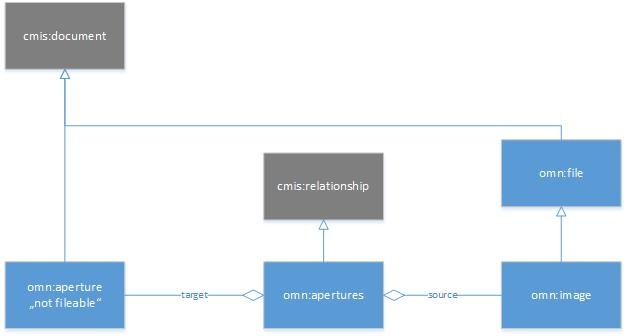
Apertures/Derivates are modeled by using a CMIS Relationship. We introduced a new type "omn:aperture" which base and parent type is "cmis:document".
An object of type "omn:aperture" always represents an Aperture/Derivate as it is defined in OMN Aperture Tool (by which you can crop images). An object of this type is not fileable (does not reside in any folder).
Additionally a CMIS type "omn:apertures" which base and parent type will be "cmis:relationship" will be introduced. The allowed target type of this relationship is "omn:aperture" while the allowed source type is "omn:image".
So an object of type "omn:image" can have zero or more "omn:apertures" relationships which point to objects of type "omn:apertures".
The Aperture FunctionPlugin configurations allow to create several aperture "templates":
Those aperture templates configured with type 'cmis_auto_active' are always applied to the assets (see also OMN File Repository configuration key 'aperture.type.auto_active'):
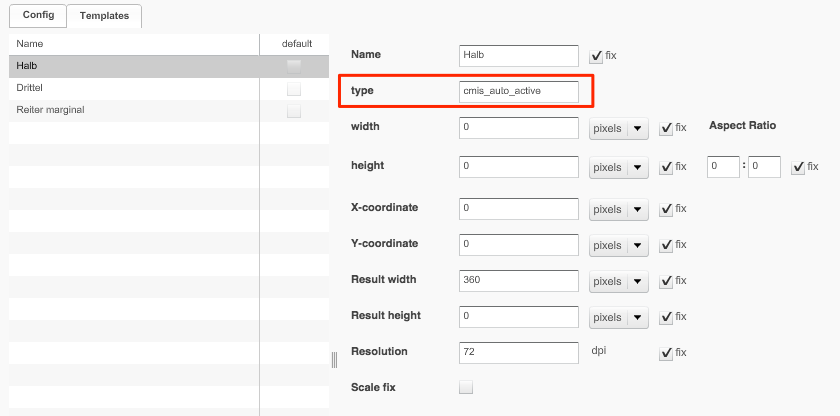
The Result dimension which is set by a value > 0 is taken as fix for the resulting aperture image and the dimension which is 0 is scaled appropriately to keep the aspect ratio of the original image.
In case both dimensions ("Result width" and "Result height") are > 0 than these values are taken as fixed and aspect ratio is not preserved.
Technically spoken these apertures are additional preview formats (next to the classic OMN previews 'coarse', 'original' and 'thumbnail').
The others (non auto-active) are normal apertures which need manual activation on the OMN frontend.
Manual and auto-active aperture templates should be configured in separate Aperture FunctionPlugin configurations in OMN since auto-active aperture should not appear in OMN Frontend at the ApertureTool.
Anyway on CMIS Server it is also configurable if it is allowed to override an auto_active aperture by manually override the template values in OMN Frontend.
CMIS Upload
Since v3.0 three new services are supported
-
createDocument: Upload a new (not yet existing) document
-
createFolder: Create a new folder
-
setContentStream: Overwrite an existing document
Create Document
To upload a document you need to call the service 'createDocument' with the following arguments:
-
folderId
-
the 'cmis:objectId' of the folder where to upload the document to
-
-
Property 'cmis:name'
-
the name of the file
-
-
Property 'cmis:objectTypeId'
-
MUST be set to 'cmis:document' (the repository then will automatically return a document of the proper type. For example if a jpg image is uploaded the returned object will be of type 'omn:image'. For a zip file the type will be 'omn:file')
-
-
contentStream
-
the content of the file to upload. MUST be set but can be empty (a content stream is always required for OMN, but it can be empty = 0 Bytes)
-
-
versioningState
-
MUST be set to 'none'
-
The repository will throw a ContentAlreadyExists exception if a document with the given name already exists in that folder. To overwrite an existing document then the service 'setContentStream' should be called.
Currently other properties than the name and the type can not be set.
Create Folder
To create a folder you need to call the service 'createFolder' with the following arguments:
-
folderId
-
the 'cmis:objectId' of the parent folder
-
-
Property 'cmis:name'
-
the name of the folder
-
-
Property 'cmis:objectTypeId'
-
MUST be set to 'cmis:folder'
-
Currently other properties than the name and the type can not be set.
Set ContentStream
To overwrite an existing document you need to call the service 'setContentStream' with the following arguments:
-
objectId
-
the 'cmis:objectId' of the document to set the new content stream to
-
-
contentStream
-
the new contentStream
-
-
overwriteFlag
-
MUST be set to 'true' (in OMN documents always have a contentStream, so it is always an overwrite)
-
-
changeToken
-
the latest change token of the document to update: The server will compare it with the latest change token on server side and only update the content stream if these are identical. If they are not identical this means someone else has changed the document in the meanwhile and an UpdateConflictException is thrown. In this case the client should download the latest document, review it and in case it still should be overwritten send the request again with updated changeToken. Note: You can set config param 'forceOverwrite=true' if files should be overwritten even if the change token does not match
-