DeepL Document Translation
Description
The DeepL document translator is a machine translation service which allows to translate a document without compromising its formatting.
The OMN integration works together with DeepL via an API.
It is possible to translate a wide range of document types such as:
-
PDF files
-
Word (.docx) documents
-
PowerPoint
-
Excel
To use the DeepL translator in the OMN context, a paid DeepL API Pro subscription must be purchased.
All information about DeepL API Pro can be found here.
API URL
Access to the following URL is needed:
General Parameters
Workflow-Name: ai_translation_document
| Key (* = required) | Type | Default | Description | Example | ||
|---|---|---|---|---|---|---|
ext.ai-translation.deepl.apiKey* |
string |
API Key for the deepl translation service. |
||||
ai_translation_document_deepl_apiKey |
string |
${ext.ai-translation.deepl.apiKey} |
API Key for the deepl translation service. By default the value from AI Translation WFL is used: 'ext.ai-translation.deepl.apiKey' |
|||
ai_translation_document_deepl_apiUrl |
string |
Base URL of the deepl translation service |
||||
ai_translation_document_omnSourceLanguageId |
language |
The OMN Source Language from which the document will be translated to. If not specified, then DeepL will try to detect the language. |
German |
|||
ai_translation_document_omnTargetLanguageId |
language |
The OMN Target Language to which the document will be translated to |
English |
|||
ai_translation_document_deepl_sourceLanguageTag |
string |
The Source Language Tag from which the document will be translated to. If not specified, then DeepL will try to detect the language. If this value is not set and parameter *_omnSourceLanguageId is set, then this value is set to the language tag which results from the configured OMN ISO Language and Region code. This Parameter should be used if the language from which to translate is not configured as OMN Language. |
de-DE |
|||
ai_translation_document_deepl_targetLanguageTag |
string |
The Target Language Tag to which the document will be translated to. If this value is not set and parameter *_omnTargetLanguageId is set, then this value is set to the language tag which results from the configured OMN ISO Language and Region code. This Parameter should be used if the language to which to translate to is not configured as OMN Language. |
en-GB |
|||
ai_translation_document_deepl_sourceLanguageTagMappings |
string |
bg:BG,cs:CS,da:DA,de:DE,el:EL,en:EN,en-GB:EN-GB,en-US:EN-US,es:ES,et:ET,fi:FI,fr:FR,hu:HU,id:ID,it:IT,ja:JA,ko:KO,lt:LT,lv:LV,nb:NB,nl:NL,pl:PL,pt:PT,pt-BR:PT-BR,pt-PT:PT-PT,ro:RO,ru:RU,sk:SK,sl:SL,sv:SV,tr:TR,uk:UK,zh:ZH |
The mappings from language tags to the DeepL Source Language. The language tag is constructed from the *_omnSourceLanguage and its configured ISO language and country code. For example 'German' with a configured ISO language code of 'de' and a country code of 'DE' will be translated to the language tag 'de-DE' which has no exact match in the map and thereby falls back to the mapping by the language code only which results in DeepL Target Language: 'DE' ('…,de:DE,…' in the mapping). There should usually be no need to set this parameter with another mapping. For special Use Cases where the default mapping needs to be overridden see paragraph Language Mapping below. |
|||
ai_translation_document_deepl_targetLanguageTagMappings |
string |
bg:BG,cs:CS,da:DA,de:DE,el:EL,en:EN,en-GB:EN-GB,en-US:EN-US,es:ES,et:ET,fi:FI,fr:FR,hu:HU,id:ID,it:IT,ja:JA,ko:KO,lt:LT,lv:LV,nb:NB,nl:NL,pl:PL,pt:PT,pt-BR:PT-BR,pt-PT:PT-PT,ro:RO,ru:RU,sk:SK,sl:SL,sv:SV,tr:TR,uk:UK,zh:ZH |
The mappings from language tags to the DeepL Target Language. The language tag is constructed from the *_omnTargetLanguage and its configured ISO language and country code. For example 'English' with a configured ISO language code of 'en' and a country code of 'GB' will be translated to the language tag 'en-GB' which is mapped to DeepL Target Language 'EN-GB'. There should usually be no need to set this parameter with another mapping. For special Use Cases where the default mapping needs to be overridden see paragraph Language Mapping below. |
|||
ai_translation_document_deepl_formality |
string |
Sets whether the translated text should lean towards formal or informal language. This feature currently only works for target languages DE (German), FR (French), IT (Italian), ES (Spanish), NL (Dutch), PL (Polish), PT-BR and PT-PT (Portuguese), JA (Japanese), and RU (Russian). Learn more about the plain/polite feature for Japanese here. Setting this parameter with a target language that does not support formality will fail, unless one of the prefer_… options are used. Possible options are:
|
prefer_more |
|||
ai_translation_document_deepl_glossaryId |
string |
The DeepL glossary ID to use for translation. Note that this must be a DeepL glossary. OMN Glossaries are not yet supported |
||||
ai_translation_document_deepl_outputFormat |
string |
File extension of desired format of translated file, for example: pdf. If unspecified, by default the translated file will be in the same format as the input file.
|
||||
ai_translation_document_omnTargetPath |
string |
${cwd}/${fileNameBase}translated${ai_translation_document_targetLanguageTag}.${fileNameExtension} |
The target path where to write the translated file to. By default it is written in the current working directory ('cwd') with the source file name ('fileNameBase') plus the string '-translated' plus the target language tag. For example if the we start the workflow on the asset '/MAM/Assets/MyDocument.pdf' and translate it to english it will be written to '/MAM/Assets/MyDocument-translated-en-EN.pdf' |
|||
ai_translation_document_omnExistingFileStrategy |
string |
newFileWithPattern |
Specifies what to do when the a file with the same name already exists:
|
overwrite |
Language Mapping
By default the OMN Source/Target Languages are translated into a language tag format which consists of the configured OMN ISO language code and the region code separated by a hyphen.
For example, if the language 'English' is configured in OMN with an ISO language code of 'en' and a region code of 'EN' then this would result into the language tag 'en-EN'.
This language tag is then mapped to the DeepL Source/Target language code by using the configured maps in parameters '_sourceLanguageTagMappings' and '_targetLanguageTagMappings' (see also General Parameters).
The default language tag mappings are:
bg:BG,cs:CS,da:DA,de:DE,el:EL,en:EN,en-GB:EN-GB,en-US:EN-US,es:ES,et:ET,fi:FI,fr:FR,hu:HU,id:ID,it:IT,ja:JA,ko:KO,lt:LT,lv:LV,nb:NB,nl:NL,pl:PL,pt:PT,pt-BR:PT-BR,pt-PT:PT-PT,ro:RO,ru:RU,sk:SK,sl:SL,sv:SV,tr:TR,uk:UK,zh:ZH
This means language tag 'bg' is mapped to DeepL language 'BG', language tag 'cs' is mapped to DeepL language 'CS' and so forth.
For the example 'en-EN' there is not an exact match: For english there only are the following mappings:
...,en:EN,en-GB:EN-GB,en-US:EN-US,...
In this case, where no exact match is found, by default users fall back to try find a mapping for the language code only.
In this case this would be 'en' which is found in the mapping and results in DeepL Language 'EN'.
If users want to override this and use British English as the DeepL target language, they can easily do that by adjusting the mapping.
A user could configure the parameter '*_targetLanguageTagMappings' with the complete mapping string again and only replace the mapping '…,en:EN,…' with '…,en:EN-GB,…' or set the following parameter:
ai_translation_document_deepl_targetLanguageTagMappings.putAll = en:EN-GB
This then replaces the old 'en:EN' mapping with 'en:EN-GB'.
For more information see also General Language Mapping.
Example configuration
The following image shows what a sample configuration for DeepL Document Translation might look like.
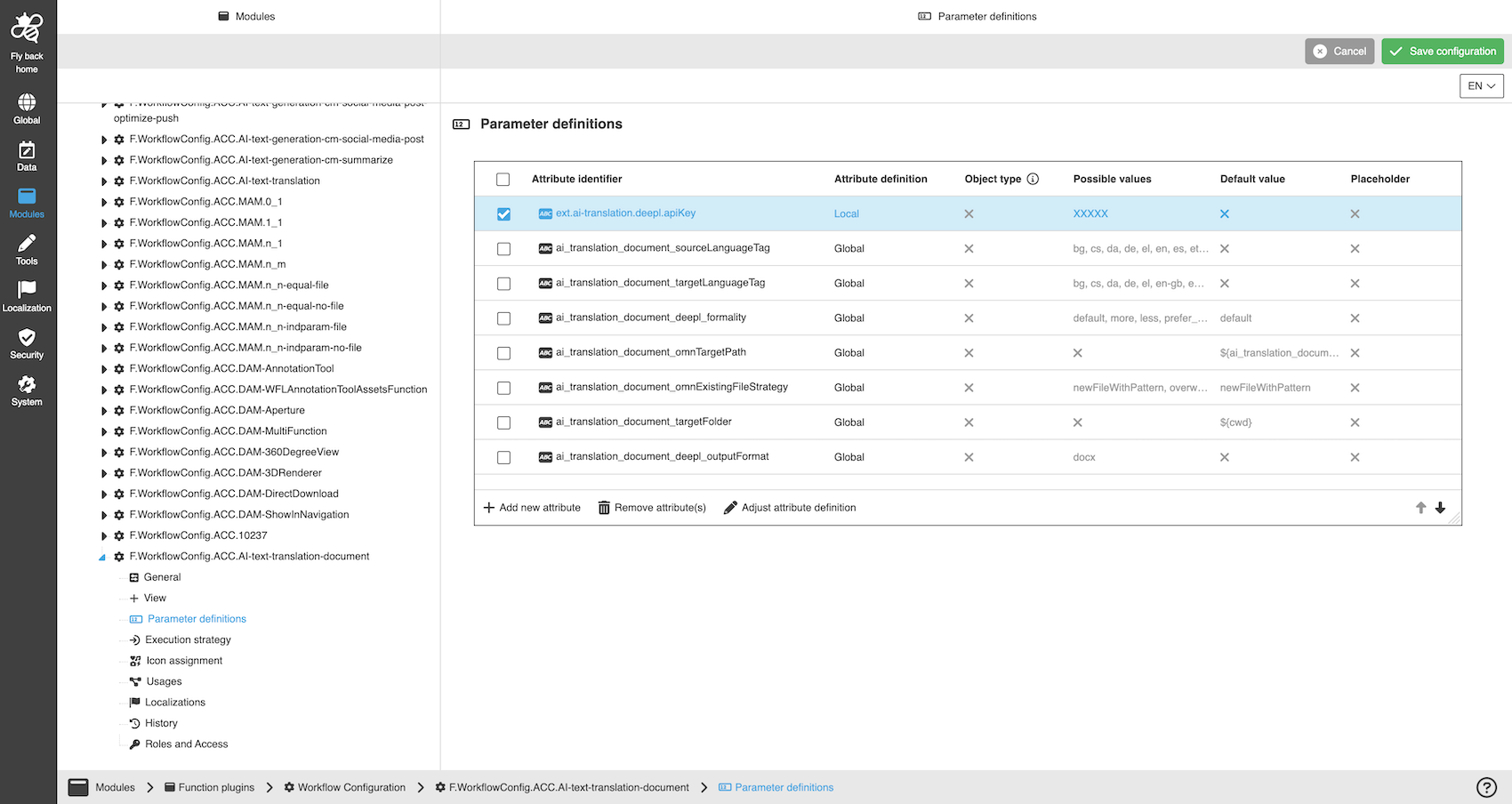
A detailed step-by-step guide to the configuration of the Workflow Config Function plug-in can be found on this page.