SYSTRAN Translate
Description
SYSTRAN Translate is a machine translation service. The OMN integration works together with SYSTRAN via an API.
The free version of SYSTRAN Translate lets users translate any text, Web page, file or RSS feed in the language of choice in real-time.
There is also existing a Translate PRO version, which brings a lot of benefits, such as unlimited text translation. The PRO version can be subscribed for a fee.
To use the SYSTRAN Translate service in the OMN context, a paid SYSTRAN subscription (Growth) must be purchased.
All information about SYSTRAN Translate API can be found here.
Supported languages
The list of supported languages is the following:
Albanian, Arabic, Bengali, Bulgarian, Burmese, Catalan, Chinese, Chinese (traditional), Croatian, Czech, Danish, Dutch, English, Estonian, Finnish, French, German, Greek, Hebrew, Hindi, Hungarian, Indonesian, Italian, Japanese, Korean, Latvian, Letton, Lithuanian, Malay, Norwegian, Pashto, Persian, Polish, Portuguese, Romanian, Russian, Serbian, Slovak, Slovenian, Spanish, Swedish, Tagalog, Tamil, Thai, Turkish, Ukrainian, Urdu, Vietnamese
All currently supported languages can be retrieved by an API call: API Documentation.
| The languages can be adapted by the providers, which may result in discrepancies between the page and the languages actually supported. |
| As this Workflow uses write operations to PIM attributes via REST API, the OMN user executing this Workflow needs to be in an admin role. API admin roles are configured in property 'omn.eai.api.admin.roles' in EAI Properties |
Configuration Parameters
Workflow-Name: ai-translation
General parameters
| Key (* = required) | Type | Default | Description | Example |
|---|---|---|---|---|
ext.ai-translation.translationService* |
string |
Name of the AI translation service which should be used ('deepl', 'ms', 'google' or 'systran') |
deepl |
|
ext.ai-translation.attributes |
string (multi) |
List of attribute identifiers which should be translated (per default all language dependent attributes are translated) |
"Artikelnummer, Farbe" |
|
ext.ai-translation.allowOverwrite |
boolean |
true |
Controls if existing values should be overwritten. If this is set to false then attributes which already contain values for the target language will not be translated (no additional cost occur) |
false |
ext.ai-translation.sourceLanguages |
language (multi) |
required |
List of content source languages which should be translated |
English, German |
ext.ai-translation.targetLanguages |
language (multi) |
required |
List of content target languages which should be translated to |
French, Japanese |
SYSTRAN specific parameters
| Key (* = required) | Type | Default | Description | Example |
|---|---|---|---|---|
ext.ai-translation.systran.apiUrl* |
string |
Base URL of the systran translation service |
https://api-translate.systran.net/translation/text/translate |
|
ext.ai-translation.systran.apiKey* |
string |
API Key for the systran translation service |
||
ext.ai-translation.systran.sourceLanguageTagMappings |
string |
The mappings from language tags to the Systran Source Languages. The language tag is constructed from the *_omnSourceLanguage and its configured ISO language and country code. For example 'German (Switzerland)' with a configured ISO language code of 'ch' and a country code of 'CH' will be translated to the language tag 'ch-CH', which then could be mapped to Systran Source Language "de" by using "ch-CH:de". Multiple mappings need to be comma separated. There should usually be no need to set this parameter with another mapping. See also General Language Mapping. Note that the ".putAll", ".removeAllKeys" feature is not yet available here. By default no mappings are provided and the ISO language code will be used as Systran Source Language. |
us-EN:en,ch-CH:de |
|
ext.ai-translation.systran.targetLanguageTagMappings |
string |
The mappings from language tags to the Systran Target Languages. The language tag is constructed from the *_omnTargetLanguage and its configured ISO language and country code. For example 'German (Switzerland)' with a configured ISO language code of 'ch' and a country code of 'CH' will be translated to the language tag 'ch-CH', which then could be mapped to Systran Target Language "de" by using "ch-CH:de". Multiple mappings need to be comma separated. There should usually be no need to set this parameter with another mapping. See also General Language Mapping. Note that the ".putAll", ".removeAllKeys" feature is not yet available here. By default no mappings are provided and the ISO language code will be used as Systran Target Language. |
us-EN:en,ch-CH:de |
Example configuration
The following image shows what a sample configuration for SYSTRAN Translate might look like.
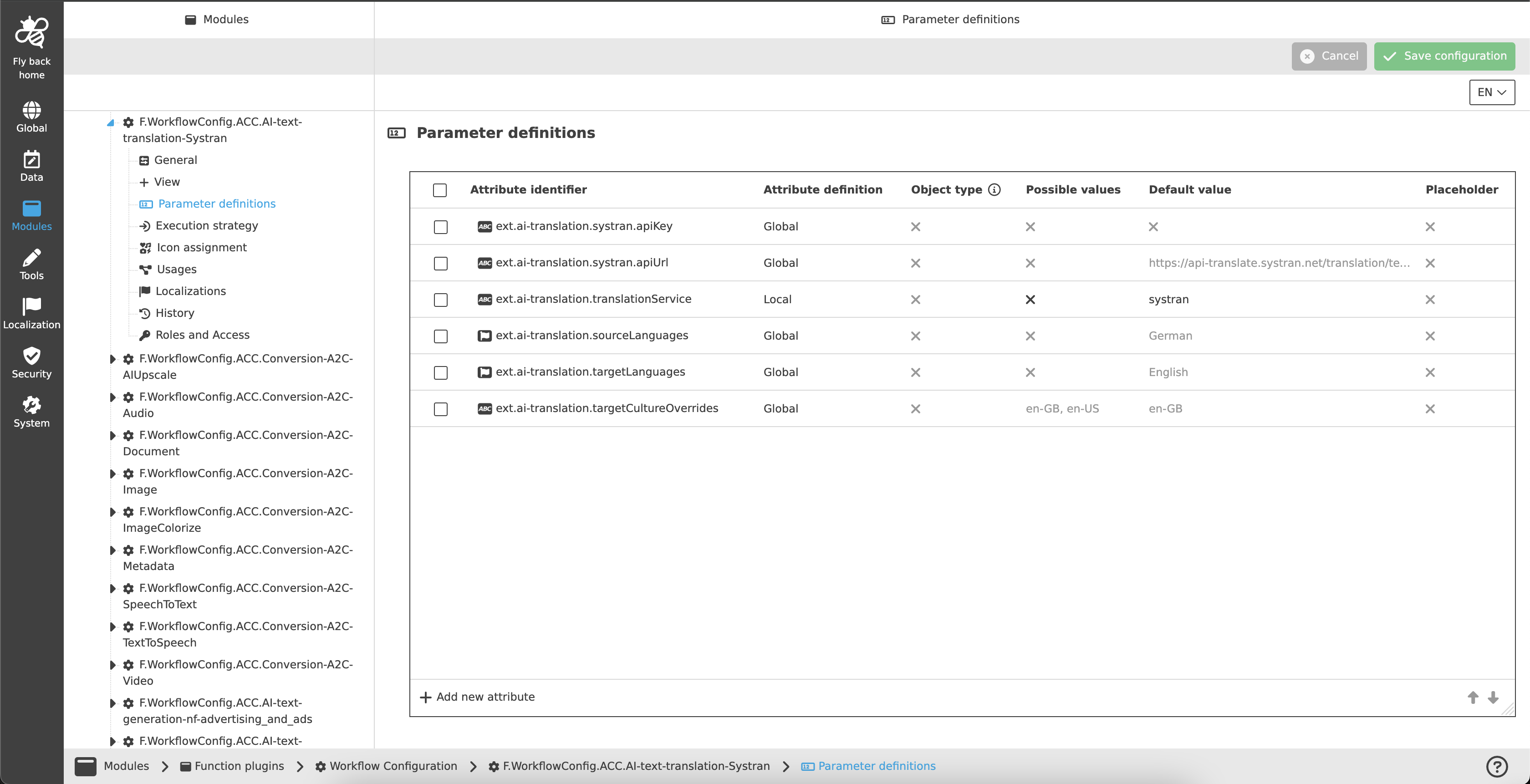
A detailed step-by-step guide to the configuration of the Workflow Config Function plug-in can be found on this page.