OMN-Search page plugin
To appear in the frontend each configured search-related plugin should be enabled on OMN-Search page which represents all available searches at one place. OMN-Search page plugin bases on available AdvancedSearch/FormBasedSearch/SimpleSearch/DuplicateSearch/PEOSearch plugins' configurations. The following options are configurable in the OMN-Search page plugin:
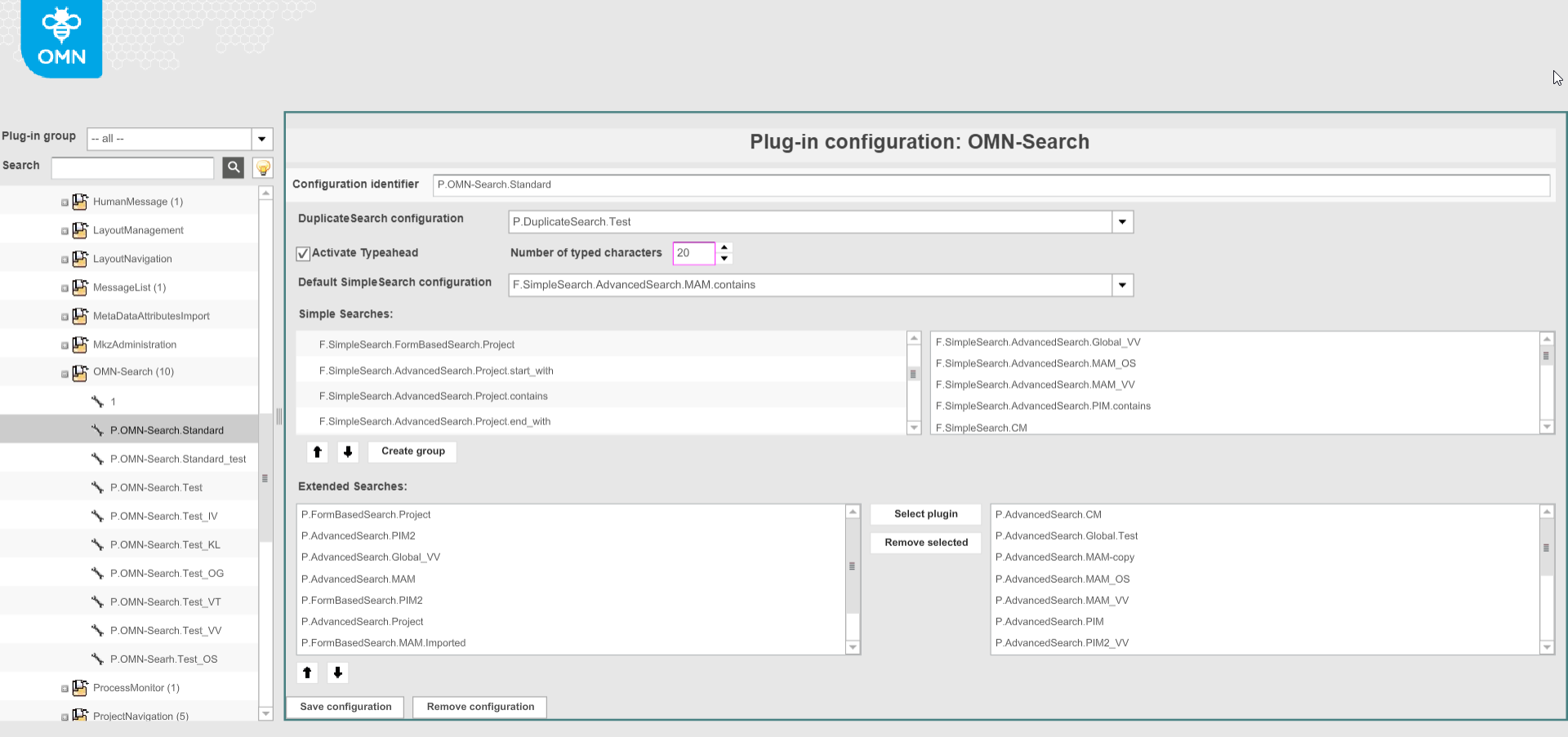
-
"DuplicateSearch configuration". The specific configuration of Duplicate Search page plugin can be set and if so it is available on the OMN-Search page in the frontend as an icon in the lower right corner.
-
"Activate Typeahead" option allows getting suggestions when typing search query into the search input field, if activated.
Provided suggestions are coming from ElasticSearch and cannot be restricted in accordance with security rules.
Meaning: the user can see a suggestion for an object he has no access to. Results of the search are controlled by security rules, so he will not find restricted object. -
"Number of typed characters" determines the number of characters to enter before the suggestions appear (disabled until the previous option is checked, equals 10 by default)
-
"Default SimpleSearch configuration" defines the search which is performed automatically after the query is specified and the search is run (if no tile with Simple Search or Duplicate Search is triggered).
Only SimpleSearches configurations added below are selectable in the dropdown and therefore should be configured first. -
"Simple Searches" defines a list of simple searches which can be used from OMN-Search page. Represented as tiles in the frontend. SimpleSearch and PEOSearch function plugins' configurations are selectable here. Multiple SimpleSearches can be assigned.
The simple searches defined in Mandator details → Quick search configuration are relevant for old client only -
"Extended Searches" defines the list of AdvancedSearch/FormBasedSearch which can be used for attribute based search.
Extended Search is launched by clicking on the link below the search bar and is represented as a modal window. All AdvancedSearch/FormBasedSearch configurations are selectable here. Multiple configurations can be assigned to extended search.
More details on the usage of Extended Searches can be found here.