Conversionmaker NLG
Description
Conversionmaker.ai is an AI-based software that generates creative, sophisticated and unique product descriptions and marketing texts from OMN product data in just a few seconds.
The tool uses a language model that has been trained on over a million texts.
With Conversionmaker.ai, the conversion rate can be increased, SEO visibility improved and up to 90% of time saved on copywriting.
Conversionmaker currently supports 15 languages and several text types such as product descriptions, category texts, Amazon marketplace texts, blog and social media posts as well as emails.
Further information can be found here.
| A subscription is required to use the service with OMN. |
Supported languages
The list of supported languages is the following:
Bulgarian, Czech, Chinese, Danish, Dutch, English (GB + US), Estonian, Finnish, French, German (+ Austria & Switzerland), Greek, Hungarian, Indonesian, Italian, Japanese, Korean, Latvian, Lithuanian, Norwegian, Polish, Portuguese (+BR), Romanian, Russian, Swedish, Slovak, Slovenian, Spanish, Turkish, Ukrainian
All languages can be seen on this page.
| The languages can be adapted by the providers, which may result in discrepancies between the page and the languages actually supported. |
| As this Workflow uses write operations to PIM attributes via REST API, the OMN user executing this Workflow needs to be in an admin role. API admin roles are configured in property 'omn.eai.api.admin.roles' in EAI Properties |
Configuration Parameters
Workflow-Name: ai_textcreation_conversionmaker
| Key (* = required) | Type | Default | Description | Example |
|---|---|---|---|---|
ai_textcreation_conversionmaker_api_key* |
string |
API Key for the conversionmaker service |
||
ai_textcreation_conversionmaker_api_projectId* |
string |
Conversionmaker project ID |
6282171639dac8dfb01c44a0 |
|
ai_textcreation_conversionmaker_languageTag |
string |
de-DE |
The language to use. This affects both: The language in which the text is generated and to which language the text is written to for language dependent attributes |
en-GB |
ai_textcreation_conversionmaker_api_name |
string |
The name for the entity (shop/product/marketplace/email). If not set, the name is derived from product name |
||
ai_textcreation_conversionmaker_api_text |
string |
The text which is used as source for the text to generate. If not set, this parameter is set automatically to a "serialized" version of the product which consists of its name, classification and included attributes |
||
ai_textcreation_conversionmaker_api_type |
string |
The entity type to use. This parameter is only eligible for "*_optimizePush" and "*_optimizePull" use case/config presets (see parameter config presets below). Possible values: PRODUCT-PAGE, SHOP-CATEGORY, INSTAGRAM_POST, FACEBOOK_POST, LINKEDIN_POST, TWITTER_POST |
||
ai_textcreation_conversionmaker_api_manufacturer |
string |
The manufacturer. This parameter is only eligible for the "marketplaces_title", "marketplaces_attributes", "marketplaces_description" and "marketplaces_content" use case/config presets (see parameter config presets below). If set, it will overwrite any value read from "*_sourceAttributeIdentifierManufacturer" parameter (see below) |
||
ai_textcreation_conversionmaker_api_sourceAttributeIdentifierManufacturer |
string |
Identifier of the PIM2 attribute where to read the manufacturer from. This parameter is only eligible for the "marketplaces_title", "marketplaces_attributes", "marketplaces_description" and "marketplaces_content" use case/config presets (see parameter config presets below). The manufacturer can be set manually by using "*_manufacturer" parameter |
||
ai_textcreation_conversionmaker_api_keywords |
string |
SEO Keywords to use for text creation. Maximum 5 Keywords, comma separated |
men’s suit, formal wear, pinstripe suit, classic |
|
ai_textcreation_conversionmaker_api_topic |
string |
The topic of the email. This parameter is only eligible for the "emails" use case/config preset (see parameter config presets below) |
Invitation to our anniversary |
|
ai_textcreation_conversionmaker_api_company |
string |
The name of the company. This parameter is only eligible for the "emails" use case/config preset (see parameter config presets below) |
apollon GmbH+Co. KG |
|
ai_textcreation_conversionmaker_api_formOfAddress |
string |
Form of address to use in generated texts. If omitted the AI will tend to keep the form of address as seen in the given inputs. Possible values: FORMAL, INFORMAL, NEUTRAL, PLURAL |
INFORMAL |
|
ai_textcreation_conversionmaker_api_textLength |
string |
Indicates the length of the generated text. Possible values: SHORT, MEDIUM, LONG |
MEDIUM |
|
ai_textcreation_conversionmaker_omn_attributesToInclude |
string (multiple) |
List of PIM2 attribute identifiers to include for text generation. "*" includes all |
||
ai_textcreation_conversionmaker_omn_attributesToExclude |
string (multiple) |
List of PIM2 attribute identifiers to exclude for text generation. Note that excluded attributes have precedence over included attributes. This means you can for example first include all by using "*" for the "*_attributesToInclude" parameter and then exclude specific attributes |
||
ai_textcreation_conversionmaker_additional_info |
string |
Additional information which should be considered in generated text. This could be some information which maybe is not covered by the included attributes of the product |
Now on sale for only $3.99 |
|
ai_textcreation_conversionmaker_targetAttributeIdentifierEntityId |
string |
Identifier of the PIM2 attribute where to write the conversionmaker entity id to. Attribute needs to be of type Text and language dependent |
||
ai_textcreation_conversionmaker_targetAttributeIdentifierEntityUrl |
string |
Identifier of the PIM2 attribute where to write the conversionmaker url to. This url will directly link to the conversionmaker ui where the text can be edited. Attribute needs to be of type Text and language dependent |
||
ai_textcreation_conversionmaker_targetAttributeIdentifierText |
string |
Identifier of the PIM2 attribute where to write the generated text to. Attribute needs to be of type Text and language dependent |
||
ai_textcreation_conversionmaker_sourceAttributeIdentifierText |
string |
Identifier of the PIM2 attribute where to read the source text from. This parameter is only eligible for "*_optimizePush", "rewrite" and "summarize" use cases/config presets (see parameter config presets below). When used in "*_optimizePush" use case then the source text is pushed (written) to the conversionmaker ui to keep it in sync. When used in "rewrite" or "summarize" use case then the source text is being rewritten respectively summarized |
||
ai_textcreation_conversionmaker_targetAttributeIdentifierTextCopyScore |
string |
Identifier of the PIM2 attribute where to write the copy score of the generated text to. Attribute needs to be of type Real and language dependent |
||
ai_textcreation_conversionmaker_targetAttributeIdentifierTextDateTime |
string |
Identifier of the PIM2 attribute where to write the date-time of the generated text to. Attribute needs to be of type Date and language dependent |
||
ai_textcreation_conversionmaker_configPreset |
string |
The config preset to use. Config presets are configuration parameter bundles which contain reasonable default values relating to specific uses cases (see also "Conversionmaker Use Cases" below). Idea behind this is to keep the complexity of workflow configuration low while still being flexible. It is strongly recommended to set a config preset since it sets many low level config parameters automatically. Possible values are: products_productPage, products_shopCategory, products_optimizePull, products_optimizePush, blogPosts_title, blogPosts_introduction, blogPosts_paragraphs, blogPosts_conclusion, blogPosts_optimizePull, blogPosts_optimizePush, marketplaces_title, marketplaces_attributes, marketplaces_description, marketplaces_content, marketplaces_optimizePull, marketplaces_optimizePush, socialmediaPosts, socialmediaPosts_optimizePull, socialmediaPosts_optimizePush, emails, emails_optimizePull, emails_optimizePush, copyScore, rewrite, summarize, keywords_suggestions |
Conversionmaker Use Cases
All Conversionmaker text types and tools are supported and seamlessly integrated within OMN.
To ease configuration OMN provides a configuration bundle (config preset) for each use case which sets several low level configuration parameters automatically.
The following table lists the available config presets. The parameter "ai_textcreation_conversionmaker_configPreset" needs to be set to one of the corresponding preset names listed here.
| Config Preset Name | Description |
|---|---|
products_productPage |
Generates text for products |
products_shopCategory |
Generates texts for shop categories |
products_optimizePull |
Pulls product or shop category text from conversionmaker webpage |
products_optimizePush |
Pushes product or shop category text to conversionmaker webpage |
blogPosts_title |
Generates blog post title text |
blogPosts_introduction |
Generates blog post introduction text |
blogPosts_paragraphs |
Generates blog post paragraph text |
blogPosts_conclusion |
Generates blog post conclusion text |
blogPosts_optimizePull |
Pulls blog text from conversionmaker webpage |
blogPosts_optimizePush |
Pushes blog text to conversionmaker webpage |
marketplaces_title |
Generates marketplace title text |
marketplaces_attributes |
Generates marketplace attributes |
marketplaces_description |
Generates marketplace description text |
marketplaces_content |
Generates marketplace content text |
marketplaces_optimizePull |
Pulls marketplace text from conversionmaker webpage |
marketplaces_optimizePush |
Pushes marketplace text to conversionmaker webpage |
socialmediaPosts |
Generates social media post text |
socialmediaPosts_optimizePull |
Pulls social media post text from conversionmaker webpage |
socialmediaPosts_optimizePush |
Pushes social media post text to conversionmaker webpage |
emails |
Generates email text |
emails_optimizePull |
Pulls email text from conversionmaker webpage |
emails_optimizePush |
Pushes email text to conversionmaker webpage |
copyScore |
Calculates the copy score |
rewrite |
Rewrites text |
summarize |
Summarizes text |
keywords_suggestions |
Generates keywords |
Example configuration
The following image shows what a sample configuration for Conversionmaker with use case product page might look like.
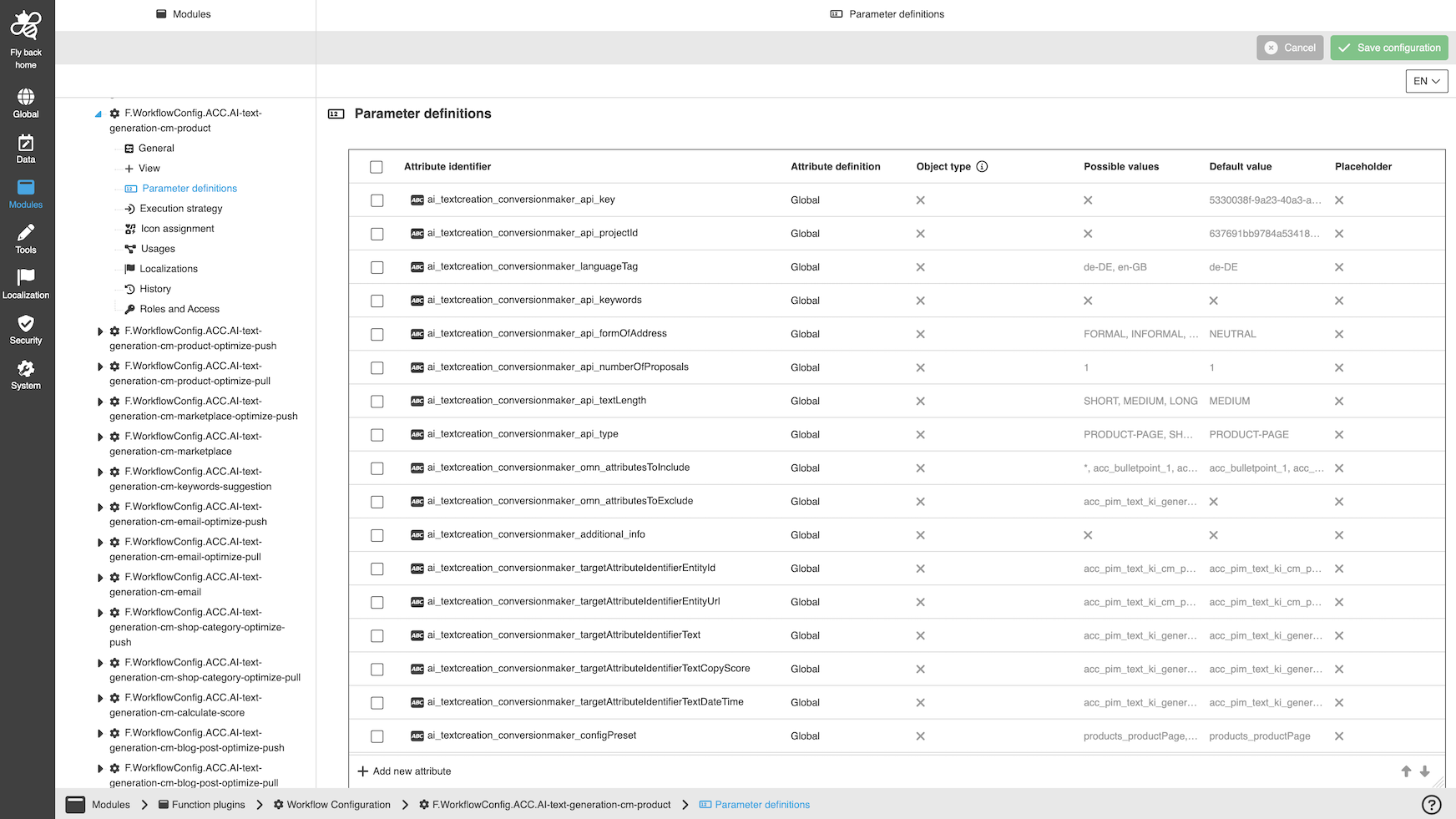
A detailed step-by-step guide to the configuration of the Workflow Config Function plug-in can be found on this page.