AI Image - ChatGPT Image Analysis
Description
ChatGPT, the innovative AI service from OpenAI, has expanded its capabilities! While it remains a master of responding to your instructions and generating creative content, it can now also analyze images.
Unlock a New World of Insights:
-
Identify objects and scenes: Upload an image and let ChatGPT tell you what it sees.
-
Extract information: Need details from a picture? ChatGPT can help you extract text, recognize objects, and understand the context.
-
Gain deeper understanding: ChatGPT can analyze the image and provide insights beyond the surface level.
Configuration Parameters
Workflow-Name: ai_imageanalysis
| Key (* = required) | Type | Default | Description | Example |
|---|---|---|---|---|
ai_imageanalysis_openai_apiKey* |
string |
The ChatGPT API Key |
||
ai_imageanalysis_openai_apiUrl |
string |
The ChatGPT API Url |
||
ai_imageanalysis_openai_apiOrganizationId |
string |
The ChatGPT Organization ID. For more information see: https://platform.openai.com/docs/api-reference/organizations-and-projects-optional |
||
ai_imageanalysis_openai_apiModelName |
string |
gpt-4-vision-preview |
The name of the ChatGPT model to use. At the time writing this manual there only exists "gpt-4-vision-preview" |
|
ai_imageanalysis_openai_apiPrompt* |
string |
The ChatGPT prompt to use. |
What does the image show? |
|
ai_imageanalysis_openai_apiDetail |
string |
auto |
Determines in which resolution the model should receive the image. For more information see: https://platform.openai.com/docs/guides/vision/low-or-high-fidelity-image-understanding |
high |
ai_imageanalysis_openai_apiMaxTokens |
long |
300 |
The maximum number of tokens that can be generated in the chat completion. |
|
ai_imageanalysis_openai_apiTimeout |
long |
30 |
The maxmimum number of seconds we wait for ChatGPT sending the result. If the request to ChatGPT takes longer than the value set here then the Workflow will result in a timeout error. |
|
ai_imageanalysis_openai_apiJsonBody |
string |
${ai_imageanalysis_openai_apiJsonBody_stringTargetAttribute} |
The JSON Body send to the ChatGPT API endpoint. For convenience we provide two JSON Bodies which contain different prompts regarding to whether the result should be tags only (like when the target attribute is an enum field) or whether the result should be plain text (like when the target attribute is a string/clob field):
|
|
ai_imageanalysis_targetAttribute* |
string |
The DAM target attribute identifier where the result from ChatGPT should be stored at. Depending on the apiJsonBody (see above) this should be either an enum or a string/clob field. It is recommended to use a language dependent field here. That way the Workflow can write the result to the corresponding language. |
||
ai_imageanalysis_assetFormat |
string |
original |
The format of the image to send to ChatGPT for analysis. It is recommended to use a lower resolution like "previewCoarse" here since it will reduce costs. Valid values are:
|
previewCoarse |
ai_imageanalysis_omnTargetLanguageId |
language (long) |
The OMN Language which will be used to write to a language dependent target attribute. By default this language will also be used for the ChatGPT result. In case you want to use a different language for ChatGPT, please set the parameter "targetLanguageTag" (see below). This way you can for example generate spanish texts even there is no OMN Language Spanish available on the system. If no language is specified then "de-DE" will be used as language tag |
||
ai_imageanalysis_openai_targetLanguageTag |
string |
The language tag which will be used for the generated ChatGPT result. By default this is set automatically to the language tag which results from the parameter "omnTargetLanguageId" (see above). But you can overwrite this in case you want the ChatGPT result in a different language. |
es-ES |
|
ai_imageanalysis_openai_targetLanguageTagMappings |
string |
The language tag mappings which will be used to map the OMN Language Tag (resulting from parameter "omnTargetLanguageId") to the language tag ChatGPT will use (the parameter "targetLanguageTag"). By default this is an empty string-map and the OMN Language Tag will simply be mapped 1:1 to the ChatGPT Language Tag. The mappings you provide here will override this behaviour. |
de-DE:es-ES,en-EN:en-GB |
|
ai_imageanalysis_configPreset |
string |
stringTarget |
The config preset to use. The available config presets automatically set the "apiJsonBody" to fit an enum or string target attribute. Valid values are:
|
enumTarget |
Example configuration
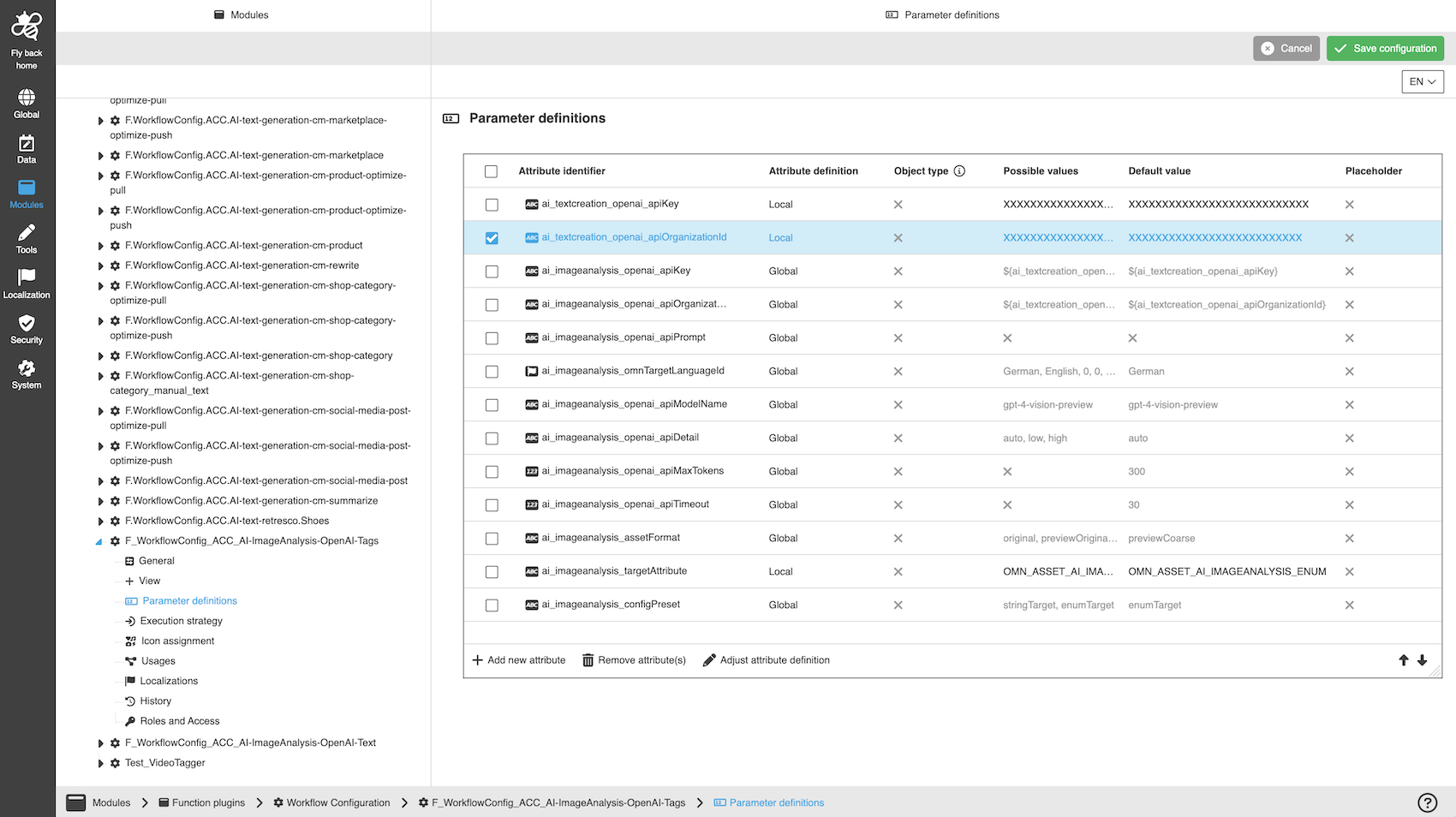
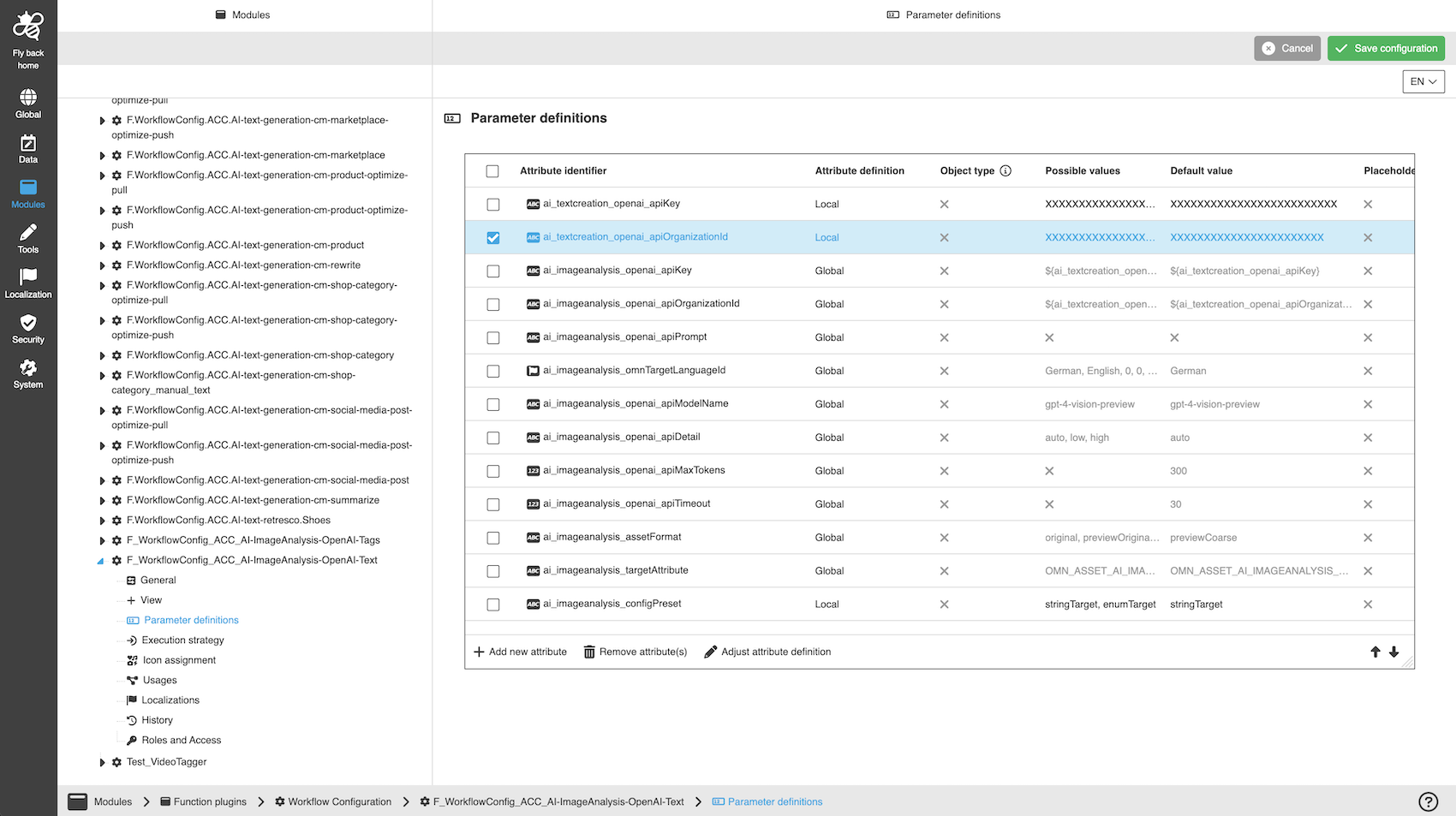
The following images show two sample configurations for AI Image Analysis:
For generating tags (enum target field):
For generating text (string or clob target field):
A detailed step-by-step guide to the configuration of the Workflow Config Function plug-in can be found on this page.