ChatGPT
Description
ChatGPT is a generative AI-Service developed by OpenAI.
It can respond to various instructions and retrieve information from the internet. It can also generate creative content such as poems, stories, product descriptions and more.
Detailed information and pricing can be found under: https://openai.com/.
| As this Workflow uses write operations to PIM attributes via REST API, the OMN user executing this Workflow needs to be in an admin role. API admin roles are configured in property 'omn.eai.api.admin.roles' in EAI Properties |
API Key
The ChatGPT API is an interface that allows you to interact with the powerful GPT model developed by OpenAI.
ChatGPT is not free for business use and needs a corresponding subscription.
There are different pricing models for ChatGPT, depending on which features and models users want to use.
The Pricing is based on the number of tokens processed, which is roughly equivalent to 750 words.
For more information about ChatGPT pricing and features, visit the official website of OpenAI: https://openai.com/pricing
In Order to use the ChatGPT Service within OMN, a user needs a valid ChatGPT API-Key (subscription) including the so called ChatGPT organization ID.
The ChatGPT Organization ID is a unique identifier that is needed to use the ChatGPT API.
To find the ChatGPT Organization ID, users will need to log in to the OpenAI account and follow the steps below:
-
Visit this page to go to your organization’s settings
-
Under the Organization Details section, you will find your Organization ID and Organization Name
-
Copy and paste your Organization ID into the appropriate field if you want to use the ChatGPT API.
If you do not have an OpenAI account or have not yet signed up for the ChatGPT API, you can fill out a form to join the waiting list. You will be notified when you get access to the ChatGPT API.
Configuration Parameters
Workflow-Name: ai-textcreation_openai
| Key | Type | Default | Description |
|---|---|---|---|
ai-textcreation_openai_apiJsonBody |
|||
ai-textcreation_openai-languageTag |
Selection of the language in which the text is to be generated |
||
ai-textcreation_openai-ToInclude |
Selection of attributes to be sent to ChatGPT for the selected item. |
||
ai-textcreation_openai-ToExclude |
Selection of attributes that should not be sent to ChatGPT for the selected item. |
||
ai-textcreation_openai-apiUrl |
API URL |
||
ai-textcreation_openai-apiKey |
personal API-Key |
||
ai-textcreation_openai-apiOrganizationId |
Organization ID in which the ChatGPT API key is bound. |
||
ai-textcreation_openai-temperature |
Value that determines how creatively (1) or factually the AI reacts (0). |
||
ai-textcreation_openai-targetAttribute |
Selection of the PIM target attribute in which the generated text will be imported |
||
ai-textcreation_openai-apiPrompt |
Contains the actual instruction in text form that ChatGPT should execute e.g. Generate a product text in German in 4 sentences |
||
ai-textcreation_openai-apiResultJsonPath |
|||
ai-textcreation_openai-flowMode |
Mode, whether the generated text should be written directly to a PIM attribute or to a FSDetail in which the user must first confirm the generation. |
||
ai-textcreation_openai-fsDetail_textEdit |
Selection of the FSDetail configuration for the indirect flow mode, in which the generated text can be confirmed. |
||
ai-textcreation_openai-output_text |
Example configuration
The following image shows what a sample configuration for ChatGPT might look like.
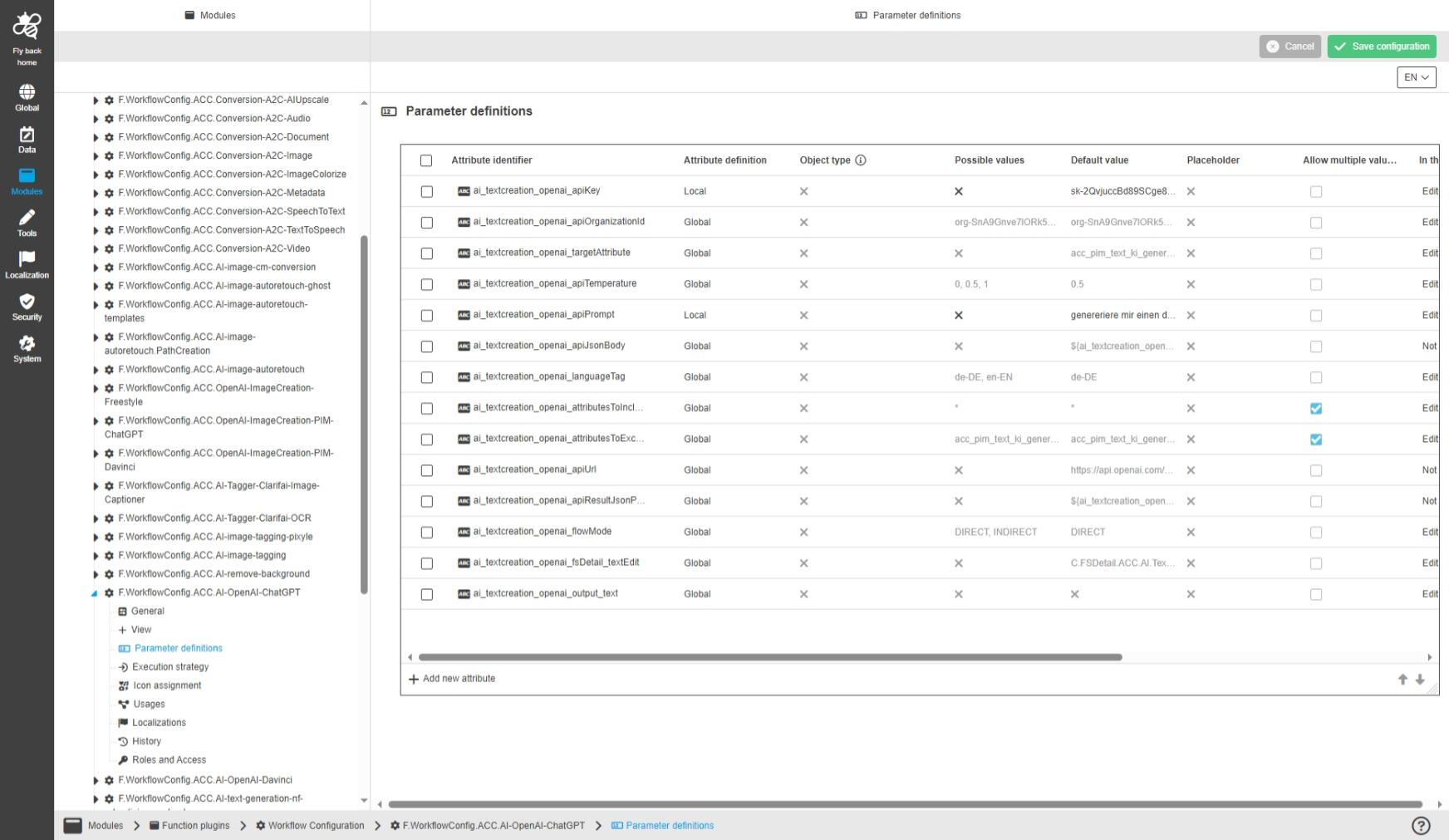
A detailed step-by-step guide to the configuration of the Workflow Config Function plug-in can be found on this page.