FSSingleObject (Content Plugin)
This view shows one asset at a time.
It is not possible to show containers such as directories, keywords, or orders.
The Single Object can be used with Assets or PIM2Products.
-
Access the plug-in via Mandators → <Mandator name> → Content plug-ins → FSSingleObject
You can use the plug-in as follows:
-
Center Area of the Frontend
-
Page plug-in "FSNavigation"
-
Page plug-in "AdvancedSearch"
-
Page plug-in "FormbasedSearch"
-
Here you can see how the configuration of FSSingleObject content plugin looks like:
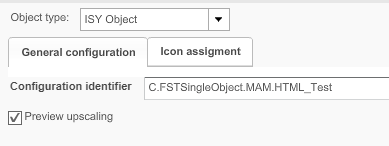
| Field | Description | Notice |
|---|---|---|
Object Type |
Available object types:
|
|
General configuration |
General configuration of the plug-in |
|
Name |
Assign an icon for the plug-in. |
|
Preview upscaling |
>> Activate the checkbox to enable upscaling of the preview |
If this option is disabled, there is no upscaling available (limit 100%). |