Views and Functions
This page allows you to define the method for the objects selected in the various widgets in order to specify where
and how they are to be opened in a separate tab.
In addition, functions can be defined in the left and center view.
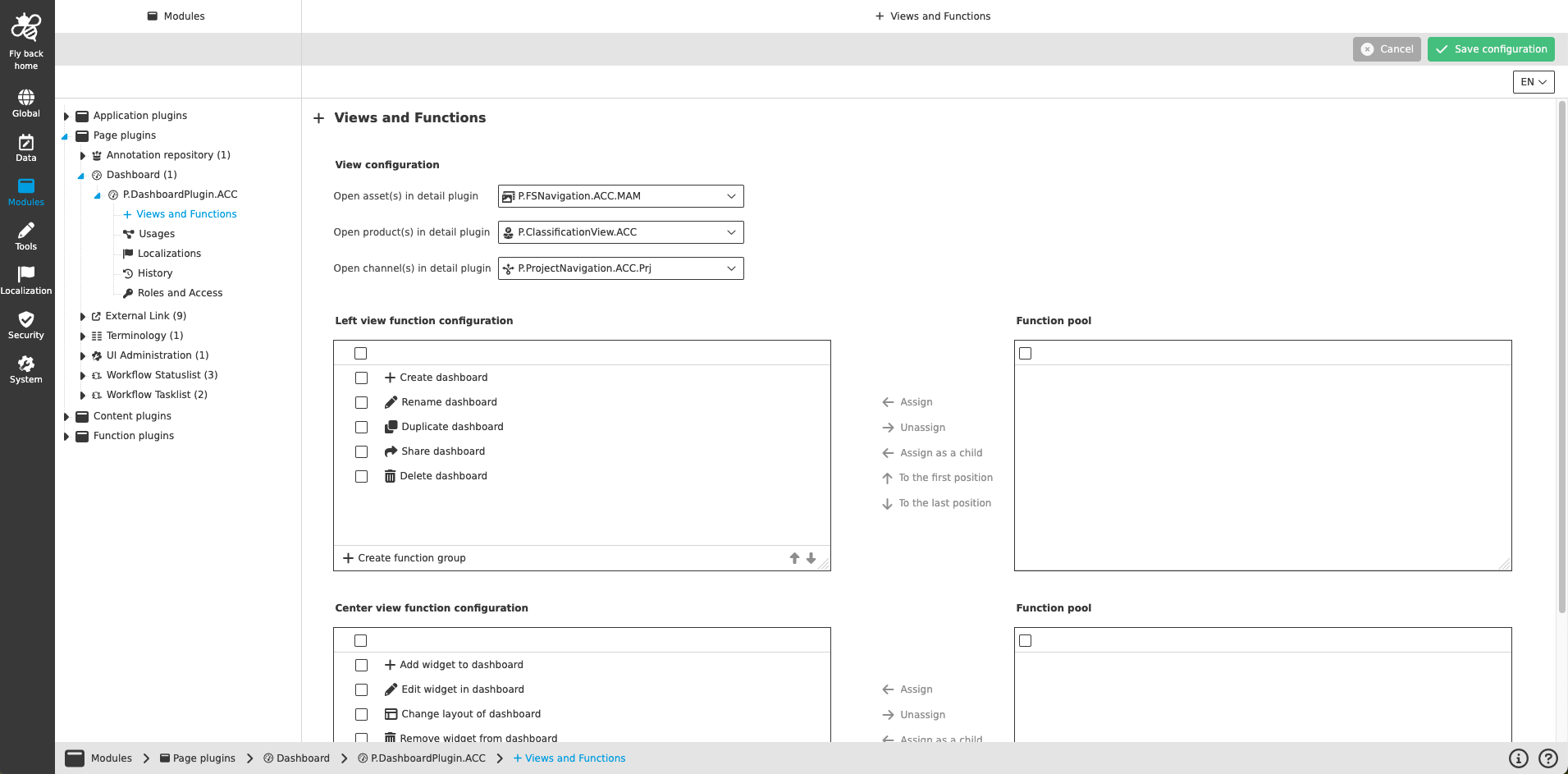
The view configuration contains the following parameters:
| Name of option | Description | Note |
|---|---|---|
Open asset(s) in detail plugin |
The dropdown allows you to select either an Asset View or a DAM Navigation (FSNavigation) plugin instance, which opens in a new browser tab when clicking on the corresponding arrow in the DAM widget. The selected object can be seen in the opened tab. |
|
Open product(s) in detail plugin |
The dropdown allows you to select either a Product View or a Classification View plugin instance, which opens in a new browser tab when clicking on the corresponding arrow in the PIM widget. The selected object can be seen in the opened tab. |
|
Open channel(s) in detail plugin |
The dropdown allows to select a Channel Navigation (Project Navigation) plugin instance, which opens in a new browser tab when clicking on the corresponding arrow in the channel widget. |
|
In the left view function configuration the following functions can be configured:
| Name of function | Description | Note |
|---|---|---|
Create dashboard |
The function allows to create new dashboards in the UI. In the creation modal it is possible to define the layout and name for the new dashboard. |
|
Rename dashboard |
The function allows to rename existing dashboards. |
|
Duplicate dashboard |
The function allows to duplicate existing dashboards. It is mandatory to define a unique dashboard name for the copy. |
All made configuration will be duplicated (e.g. configured widgets and their configurations) |
Share dashboard |
The function allows to share a dashboard with other users. |
The function is currently not supported in the UI. |
Delete dashboard |
The function allows to delete existing dashboards. |
| The configured functions are available in the left view toolbar in the UI. |
| The 'Share dashboard' functionality is currently not implemented in the UI. |
| The concept of adding functions is the same throughout the whole Configuration Client, detail description can be found here. |
In the center view function configuration the following functions can be configured:
| Name of function | Description | Note |
|---|---|---|
Add widget to dashboard |
The function allows to add widgets to the dashboard layout. It is possible to add global widgets or module specific widgets for DAM, PIM or CM module. |
The function is available in the center toolbar in the UI. |
Edit widget in dashboard |
The function allows to edit a widget. The given functionality in the UI is related to the widget type. |
The function is available by clicking on '…' in the upper right corner in a widget. |
Change layout of dashboard |
The function allows to change the layout of a dashboard. The configured widgets will rearrange in the canvas according to made layout decission. |
The function is available in the status bar settings of the center view. |
Remove widget from dashboard |
The function allows to remove configured widgets from the dashboard. |
The function is available by clicking on '…' in the upper right corner in a widget. |
| Unlike other function configurations, these are not just toolbar functions. Where the respective functions are displayed in the interface is described in the 'Note' column. |
| The concept of adding functions is the same throughout the whole Configuration Client, detail description can be found here. |