AI Image - Dall-E Creation Service
Description
DALL-E is an AI system that can generate images from text descriptions, the so-called prompts.
It was developed by OpenAI and is based on a transformer model that processes both text and image as a sequence of tokens.
DALL-E can combine different concepts, attributes and styles and generate realistic or creative images.
Further information and examples can be found official website.
There are now several versions of Dall-E, OMN supports the latest version called Dall-E3.
-
DALL-E 1 was released by OpenAI in January 2021 and can only generate simple images against a simple background.
-
DALL-E 2 from April 2022 can generate images with higher resolution compared to DALL-E 1, generate more complex/photorealistic scenes and generally produces better results.
-
DALL-E 3 from August 2023 is the latest model and uses a larger and more balanced data set that contains more diverse scenarios and therefore produces better, more detailed results. It interprets prompts better and generates images that are closer to the text entered. Furthermore, DALL E3 can generate images with even higher resolution and strictly censors or prevents the generation of violent, hateful or adult content.
The Dall-E AI Image Creation workflow can be configured in two ways:
-
In a “freestyle“ manner where the workflow directly accepts a text input from the user which describes the image that should be generated.
-
To be started on a selected product whereby Dall-E will generate an image based on the product attributes, name and category.
API URL
Access to the following URLs is needed:
-
https://api.openai.com/v1/chat/completions (only needed for product image generation)
Configuration Parameters
Workflow-Name: ai_imagecreation_openai
"Freestyle" Image Generation
| Key (* = required) | Type | Default | Description | Example |
|---|---|---|---|---|
ai_imagecreation_openai_apiUrl |
String |
Open API Url |
||
ai_imagecreation_openai_apiKey |
String |
Open API Key |
||
ai_imagecreation_openai_apiOrganizationId |
String |
Open API Organization ID (optional) |
||
ai_imagecreation_openai_omnTargetPath |
String |
/MAM/Asset-Data/DallE/DallE-Generated.png |
Target Path (incl. filename) of where to store the created image |
|
ai_imagecreation_openai_apiPrompt |
String |
The Prompt which is used to create the image. |
A beautiful meadow with bees humming around the flowers |
|
ai_imagecreation_openai_languageTagMappings |
Stringmap |
de-DE:de_DE,de-AT:de_DE,de-CH:de_DE,en-US:en_EN,en-UK:en_EN,en-EN:en_EN,fr-FR:fr_FR,fr-CH:fr_FR,nl-NL:nl_NL,pl-PL:pl_PL,it-IT:it_IT,es-ES:es_ES |
The language tag mappings which map the language tag to a given omn locale. |
|
ai_imagecreation_openai_omnExistingFileStrategy |
String |
newFileWithPattern |
The strategy used if the file already exists. Possible values are:
|
|
ai_imagecreation_openai_apiJsonBody |
String |
{
"prompt": "\${ai_imagecreation_openai_apiPrompt}",
"n": \${ai_imagecreation_openai_apiNumberImages},
"size": "\${ai_imagecreation_openai_apiImageSize}"
}
|
The API JSON Body which is used. You can adjust this JSON Body to fit newer models like DallE-3: |
|
ai_imagecreation_openai_apiNumberImages |
Long |
2 |
The number of images which should be generated |
|
ai_imagecreation_openai_apiImageSize |
String |
1024x1024 |
The size of the generated image. |
Product Image Generation
The following parameters are only applicable when the workflow is started on products.
| Key (* = required) | Type | Default | Description | Example |
|---|---|---|---|---|
ai_imagecreation_openai_languageTag |
String |
de-DE |
Language Tag of the language from which to take the language-dependent product attribute values. |
en-GB |
ai_imagecreation_openai_attributesToInclude |
String (multiple) |
* |
The product attributes to include into the image description from which an image should be generated. Default is the wildcard character, which includes all. |
|
ai_imagecreation_openai_attributesToExclude |
String (multiple) |
The product attributes to exclude into the image description from which an image should be generated. |
||
ai_imagecreation_openai_apiUrlTextGen |
String |
The OpenAI API URL used for generating the image description text used by DallE to generate the product image. |
||
ai_imagecreation_openai_apiPromptTextGen |
String |
Create a product description with emphasis on visual attributes. Create it in english and use max \${ai_imagecreation_openai_characterLimit:-300} characters. |
A prompt for ChatGPT which is injected after the serialized product with its attributes to guide ChatGPT in what kind of product description should be generated. |
|
ai_imagecreation_openai_apiTemperatureTextGen |
String |
0.7 |
The Temperature value used by ChatGPT to generate the image description text |
|
ai_imagecreation_openai_apiJsonBodyTextGen |
String |
{
"model": "gpt-3.5-turbo",
"messages": [
{
"role": "system",
"content": "You are a helpful assistant. You are in the role of an artist which uses a colorful and visual language"
},
{
"role": "user",
"content": "You are a helpful assistant. You are in the role of an artist which uses a colorful and visual language"
},
\${chatGptProductMessages},
{
"role": "user",
"content": "\${ai_imagecreation_openai_apiPromptTextGen}"
}
],
"temperature": \${ai_imagecreation_openai_apiTemperatureTextGen:-0.7}
}
|
The API JSON Body used for generating the image description text. The variable “${chatGptProductMessages)“ will be expanded to the serialized product text |
|
ai_imagecreation_openai_configPreset_chatGpt_apiResultJsonPathTextGen |
String |
$.choices[0].message.content |
The JSON Path from where to pick the generated image description text from the ChatGPT JSON response |
|
ai_imagecreation_openai_productTextTemplate_deDE_template |
String |
Das Produkt '\$\{productName}' \${productNodeHierarchy:+in der Kategorie \$\{productNodeHierarchy}:-} hat die folgenden Attribute: \$\{productAttributes}. |
The product serialization template which is used for serialized product in language “de-DE“ and later is injected into variable “${chatGptProductMessages)“ to be used for image description generation |
|
ai_imagecreation_openai_productTextTemplate_deDE_languageTag |
String |
de-DE |
The language tag which identifies the language where the “*_deDE_template“ above will be used. To introduce new templates for new languages add two new variables for each language. |
|
ai_imagecreation_openai_productTextTemplate_enEN_template |
String |
The product '\$\{productName}' \${productNodeHierarchy:+in category \$\{productNodeHierarchy}:-} has the following attributes: \$\{productAttributes}. |
The product serialization template which is used for serialized product in language “en-EN“ and later is injected into variable “${chatGptProductMessages)“ to be used for image description generation |
|
ai_imagecreation_openai_productTextTemplate_enEN_languageTag |
String |
en-EN |
The language tag which identifies the language where the “*_enEN_template“ above will be used To introduce new templates for new languages add two new variables for each language. |
|
ai_imagecreation_openai_productTextTemplate_default_template |
String |
Das Produkt '\$\{productName}' \${productNodeHierarchy:+in der Kategorie \$\{productNodeHierarchy}:-} hat die folgenden Attribute: \$\{productAttributes}. |
The default product serialization template which will be used if no mapping for used language tag could be found |
Example configuration
The following images show what a sample configuration for DALL-E might look like.
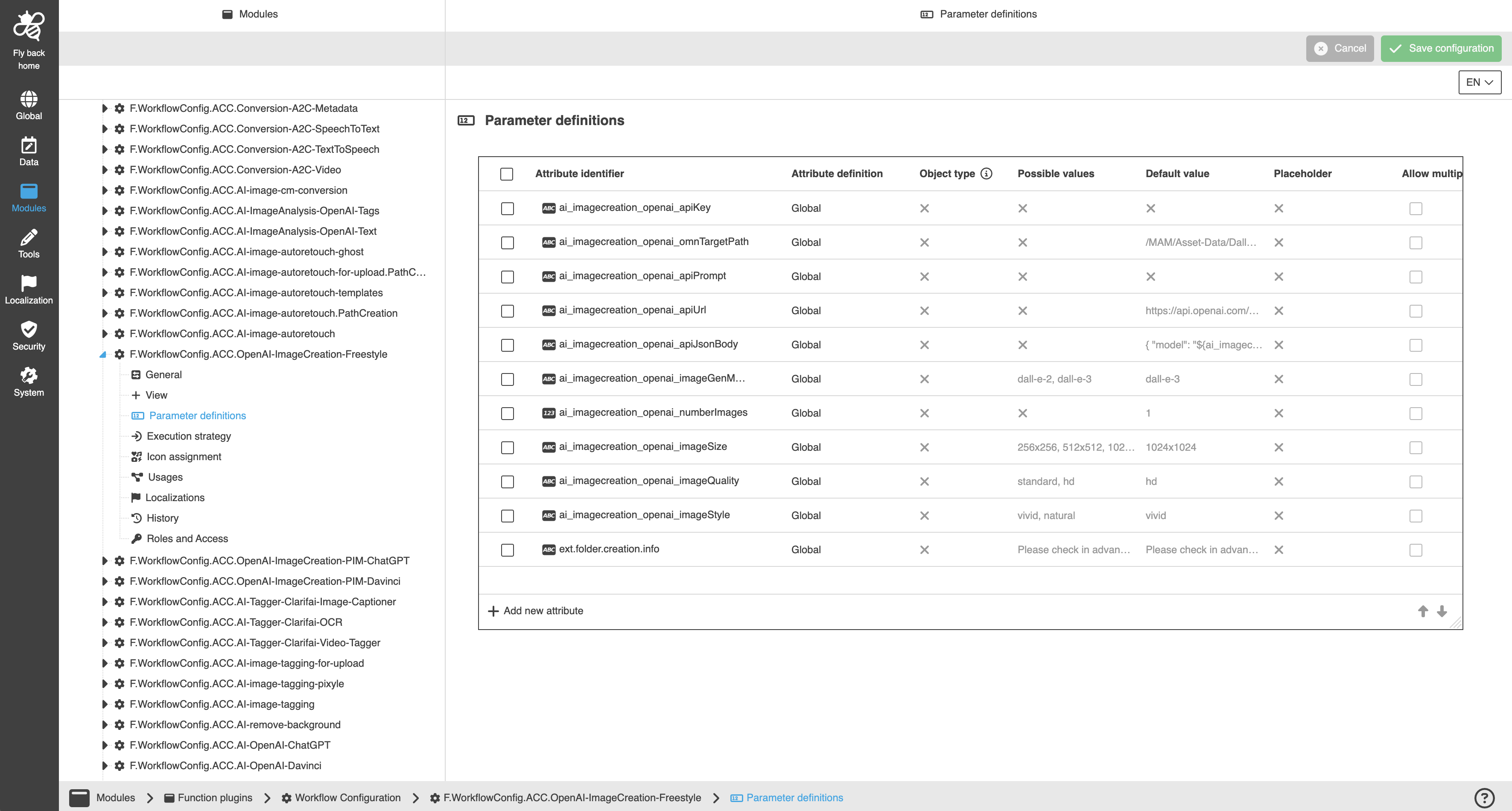
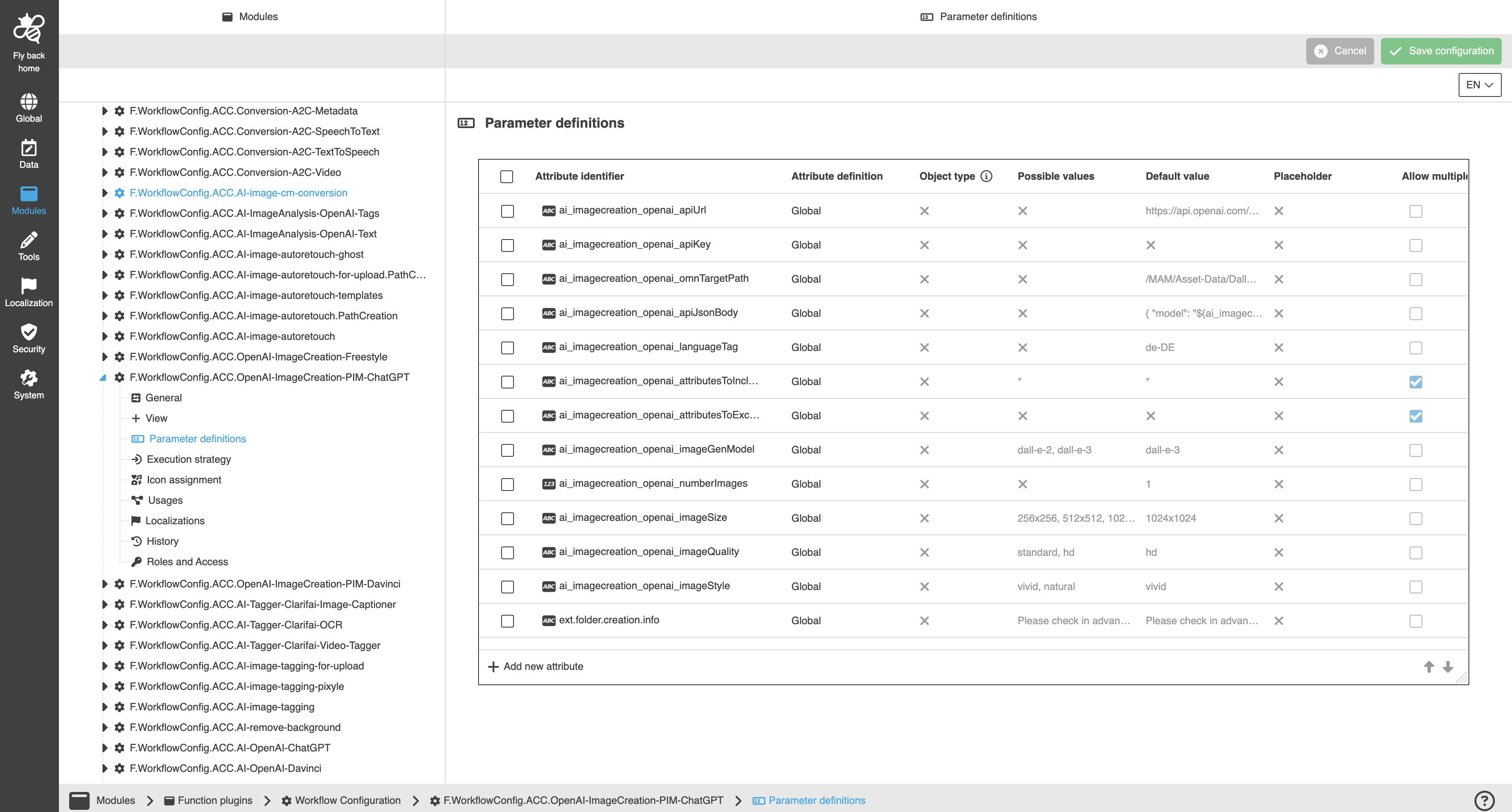
A detailed step-by-step guide to the configuration of the Workflow Config Function plug-in can be found on this page.