Bottom bar
This page provides the possibility to configure the UI sidebarstructure of the so-called Bottom bar. Bottom bar means all the sidebar elements, which are shown in the UI below the '…' (=further menu items).
| The Bottom bar in the frontend can contain a max. of 3 configured sidebar items. Every more item will be shown in the further menus item. |
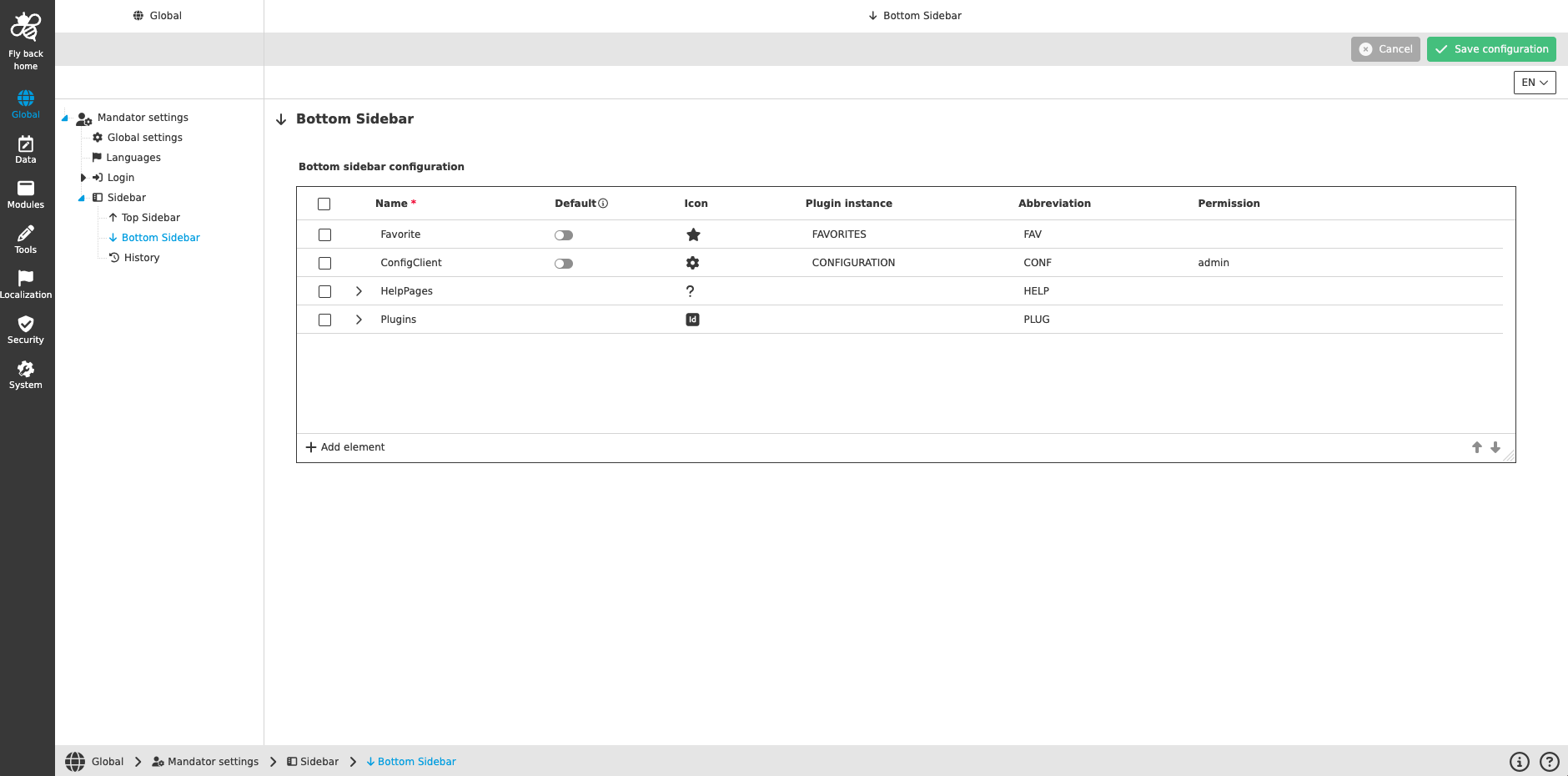
The table widget for the bottom sidebar configuration contains
-
the following columns:
| Column name | Description | Note |
|---|---|---|
Name |
Defines the name of the sidebar item, which is shown on hover. |
This field is mandatory. |
Default |
The toggle allows to configure one sidebar item (one in top or bottom bar) to be shown as default after log into the system. |
|
Icon |
Defines the icon shown in the sidebar. |
Each sidebar item has a predefined default icon. |
Plugin instance |
Defines the plugin instance opened by clicking on the item. |
Dropdown provides a list of all configured plugins, which can be added to the sidebar. |
Abbreviation |
Defines the abbreviation is shown in the sidebar in case the 'Name' is longer than 5 characters. |
|
Permission |
Shows the applied permissions from the security configuration on the related sidebar item. |
Security permissions can be defined under the sidebar item Security. |
-
the following functions:
| Function name | Description | Note |
|---|---|---|
Arrow up |
Function changes the position of selected items to one position above |
The function is available:
|
Arrow down |
Function changes the position of selected items to one position below |
The function is available:
|
Add element |
By click on this function a new sidebar item is created in the table and can be maintained |
The function is available if one or none sidebar item is selected. |
Assign icon |
By click on this function icon assignment modal will be opened, where the user can assign an individual icon for the sidebar item. |
The function is available if first level in sidebar structure is selected. Details, see Icon assignment |
Set to default icon |
By click on this function the icon will be set to the defined default icon for the related plugin-instance. |
The function is available as soon as the current set sidebar icon is different from the defined default icon. |
Pencil icon |
By click on this icon a modal opens where user can define localizations and special configurations for navigation plugins. |
The function is a table row function. |
Remove icon |
By click on this icon the related sidebar item is deleted. |
The function is a table row function. |