Usermanagement (Page Plugin)
Purpose
The Usermanagement plugin allows to manage the access to a mandator and allows to create, modify or delete users and to assign them to a mandator’s role over the Enduser UI.
Possible Usage of the plugin
The plugin can be used as follows:
-
Sidebar menu of the Frontend (see sidebar configuration)
Preconditions
The following prerequisites must be ready:
-
At least one group is configured
-
Mandator roles are configured
General configuration
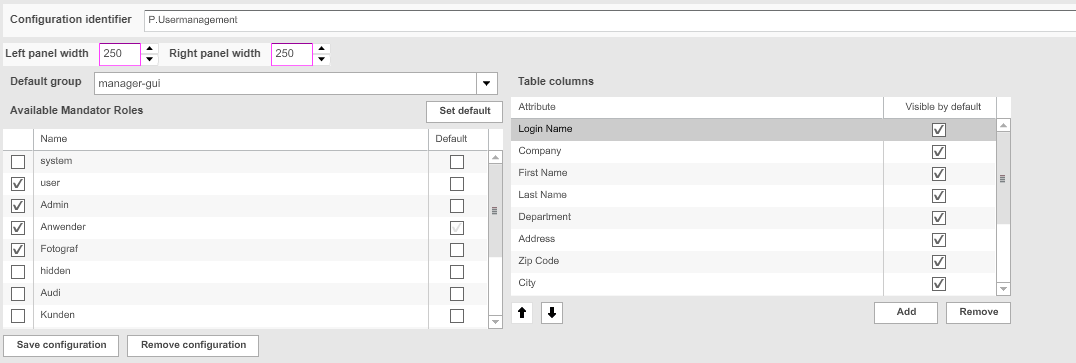
Figure : Usermanagement Page Plugin : general configuration
Default Group and Mandator Roles
The following settings are used to define which user roles can be assigned to a user via user management and to which default group a new user will be added.
| Option | Description | Note |
|---|---|---|
Default Group |
|
New users are automatically assigned to the default group. |
Available Mandator Roles |
|
New users are automatically assigned to the default role. The default role can be changed by selecting a Mandator Role and use Set Default |
Page plugin "Usermanagement" configuration parameters
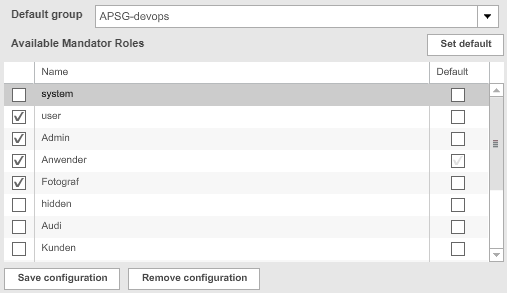
Usermanagement Page Plugin: groups and roles configuration
Usermanagement columns (Appearance in the frontend)
The following settings are used to define which information is available in Usermanagement module in Frontend and thus can be managed
| Option | Description | Note |
|---|---|---|
Table Columns |
|
Visible by default will show the Usermanagement attribute directly in Usermanagement in frontend (otherwise it will be hidden and can be enabled in the frontend) |
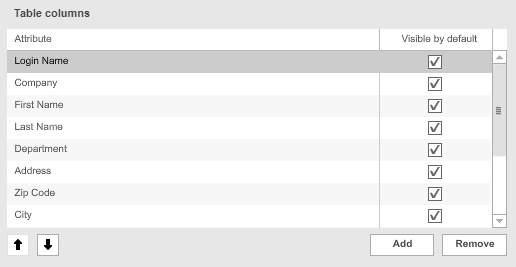
Usermanagement Page Plugin: column configuration
Appearance in the Frontend
All details of the Usermanagement plugin in the frontend can be found here.