General
This page gives the possibility to configure search criteria for the Duplicate Search, which are then available for the user in the UI.
This search criteria define how and where the user can search for a duplicate.
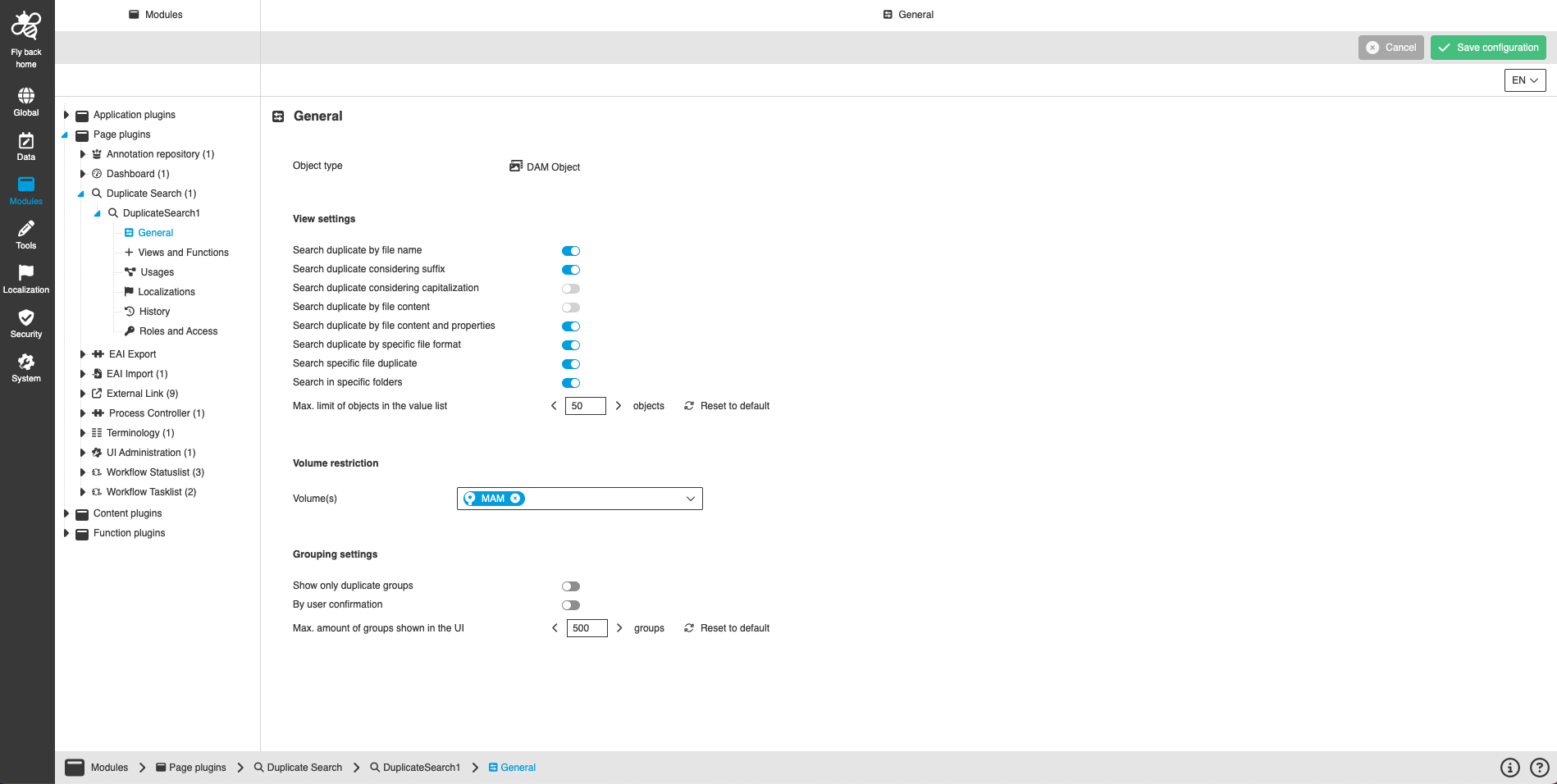
The general configuration contains the following parameters:
| Name of option | Description | Note |
|---|---|---|
Object type |
The Object type defines type of objects which are visualized in the Duplicate Search result. |
Info is read-only because only DAM Object type is valid. |
Search duplicate by file name |
Toggle which enables the search for file name duplicates in the UI. |
The toggle is turned on by default. |
Search duplicate considering suffix |
Toggle which enables the possibility to select if suffix should be considered or not. |
The toggle is turned on by default. |
Search duplicate considering capitalization |
Toggle which enables the possibility to select if capitalization should be considered or not. |
The toggle is turned off and disabled because Elastic Search cannot differentiate capitalization. |
Search duplicate by file content |
Toggle which enables the search for file content duplicates in the UI. |
To see this setting in the configuration, the property 'Checksum.Image.Enabled=true' must be set. Searches for duplicates with the same image content (binary content evaluation using the MD5 method). The toggle is turned on by default. |
Search duplicate by file content and properties |
Toggle which enables the search for file content and properties duplicates in the UI. |
Searches for duplicates with the same image content and file header information. The toggle is turned on by default. |
Search duplicate by specific file format |
Toggle which enables the possibility to enter file format via text field in the UI. |
The toggle is turned on by default. |
Search specific file duplicates |
Toggle which enables the possibility to select if user wants to search only specific file duplicates by entering file name(s). |
The toggle is turned on by default. |
Search in specific folders |
Toggle which enables the possibility to select if user wants to search only in specific folders by entering folder name(s). |
The toggle is turned on by default. |
Max. limit of objects in the value list |
The number entered influences the max. amount of objects that can be loaded in the 'only in specific folders' dropdown in the UI. |
The allowed value range is 10 - infinite. |
Volume(s) |
Dropdown to select in which volumes the Duplicate Search should look for duplicates. The configured volumes are available in the UI and can be further restricted. |
The dropdown lists all activated RNCs / volumes of the system, which are configured at least once in a FS Navigation for the current mandator. |
Show only duplicate groups |
If the toggle is activated, the duplicate search results are only visualized as groups (no nesting available). If the toggle is deactivated, the duplicate search results are shown nested in the UI. |
The toggle is turned off by default. |
By user confirmation |
If this toggle is activated, the selected previous toggle is applied as default in the UI, but can be changed by the user. |
The toggle is turned off by default. |
Max. amount if groups shown in the UI |
The number entered influences the max. amount of groups which can be shown in the UI. |
The allowed value range is 1 - 5000. |