Common Concepts
API Architecture
The OMN REST APIs are REST over HTTP-like APIs that follow the REST architectural style and guiding constraints. Clients can communicate with the APIs via HTTPS. The APIs support JSON and XML as request and response format.
REST Style and guiding constraints
Client-Server
The user interface (client) concerns are separated from the server (OMN API) concerns (separation of concerns), which means both components can evolve independently.
Statelessness
Servers don’t maintain client state, clients manage their own application state. The client’s requests to the server contain all the information required to process them.
Cacheable
Responses as marked as cacheable or not. Systems and clients can cache responses when convenient to improve performance. They also dispose of non-cacheable information, so no client uses stale data.
Layered system
Clients cannot see beyond server layer. For example if a proxy or load balancer is placed between the client and server. This confined scope allows OMN server to easily add load-balancers and proxies to improve authentication security or performance.
Uniform interface
OMN REST services provide data as resources, with a consistent namespace.
-
The resources requested are identifiable and separate from the representations sent to the client.
-
Resources can be manipulated by the client via the representation they receive because it contains enough information to do so.
-
Self-describing messages returned to the client contain enough information to describe the way the client processes them.
-
Hypertext/Hypermedia, i.e. after accessing a resource, the client should be able to use hyperlinks to find all currently available executable actions.
Supported Request and Response Formats
OMN API supports JSON and XML as request or response format.
JSON requests are supported in UTF-8 and are the default.
XML requests are supported in UTF-8 and UTF-16. XML responses are provided in UTF-8.
Use the HTTP ACCEPT header to specify either JSON or XML.
Cross-Origin Resource Sharing (CORS)
Problem: Current web browsers enforce that clients can only make requests to a resource whose origin matches the client’s URL. The client URL protocol, port, and hostname should all match the requested server. So how can clients use resources from external 3rd parties (for example from external APIs)?
Cross-Origin Resource Sharing (CORS) is a mechanism for integrating applications. It allows client web applications to request resources from origins other than their own (another domain outside the domain from which the first resource was served). This enables client applications to reference 3rd party API resources.
HTTP
HTTP which stands for HyperText Transfer Protocol (HTTP) is a standard (RFC 9110 HTTP Semantics) communication protocol for interactions on the internet.
It provides a uniform interface for interacting with a resource by sending messages that manipulate or transfer representations, regardless of its type, nature, or implementation. Each message is either a request or a response.
A client constructs request messages that communicate its intentions and routes those messages toward an identified origin server. A server listens for requests, parses each message received, interprets the message semantics in relation to the identified target resource, and responds to that request with one or more response messages. The client examines received responses to see if its intentions were carried out, determining what to do next based on the status codes and content received.
The HTTP specification defines a number of standardized, not resource-specific request methods that are commonly used in HTTP to indicate the purpose for which the client makes a request.
Request method examples: GET, POST, PUT and further (cp. HTTP methods).
Request structure
An HTTP request (client to server communication) mainly consists of the following parts:
| Part | Description |
|---|---|
Uniform Resource Identifier (URI) are used to identify the target of an HTTP request which is called a resource. HTTP does not limit the nature of a resource. |
|
request method which indicates the purpose for which the client has made this request. Examples: |
|
(aka headers) are sent or received before the content are referred to as "header fields". The "header section" of a message consists of a sequence of header field lines. Each header field might modify or extend message semantics, describe the sender, define the content, or provide additional context. |
|
represents the content of a request message which will be interpreted by the server-side (API side). It depends on the selected HTTP method if a request body is supported or not. |
|
The status code of a response is a three-digit integer code that describes the result of the request and the semantics of the response, including whether the request was successful and what content is enclosed (if any). Examples: 200=OK,400=Bad Request, 500=Internal Server Error |
|
represents the content of the response message which will be interpreted/displayed by the client-side. It depends on the selected HTTP method if a request body is supported or not. |
REST over HTTP
REST stands for Representational State Transfer which is an architectural style for distributed hypermedia systems and defines principles a service have to follow to be RESTful.
A stateless client-server protocol is used to implement the REST paradigm. The main application layer protocols used are HTTP and HTTPS. That is why it is also known as REST over HTTP.
Security
Access
To access the OMN REST API you can use basically any programming language that has support for the HTTP protocol. You can even use HTTP clients or command line tools like curl to process API requests.
Authentication
The OMN REST APIs use JSON Web Tokens (JWT) to secure the access. You have to provide a valid JWT in the authorization header to access the OMN API resources. If the API requires also authorization, related information must also be sent via this token.
To generate or debug JWTs you can use jwt.io.
curl -H 'Authorization: Bearer <JWT-TOKEN>' ...
Assuming your jwt_filter.properties looks like this:
api.secrets={ cmis: 'secret_text_cmis', workflow: 'secret_text_workflow' , frontend: 'secret_text_frontend' }
jwt.expire.max=72000000
Open jwt.io and generate a token by using algorithm "HS512". You can use the following token as template and just adjust the fields to your environment (just copy the token into the "Encoded" window):
eyJraWQiOiJjbWlzIiwidHlwIjoiSldUIiwiYWxnIjoiSFM1MTIifQ.eyJtYW5kYXRvciI6IkJpbGRlcndlbHRlbiIsInN1YiI6ImFkbWluIiwiaXNzIjoiV29ya2Zsb3dDb21wb25lbnQiLCJleHAiOjE2MzA4MDM4MTYsInVzZXJuYW1lIjoiYWRtaW4iLCJhY2Nlc3NBbGxDb25maWd1cmF0aW9uIjoidHJ1ZSJ9.qSfy_VjMaIlvzm1gxjVksZpA6AdeCy0nuA6hdJO-caG29hVNF6ZtWeNuzHIPJYeTUgbH8VW_xPe45gi_TCgS3g
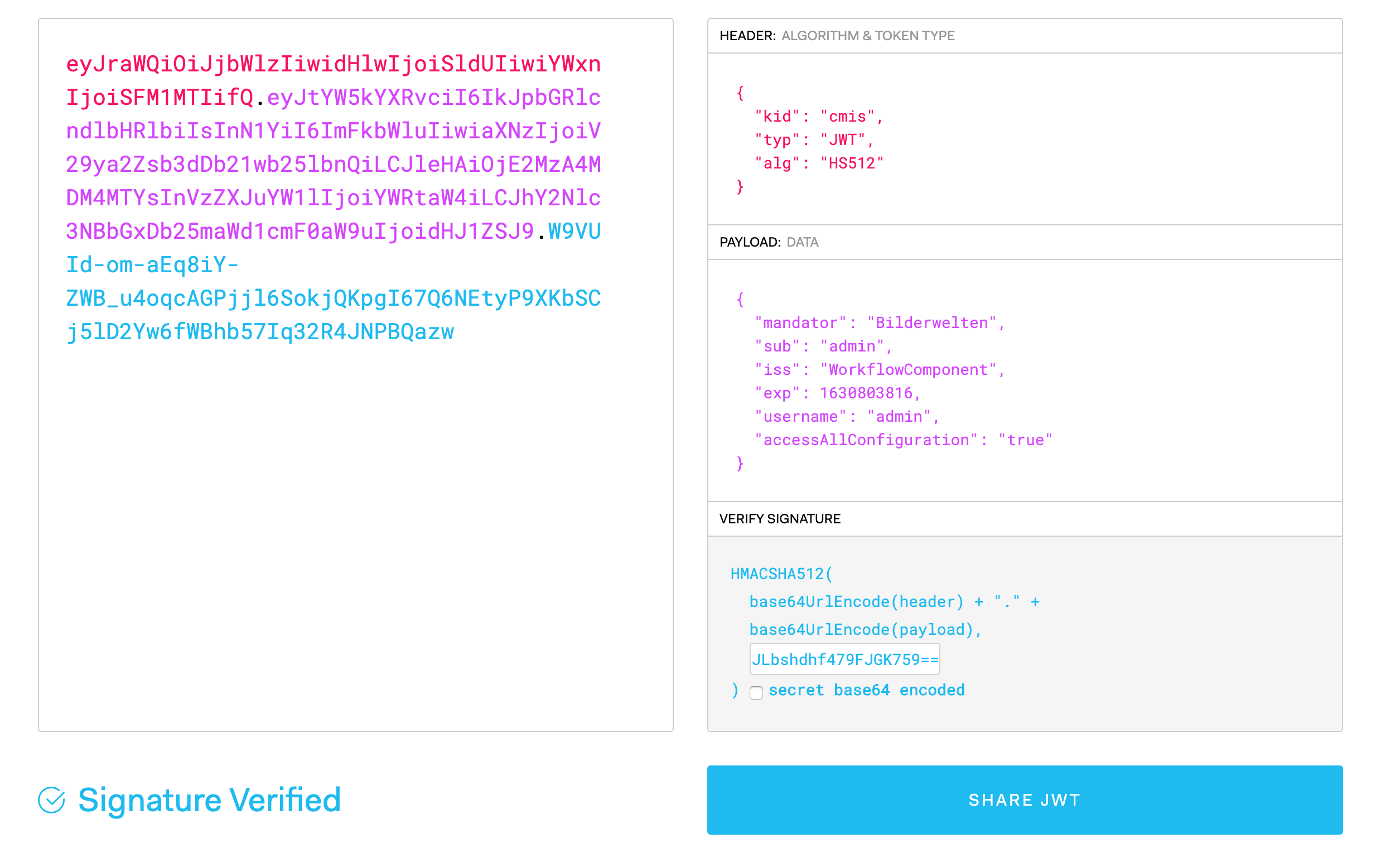
Adjust the following fields:
-
"kid" should match a key in api.secrets, in the example file cmis, workflow or frontend.
-
"mandator" should match your OMN mandator
-
make sure the expiration date "exp" is in the future. "exp" should not be too far in the future, the maximum time span is set in the 'jwt.expire.max' value in jwt_filter.properties. In our example it is set to 72000000 seconds. These are 2 years and 4 months. So the exp date has to be within this time range (You can hover with the mouse over the exp-field and it will show you a human readable format for that timestamp)
-
enter the secret from your jwt_filter.properties into the textfield in the "Verify Signature" window.
Voila! The generated key should be your key to access the OMN-API