Terminology Page Plugin
Purpose
Product information may exist in different languages. To facilitate translation it is possible to fill a terminology database with terms and sentences to be used as translation proposals. To provide these terms and sentences, the 'Terminology' page plugin is needed.
The Terminology plugin contains of:
-
Terminology view - maintain terms and sentences in a glossary
-
Glossary view - manage glossaries (e.g. up to date, possible to export needed glossaries to DeepL glossary etc.)
Tutorial
Video how to add content views can be found here.
Preconditions
To configure the Terminology plugin, the following plugin should be available:
-
Table plugin
General configuration
The configuration of Terminology plugin includes two parts:
Tab name |
Description |
Note |
Views and Functions |
On this page you can define which content views and functions should be shown on the UI client |
see more details Views and Functions |
Import and Export |
On this page you can configure the parameters for CSV conversion (if needed) |
see more details Import and Export |
Localization |
On this page the user can localize his/her own Terminology page plugin to see wished terms in the UI of Terminology. |
See more details Localization tab of the plugin instances |
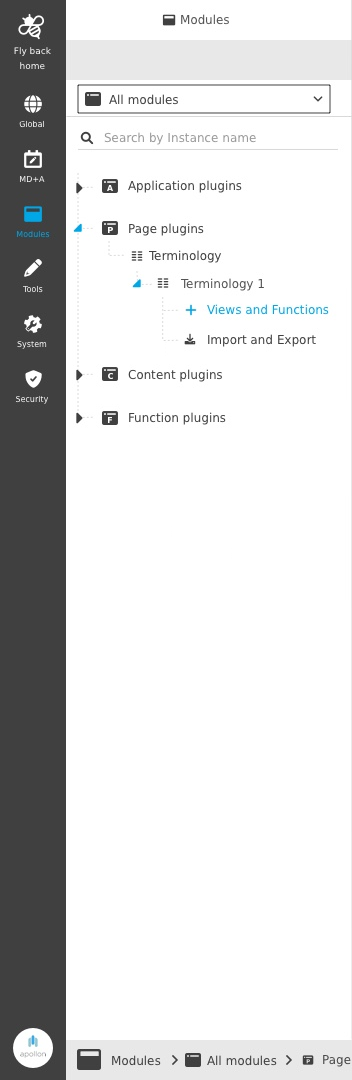
Image 1 The configuration structure of the Terminology plugin
| Management of the plugin instances is done in the same way throughout the whole ConfigClient. The details on this common concept can be found here. |
Appearance in the frontend
All details of the Terminology plugin in the frontend can be found here.
Sample Configuration (Reference files)
To import an example configuration via XML file from the ConfigClient, please download the XML files below and import them:
Step |
Purpose |
Configuration Example (XML) |
Hints |
1 |
Glossary attribute creation |
Not available in OMN 5.11, import will be implemented within 5.12 |
Create manually attributes from type string with identifier (DEEPL_MODIFICATION_DATE,DEEPL_EXPORT_STATUS) |
2 |
Table plugin |
Create and add Workflow Config plugin |
|
3 |
Workflow Config plugin |
Download the example deletion plugin xml |
Optional Create and add Workflow Config plugin |
4 |
Terminology plugin |
Create an instance of the Terminology plugin |
| All steps must be carried out in the correct order as shown in the table. |