Usage of ArticleBriefing Migration Tool
If image slot from ArticleBriefing has been edited via the old client and has new EC image, this image can be migrated to the new ImageEditor composition.
Migration functionality is being performed by next steps:
-
Checking, whether product has any image slots, which require migration;
-
Asking user, whether he wants to migrate needed products with slots;
After that some functionality is being invoked, if user wants to perform migration. Otherwise, only products, which don’t have any slots to migrate, will be opened in ArticleBriefing
Each step requires separate groovy script (names can differ):
-
BeforeOpenCheck.groovy;
-
BeforeOpenExecute.groovy;
Configuration
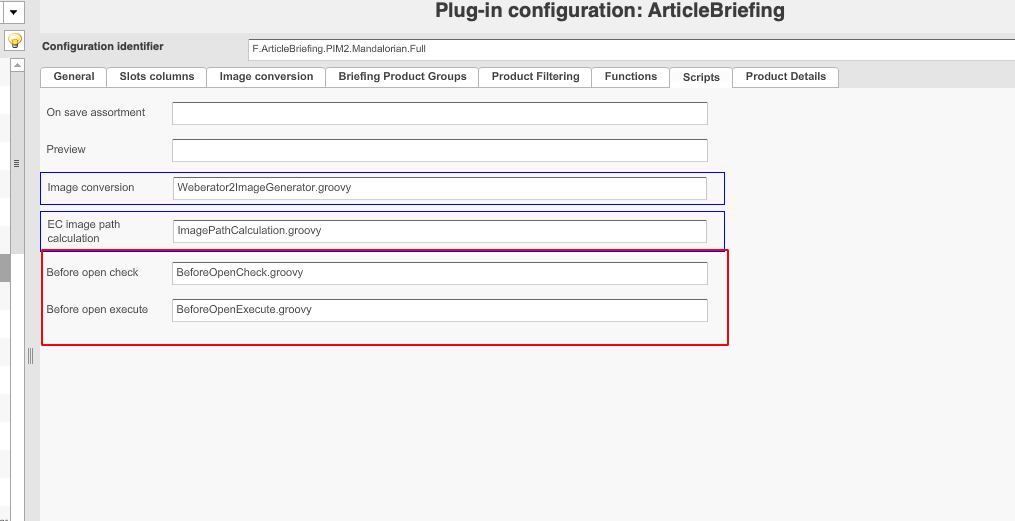
To enable checking and performing of migration user must configure at least 2 groovy scripts (marked with red rectangle):
Scripts can have the next structure:
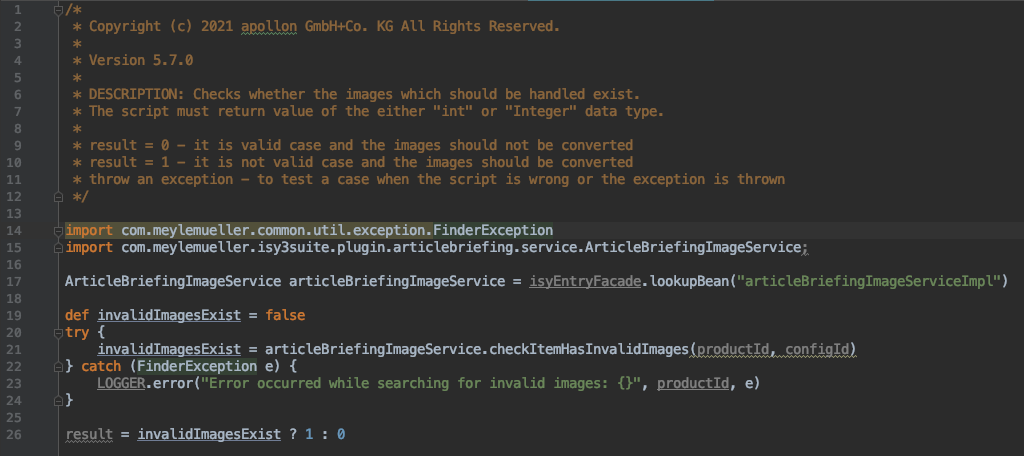
Script uses next parameters:
-
projectId- identity of opened project (not used by HTML5 client);
-
productId - identity of opened product (used for fetching acknowledged slots);
-
configId - identity of ArticleBriefing plugin configuration (used for fetching unacknowledged slots);
-
isyEntryFacade - used to lookup needed bean from Spring context (in our case that is ArticleBriefingImageServiceImpl);
-
LOGGER - used for logging in case of need to notify admin/user about any errors / warnings / information;
Migration check script must return two numeric values: 0 or 1:
-
0 means that no image slots need to be migrated and product can be opened without any additional actions;
-
1 means that there is at least one image slot, which contains non-migrated image;
-
thrown exception means that there were some errors during checking the need to migrate;
For migration execution script options almost the same:
-
0 means that no image slots have been migrated;
-
1 means that there is at least one image slot, which has been migrated;
-
thrown exception means that there were some errors during migrating image;
What is ArticleBriefingImageService?
According to the documentation: ArticleBriefingImageService is a service for performing operations on images and image slots in ArticleBriefing plugin. This operations also contain operations related to migrating.
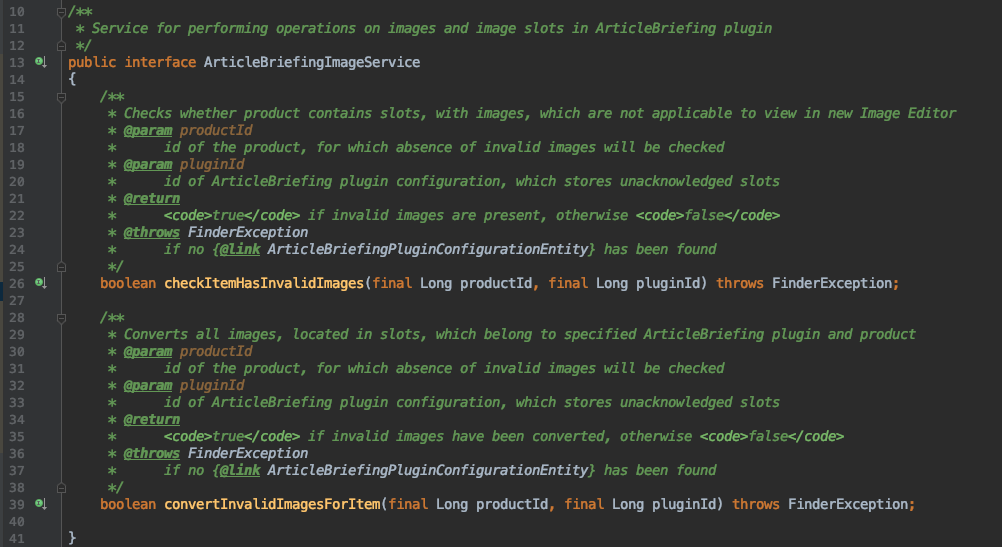
Each operation has it’s own function:
-
Migration need check:
checkItemHasInvalidImages -
Migration execution:
convertInvalidImagesForItem
Migration need check
Checking of need to migrate image composition is being determined by 3 parameters:
-
Whether image slot contains EC image identity in its information
-
Whether image slot contains EC info params (old client ImageEditor params)
-
Whether image slot contains the new composition created on HTML5 client
Absence of information, mentioned in first two points will make it sure that image has not been ever edited and does not need any migration actions.
Absence of information, mention in the third point will make it sure that image has neither been edited nor migrated. Therefore, migration can be performed.
Migration execution
If checkItemHasInvalidImages has returned true, then user can continue with deciding, whether he wants or doesn’t want to perform migration.
Migration itself is being executed in the separate service: MigrationService.
This service has the next simple declaration:
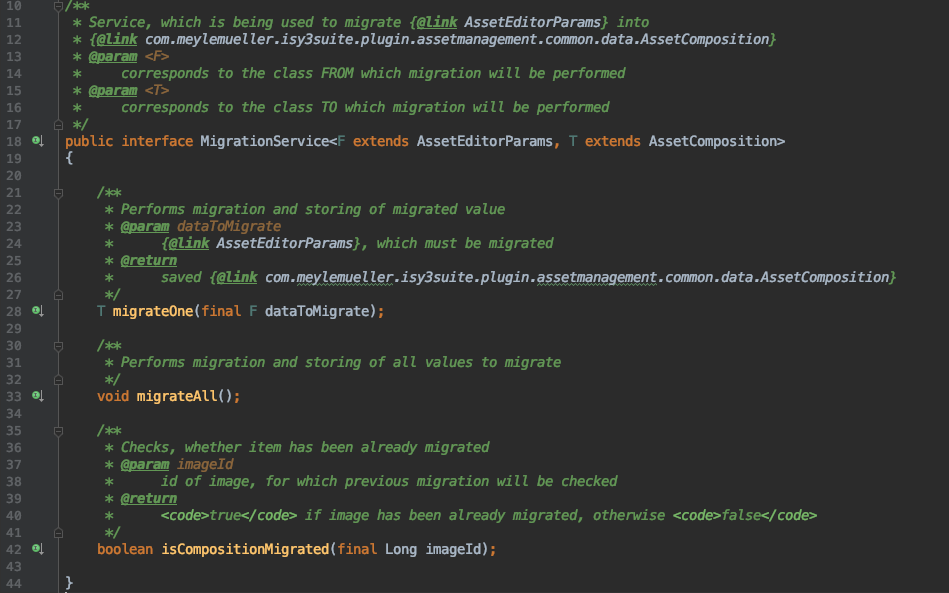
This service contains the next functions:
-
migrateOneperforms migration itself, converting item of typeF(corresponds to FROM) to item of typeT(corresponds to TO). After that, migrated item is being saved and returned; -
migrateAllperforms migration for all 'old' images, stored in database. Basically, it fetches all image compositions for the old client ImageEditor and appliesmigrateOnefunction on them; -
isCompositionMigratedchecks if image has been already migrated by image’s identity.
To make it possible to use MigrationService user need to provide two implementation for item from which and to which migration will be performed.
In case of ArticleBriefing and HTML5 ImageEditor plugins the next implementations are used:
Full steps from configuring migration and creating data to migrate till end of migrating composition are shown on the next video: