Adding Menu Items of Type Details, Relation, History, Translation to a ProductView
This overview is only valid for menu items of the type Product Details, Related Assets, Related Products, History, Translation.
Make sure that you have at least one of the following plug-ins available:
✓ Content plug-in “FSDetail”
✓ Content plug-in “FSTable
For displaying the product view, the following plug-ins can also be used:
✓ Content plug-in "FSTable" as History View
✓ Content plug-in "Metadata Translation"
✓ Content plug-in "FSSingleObject"
✓ Content plug-in "FSLightTable"
✓ Content plug-in “FSCoverFlow” (no longer supported for HTML5 client)
✓ Content plug-in "FSGridView" (no longer supported for HTML5 client)
This is how configuration of the menu item of these types looks like:
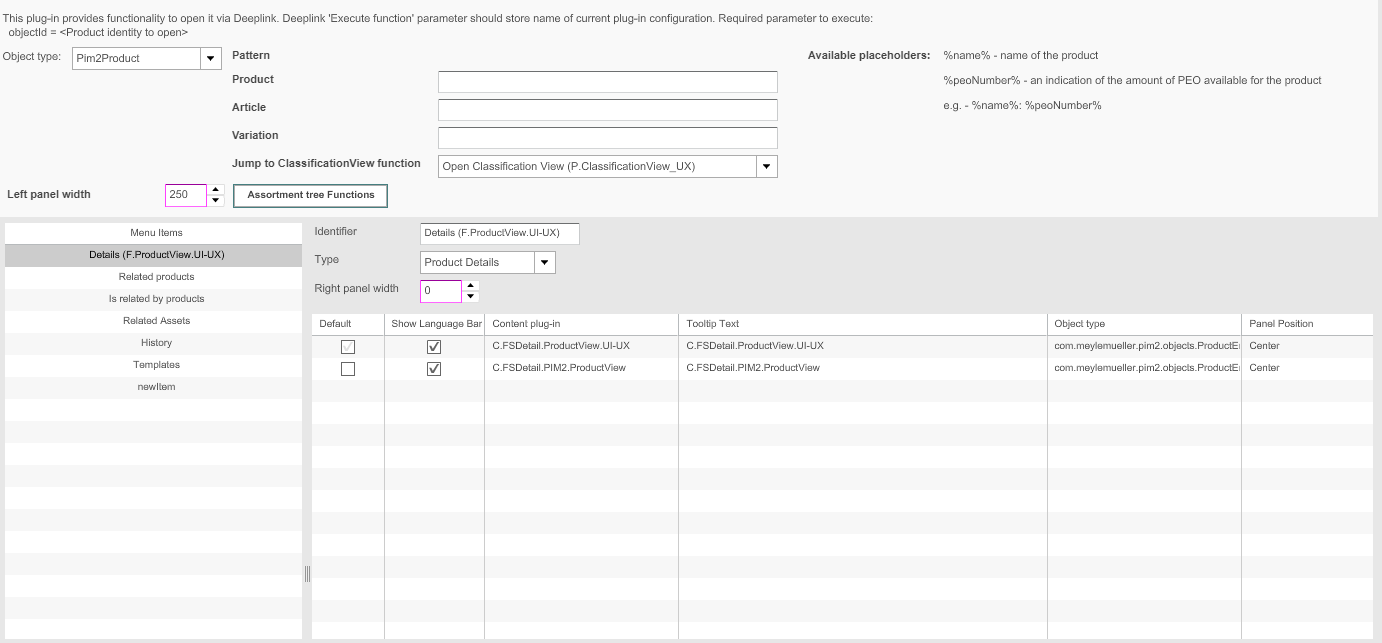
Short descriptions on the configuration of the menu item of these types are provided in the table below:
| Field | Description | Notice |
|---|---|---|
Identifier |
Name of the specific menu item. |
|
Type |
For choosing a type for the menu item: Product Details, Related Assets, Related Pro-ducts, History, Textvariation, Translation, Usage, Templates, Search |
|
Right panel width |
Width of the right area can be modified. |
All values in pixels |
Content Views |
For adding a content view. If necessary, for adding functions to the content view |