OMN Accelerator
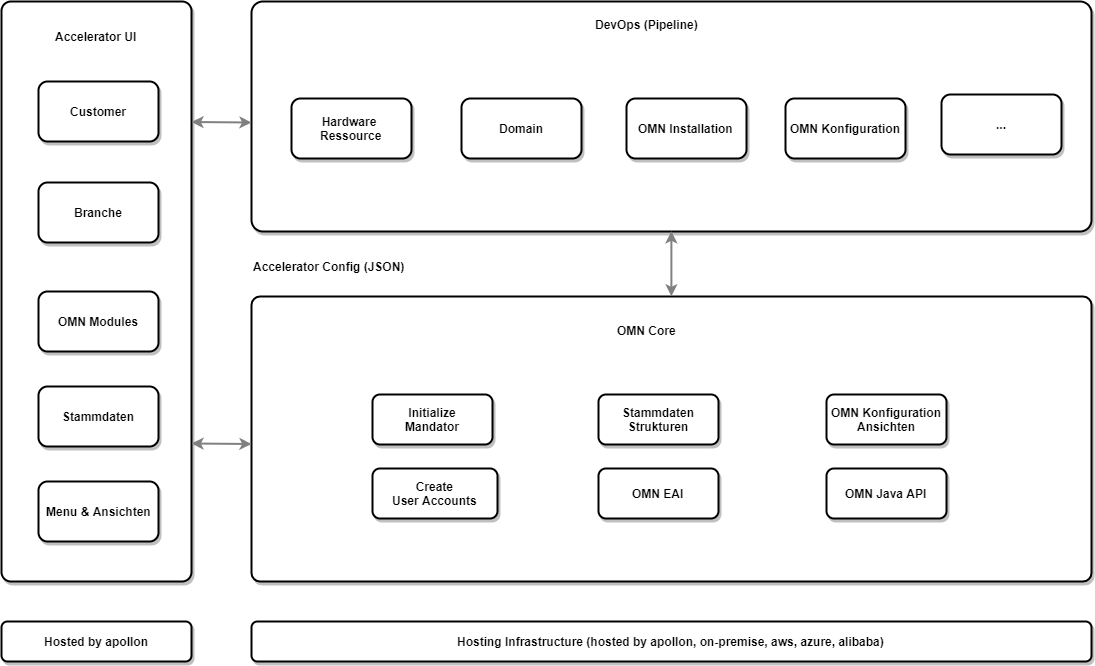
Accelerator Pipeline Overview
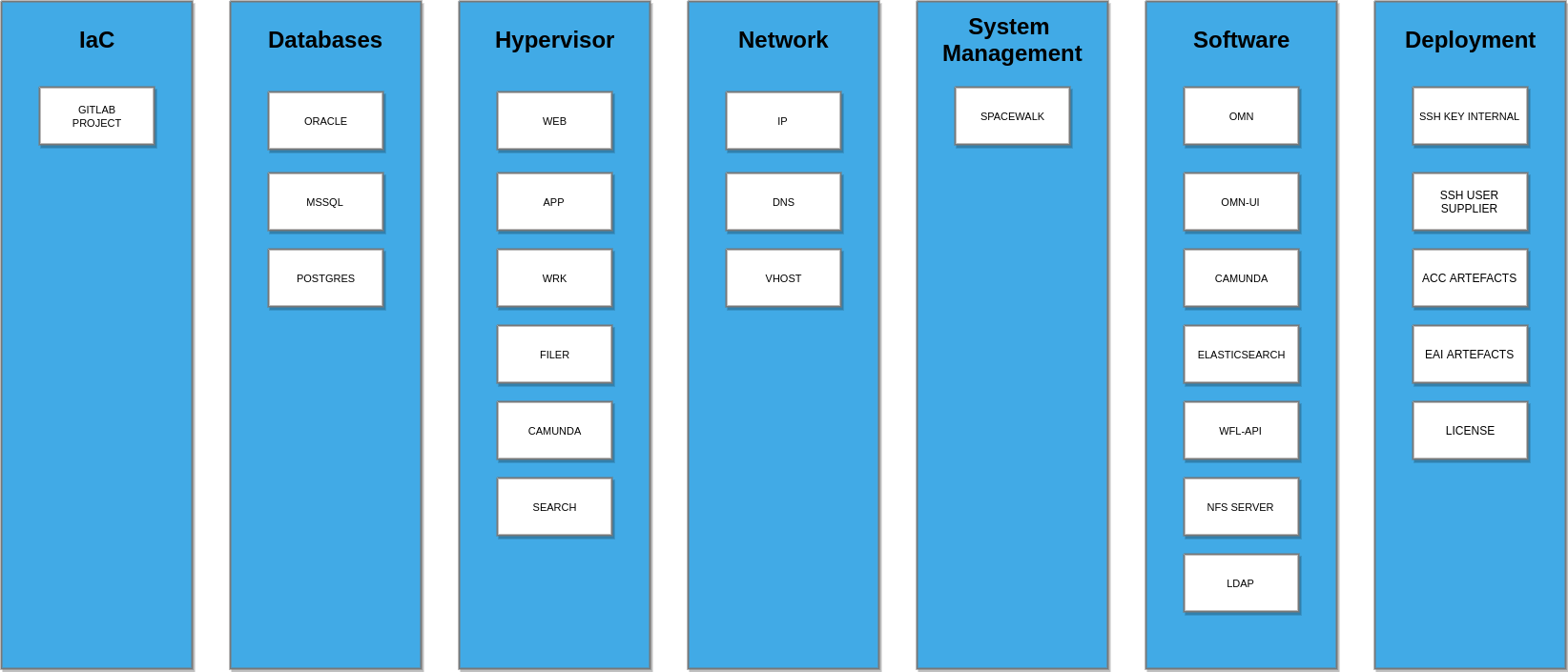
Initialization
Accelerator starts after spring root context has been initialized. After OMN is configured successfully and bulk imports have been scheduled, Accelerator sets a flag into table USER_ACTIVITY:

If this flag is present, Accelerator will not be executed again on other startups of OMN.
Features
Possible Features
-
AnnotationExport
-
ArticleBasedImageOrder
-
Automatic Asset Linker and Tagger
-
BriefingModule
-
BriefingReport
-
Checkin
-
CheckoutChannel
-
CometExportingChannel
-
CreationForm
-
DeliveryChannel
-
DirectDownload
-
DocEdit
-
DocEditSave
-
Download
-
DownloadChannel
-
FileCopy
-
GenericBriefingReport
-
HandshakeTransfer
-
HeliosLayoutDownload
-
HTTPLink
-
ImageEditor
-
ImageWorkflowStarter
-
ISY3Handshake
-
JSExecution
-
LayoutCreator
-
LayoutEditor
-
NamingConventionTest
-
OnlineBriefing
-
OpenInProjectAssetView
-
OpenPeoByName
-
PartialCatalogsAssigner
-
PeoSearch
-
Preparing
-
PRJMultipleDownload
-
PrjStructureDL
-
ProductExport
-
ProjectJavascriptStarter
-
QRCodeView
-
QuarkExportingChannel
-
SelectionClientEmbedded
-
ShellScriptExecution
-
StartOnlineMask
-
TextWorkflowEditor
-
UsageHistory
-
VisualImageSearch
-
WFLFileUpload
-
WorkflowJavascript
-
WorkflowStarter
Implemented Features
There is a possibility in OMN Accelerator to create some features optionally by selecting them in the UI. To create them, their keys should be passed to the OMN Accelerator config.
To create all implemented optional features at once, option "All" (key: all) should be selected in "Optional Features" dropdown.
| Name | Optional (key) |
|---|---|
360 Degree View |
+ (360-degree-view) |
3D Renderer |
+ (3d-renderer) |
AdvancedSearch |
- |
AI image AutoRetouch (WorkflowConfig) |
+ (ai-image-autoretouch) |
AI image AutoRetouch (Ghost) (WorkflowConfig) |
+ (ai-image-autoretouch-ghost) |
AI image tagging (WorkflowConfig) |
+ (ai-image-tagging) |
AI text translation Google (WorkflowConfig) |
+ (ai-text-translation-google) |
AI text translation DeepL (WorkflowConfig) |
+ (ai-text-translation-deepl) |
AI text generation (WorkflowConfig) |
+ (ai-text-generation) |
AI remove background (WorkflowConfig) |
+ (ai-remove-background) |
AnnotationTool |
+ (annotation-tool) |
Aperture |
+ (aperture) |
ArticleBriefing |
+ (articlebriefing) |
AssetVariations |
+ (asset-variations) |
AssetView |
+ (asset-view) |
Briefing module |
+ (briefing-module) |
BulkEditor |
+ (bulk-editor) |
ClassificationView |
- |
CompareView |
+ (compare-view) |
DashboardPlugin |
- |
DuplicateSearch |
+ (duplicate-search) |
EAI products CSV export (JavaFunction) |
+ (eai-products-csv-export) |
EAI products XML export (JavaFunction) |
+ (eai-products-xml-export) |
EAI projects XML export (JavaFunction) |
+ (eai-projects-xml-export) |
FSNavigation |
- |
GenericReport |
+ (generic-report) |
ImageEditor |
+ (image-editor) |
JSFunction |
- |
MessageList |
+ (message-list) |
MetaData Translation |
+ (metadata-translation) |
OMN-Search |
- |
ProcessMonitor |
+ (process-monitor) |
ProductView |
- |
ProjectFlatplanView |
+ (flatplan) |
ProjectNavigation |
- |
ProjectNavigationStarter |
- |
PEOView |
+ (peo-view) |
Selection Client |
+ (selection-client) |
Shopping Cart |
+ (shopping-cart) |
ShowInNavigation |
- |
SimpleSearch |
- |
Upload |
- |
UsageHistory |
+ (usage-history) |
User registration |
+ (user-registration) |
Version view |
+ (version-view) |
WFLStatus |
+ (wfl-status) |
WFLTodoList |
+ (wfl-todo-list) |
Profile structure and naming conventions
It is better to consider the directory structure of the profiles using the example of a default profile:
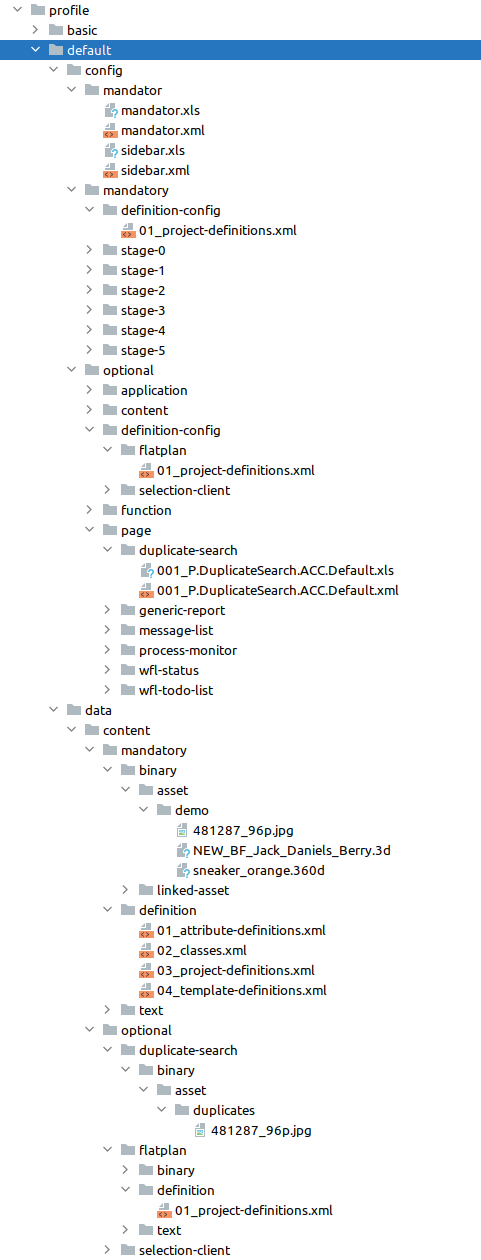
Directories and files description:
-
config- contains all plugins configurations and mandator settings.-
mandator- contains mandator and sidebar settings:-
mandator.xml- mandator settings (welcome page plugin, UI and content languages, license agreement, etc). -
sidebar.xml- sidebar structure.
-
-
mandatory- contains various plugins configurations which will be imported independent of selected Possible features during the initialization process in the Accelerator app. Also, it may contain XML data with the config part for the definitions. The import order is important, and it is implemented usingstagedirectories (this does not apply to the directorydefinition-configwhich is processed separately by the OMN EAI):-
definition-config- contains XML data with the config part for the definitions from thedata/content/mandatory/definitiondirectory. -
stage-0- contains plugins that are not dependent on any other plugins (mainly they are Content plugins). -
stage-1- contains plugins that depend on plugins from thestage-0directory. -
stage-2- contains plugins that depend on plugins from thestage-1directory. -
etc.Plugins configurations inside of Stagedirectories should not depend on other plugins configurations from the same directory. Also, there is no import order in theStagedirectory context.
-
-
optional- contains plugins configurations for features from the Possible features list divided by their type. The plugin(s) will be created only if an appropriate Possible feature was selected.Optional features are imported only between the stage-0(because most of them are depends on the Content plugins from this stage) and thestage-1(because most of the plugins from this and other stages have links to the optional plugins).-
application- contains Application plugins configurations (like Shopping cart). Names of subdirectories are used as keys for corresponding Possible features in the Accelerator app. -
content- contains Content plugins configurations (like Selection client, Flatplan, etc). Names of subdirectories are used as keys for corresponding Possible features in the Accelerator app. -
definition-config- contain XML data with the config part for the optional definitions. -
function- contains Function plugins configurations (like Bulk editor, Aperture, etc). Names of subdirectories are used as keys for corresponding Possible features in the Accelerator app. -
mandator- contains updates of the mandator settings (mandator.xml) for features like User Registration. Names of subdirectories are used as keys for corresponding Possible features in the Accelerator app. -
page- contains Page plugins configurations (like Duplicate search, Generic report, etc). Names of subdirectories are used as keys for corresponding Possible features in the Accelerator app.
-
-
-
data/content- contains OMN data descriptors and data content. The import order is important.-
mandatory- contains all master data which will be imported in any case.-
definition- contains XML data with definitions of all data structures in the profile (attributes, projects, classes, etc.).This XML data should not contain the <config>…</config>node in it. For the import of theconfigpart of definitions,definition-configdirectories should be used.-
01_attribute-definitions.xml- contains PIM2 attribute definitions. -
02_classes.xml- contains PIM2 classes definitions. -
03_project-definitions.xml- contains project type definitions. -
04_template-definitions.xml- contains PEO template definitions. -
05_asset-definitions.xml- contains metadata attribute definitions.
-
-
binary- contains any kind of files which will be imported as an assets.-
asset- files and directories in this directory will be recursively imported to the RNC as is. -
linked-asset- files and directories in this directory will be imported only when they are linked to the imported projects or products (e.g., like images and directories for the Flatplan and Selection client features).
-
-
text- contains data content which will be imported-
01_assets.xml- assets data (used to import assets with the defined GUID which can be used for linking to the products/projects). -
02_products.xml- PIM2 products data. -
03_projects- projects data. -
04_templates.xml- PEO templates data.
-
-
-
optional- contains the same data and directory structure as in themandatorydirectory but now they are split by optional features.
-
| Highlighted directories and files should always be present - their absence will lead to an exception in the work of Accelerator. |
An example of the required directory structure and files is the empty profile:
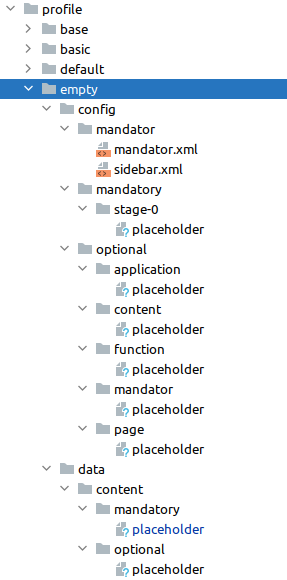
All XLS files in these directories are used for the localization of appropriate plugins (their names should be the same excluding file extension).
The naming convention of the plugin configuration files is the same as for plugin configurations in the OMN backend. In addition to it, plugin configuration file name may contain number prefix (if the import of plugins/data must have specific order). Summarizing all the above, we have the following template:
(NUM_)[First letter of the plugin type: C, F, A, P].[Plugin name: BulkEditor, Aperture, etc].[Plugin configuration name and other custom name parts].xml
Examples:
-
007_C.FSTable.ACC.Assets.xml -
011_C.FSDetail.ACC.PIM2.Right.xml
|
Application plugins have only one configuration in the OMN system, so we use just only plugin type as a name for plugin configuration file. Example: Shopping cart feature which is a sub configuration of the MAM plugin has named |
Profile dependency and inheritance
Since the 5.9.0 version, it is possible to set dependency between profiles: the dependent profile will be imported over the base profile. The introduction of this lite inheritance mechanism (dependency-level is limited to only one dependent profile) lets us minimize the number of plugin configurations, localization, and data in the dependent profile.
A dependent profile has the same structure as a regular profile, no specific configurations/directory structures are required.
An example of this inheritance is the fashion profile which depends on the base profile: it will inherit all plugin configurations, localization, and data from the base profile and also add its own content to the accelerated system.
"omnConfig": {
    "profile": "fashion",
    "dependsOn": "base",
    "features": [
        "all"
    ]
},
The use of profile inheritance is specified with the dependsOn attribute in the Accelerator configuration JSON: it should contain the name of the base profile which will be imported first. If the dependsOn attribute is not specified, then Accelerator will just import the target profile.
Database dependent reports
Also since the 5.9.0 version, it is possible to import reports (GenericReport plugin configurations) depending on the used database type: MSSQL or Oracle.
During the import process, the OMN Accelerator will check all XML file names in generic-report directories for the -MSSQL or -Oracle postfixes. E.g., plugin configuration 001_F.GenericReport.ACC.DBTables-MSSQL.xml in the profile/base/config/optional/page/generic-report directory will be imported only in case when MSSQL database is used. If the plugin configuration file name has no postfixes with the database type, it will be imported for all database types.
The database type is retrieved from the database node of the Accelerator JSON configuration:
"database": {
    "type": "mssql",
    "versionTag": "server:2017-latest",
    "local": true
},
BriefingModule (Patch&Brief) plugin configuration notice
Due to the specific of the BriefingModule plugin and Accelerator, we need to import the BriefingModule plugin configuration twice:
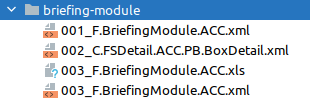
During the first import, box data attribute definitions (BriefingModule-specific attributes) will be imported. These attributes are used in FSDetail plugin configurations (Box Details).
After all additional configurations will be imported, we need to import the BriefingModule plugin configuration again - this configuration will be final.
Accelerator Backup
Production environments receive a daily VM backup. This includes:
-
omn filer data like
-
omn data
-
omn previews
-
omn tmp
-
ftp data
-
-
host mounted docker volumes like
-
elasticsearch indices
-
camunda postgres database
-
omn properties (/usr/local/omn/config)
-
webapps static (/usr/local/omn/catalinabase/webapps/static)
-
webapps export (/usr/local/omn/catalinabase/webapps/export)
-
omn optionals (/usr/local/omn/codebase/optional)
-
omn logs
-
-
All files outside of docker containers
-
Database (mssql, oracle, oracle-xe)
This doesn’t include
-
files inside docker containers outside of the paths above
Additional Oracle Backups
The customer can purchase additional database backups seen in https://apollon-cloud.atlassian.net/wiki/display/MAN/OMN+Hosting+und+Preisliste+2022 which does only include the oracle database.
Monitoring
All systems (Product, Development, Test, Demo) are monitored. Only systems in product environments are actively monitored by our Rufbereitschaft.
Accelerator App
This is a short explanation about some parts of the UI in the accelerator APP.
Grails Fields
Grails offers the Fields plugin which allows to customize the look (the rendering) of input fields. The following explanations apply to the omn-accelerator-app project only because the official documentation is not very good.
Rendering fields
For each type of field a folder with its corresponding name is created in views/_fields. When rendering input fields (textfields etc.) grails checks for a template in this directory.
The styling happens in a gsp-File that has to be called _widget.gsp or _displayWidget.gsp.
The _widget.gsp is used in the scaffolding templates "create" and "edit". To change the field for "show" and "index" the template has to be named _displayWidget.gsp in the same folder.
Template for "create" and "edit":
views/_fields/manyToMany/_widget.gsp
Template for "show" and "index":
views/_fields/manyToMany/_displayWidget.gsp
The type of a field is decided by grails but can be set manually in the controller by setting the attribute widget as a constraint for a field.
The official guide on these folders and the naming can be found here.
|
This is done to the accTriggerToken in User.groovy to use the template |
Tables and Lists
The tables and lists have their own templates determining their looks. The templates can be found in views/templates._fields.
A table is used for the "index"-page, a list is used for "show".
The last column of the table is added permanently in this template to show the actions.
Sorting and pagination is included by grails. In this case only the styling has been adapted inside table-looks.css.