MAM Module Features
MAM stands for Media Asset Management.
In current usage, MAM is also referred to as DAM (Digital Asset Management).
-
Access the application module via Mandators → <Mandator name> → Application modules → MAM
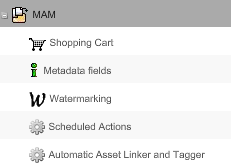
Here is the list of separate configurations of the MAM module:
| Field | Description | Notice |
|---|---|---|
Shopping Cart |
Before downloading from the Frontend, assets can be collected in the shopping cart |
see "Shopping Cart" |
Metadata fields |
Defines metadata attributes for different object type |
|
Watermarking |
Sets a watermark, so that information is visible in the asset in the preview |
see "Watermarking" |
Scheduled Actions |
Configures an automatic process on files based on specific rules |
|
Automatic Asset Linker and Tagger |
Configures an automatic tagging and/or linking of assets to Pim Products based on file information |
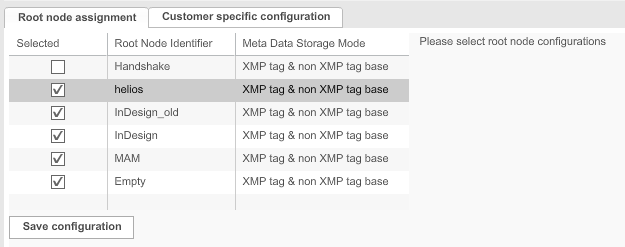
This is how the configuration of MAM application module looks like:
| Field | Description | Notice |
|---|---|---|
Root node assignment |
If more than one root node is configured in the OMN system, one needs to be assigned for the MAM. |
|
Customer specific configuration |
Content is coming soon |