General
This page provides the possibility to configure how the search field on the OMN Search page behaves for this Simple Search instance.
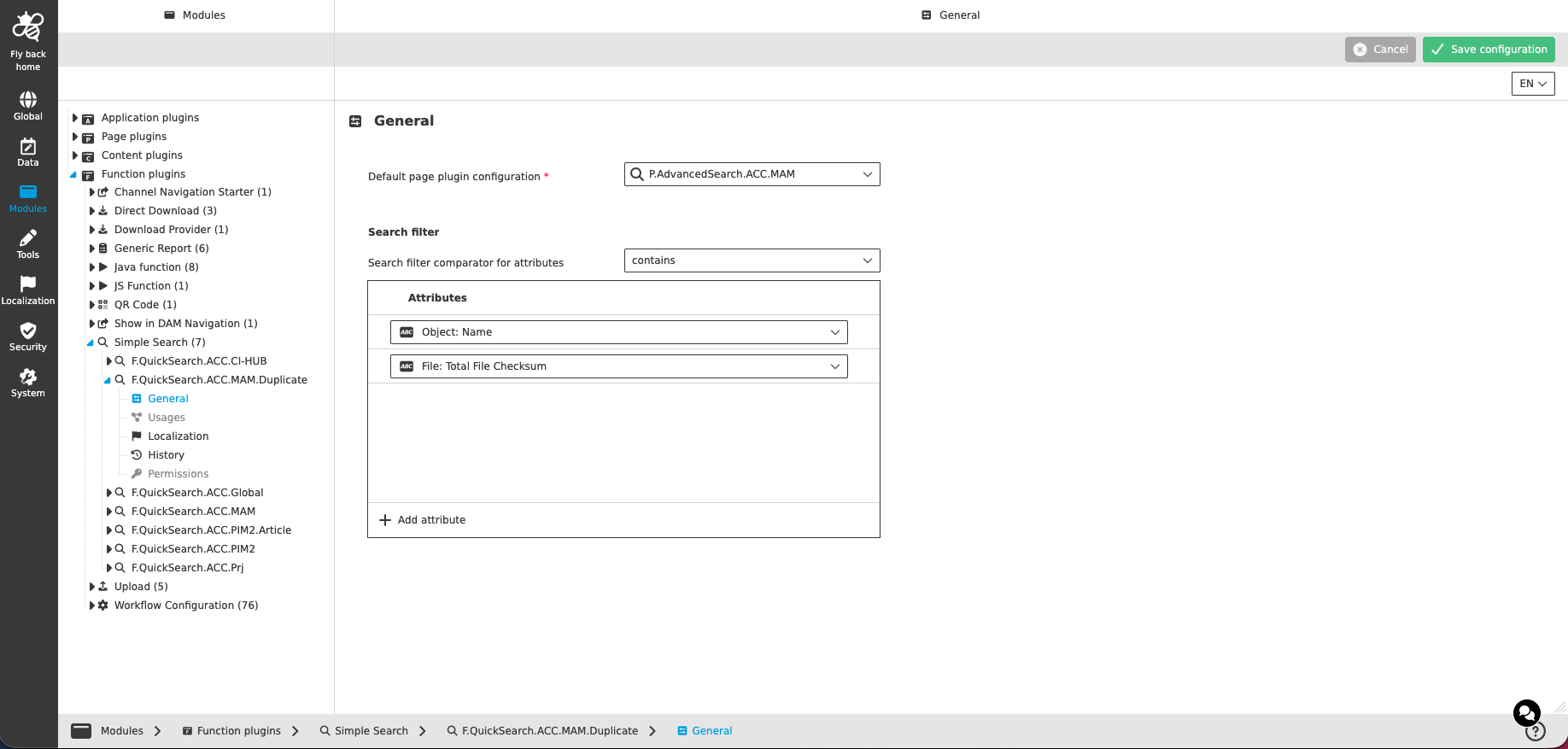
| Name of option | Description | Note |
|---|---|---|
Default page plugin configuration |
The dropdown lists all Advanced Search and Formbased Search page plugin instances configured for the current mandator (visualized with icon and identifier). The selected page plugin configuration is used to display the search results. |
The dropdown supports single-select |
Search filter
| Name of option | Description | Note |
|---|---|---|
Search filter comparator for attributes |
The dropdown lists the supported comparators for the search input field in the UI:
|
|
The table widget below is used to configure the attributes which are searched with the entered search term.
| Column name | Description | Note |
|---|---|---|
Attributes |
Contains a dropdown to select an attribute. Only attributes of the object type of the selected default page plugin are shown. |
The dropdown supports single-select |
The following functions are available:
| Function | Description | Note |
|---|---|---|
Add attribute |
By clicking the function, a new table row is created and the attribute dropdown is in focus (opened). |
Available at the bottom of the table widget |
Delete attribute |
By clicking the function, the corresponding table row is deleted. |
Available as a table row function |
| If no attribute is configured, a fulltext search (search on the basis of all indexed attributes at once) is performed in the frontend. |