Templates
This tab type provides the possibility to configure which PEO templates are available in the Product View and whether the channels a PEO is linked to are shown.
The tab is available as a sub-element of the 'Tabs' tab in the tree of the Configuration Client as soon as it is configured on the Tabs page and the configuration is saved. It is represented with its icon and the configured tab name.
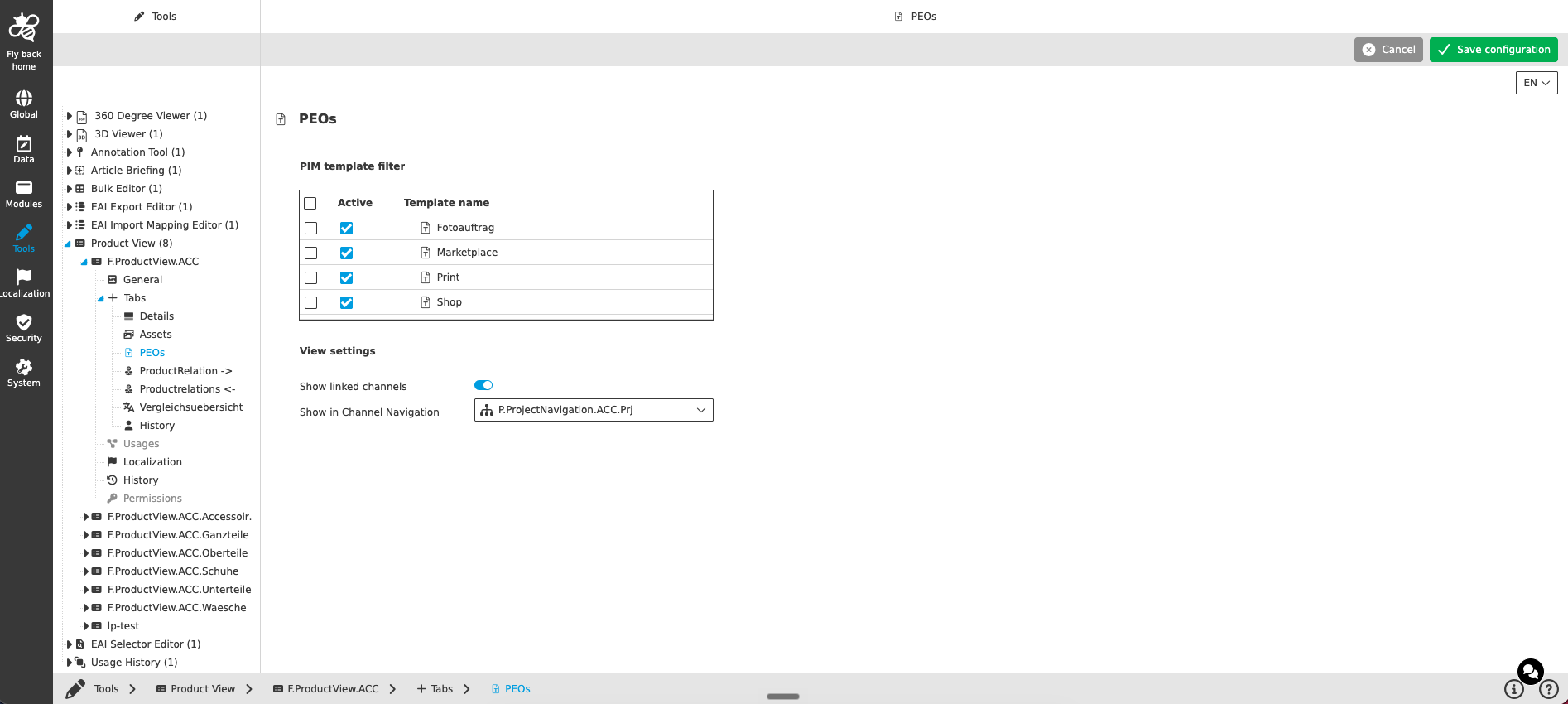
The page contains following areas:
PIM template filter
This table widget is used to configure the templates that shall be used for the 'Create option' process in the frontend.
| Column name | Description | Note |
|---|---|---|
Active |
Contains a checkbox. Enable the checkbox of a template that shall be used for the 'Create option' process in the frontend. |
Only templates with an activated checkbox are shown in the UI |
Template name |
The column lists all templates of the current mandator configured in the frontend of the Classification View templates. |
The templates are visualized with name and icon |
View settings
| Name of option | Description | Note |
|---|---|---|
Show linked channels |
If the toggle is turned on, the channels the PEO is linked to are shown. If the toggle is turned off, the channels are not shown. |
The toggle is turned off by default |
Show in Channel Navigation |
The dropdown lists the Show in Channel Navigation plugin instances configured in the current mandator. With the selected function it is possible to jump directly to the linked channel. |
|
Function configuration
The concept of adding functions is the same throughout the whole Configuration Client, detailed description can be found here.
The function configuration section is available by default and has effect for all templates.
| In the current implementation only toolbar functions can be configured. |