Custom Preview
Custom previews are additional, customer specific preview types which are generated by an own script during the preview generation. This allows to provide previews which are not covered by the standard preview types, e.g. a rotated version of an image, a preview with a watermark or a preview in a special file format. Custom previews are shown for example in the PEO View.
Depending on the synchronizer which runs on the OMN system, a custom preview is defined by a different kind of script:
-
On-prem synchronizer - the custom preview is generated by a shell script on the server (script type 'is shell').
-
Lambda synchronizer (AWS) - the custom preview is defined by a JavaScript stored in S3 (script type 'is lambda').
Both kinds of custom previews are maintained in the same table. Each synchronizer processes only the rows of its own script type and skips the others.
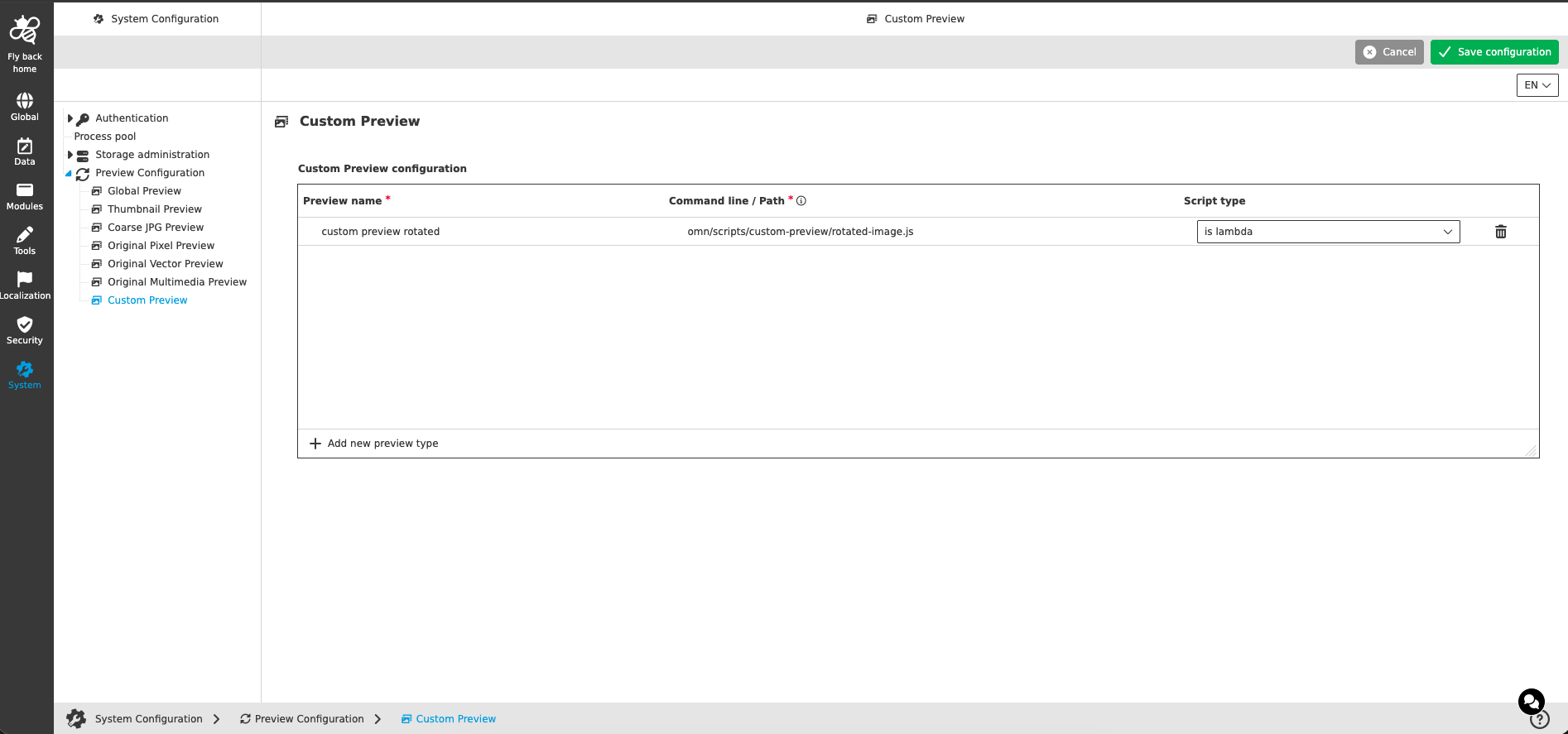
Custom Preview configuration
Each row of the table defines one custom preview type.
| Name of option | Description | Note |
|---|---|---|
Preview name |
Name of the custom preview type, e.g. 'RotatedImage'. The name is used as identifier of the preview type and as file name of the generated preview. |
|
Command line / Path |
Depending on the script type either the command line of the shell script or the path of the JavaScript, see the sections below. |
|
Script type |
Defines which synchronizer generates the custom preview and how the value of 'Command line / Path' is interpreted: 'is shell' - shell script run by the on-prem synchronizer; 'is lambda' - JavaScript run for the Lambda synchronizer. |
|
The following functions are available in the table:
| Function | Description |
|---|---|
Add new preview type |
Adds a new row to the table. The focus is set to the 'Preview name' field of the new row. |
Delete preview type |
Deletes the custom preview type of the corresponding row. The function is shown at the end of the row on hover. |
| The table is resizable, so that long command lines can be entered conveniently. |
Shell script (on-prem synchronizer)
For script type 'is shell' the 'Command line / Path' contains the path to a shell script on the server where the synchronizer is running, followed by the parameters which are passed to the script, e.g. /usr/local/bin/omn-convert.sh {sourceFilePath} {fileType} {tempDirPath} {pageCount} {previewType}
The following placeholders can be used and are replaced when the script is called:
| Placeholder | Description |
|---|---|
{sourceFilePath} |
The path to the source file |
{fileType} |
The OMN file type of the source file |
{tempDirPath} |
The temp directory. The follow-up function assumes that the generated preview is located there. |
{pageCount} |
The total page count of the document if supported, otherwise 1 |
{previewType} |
The name of the preview type as defined in 'Preview name', e.g. RotatedImage |
The script is expected to return the OMN file type of the file it has created. This type has to match one of OMN’s file types, otherwise the preview is ignored. The follow-up functionality assumes that the generated preview is located at {tempDirPath}/{previewType}.<extension>, e.g. /tmp/previews/123456789/RotatedImage.tiff.
| File extension and file type might not always match, e.g. png versus PNGf, tif versus TIFF, jpg versus JPEG, pdf versus "PDF " (white space at the end). Currently it does not work for "PDF " as the script’s return value is trimmed. |
A sample shell script and further details can be found in Create a Custom Preview Configuration. The location of the generated custom previews can be defined in the omn_*.properties with the parameter FileSystems.CustomFileSystemPath=<Path to previews>.
JavaScript (Lambda synchronizer)
For script type 'is lambda' the 'Command line / Path' contains the S3 key of a JavaScript file, e.g. omn-web/scripts/custom-preview.js. The bucket in which the scripts are stored is configured on the server with the property preview.lambda.custom.script.bucket.
The JavaScript does not generate the preview itself. It is evaluated by OMN for each checked-in asset and decides which custom previews are generated for this asset and with which tool parameters. The preview itself is then generated by the preview Lambda.
The script receives the input values in the parameter context, which is accessed with context.get('<name>'):
| Context value | Description |
|---|---|
assetId |
Database id of the asset |
fileType |
The OMN file type of the source file |
pageCount |
The total page count of the document if supported |
fileInfo |
Information about the source file |
dataBucket / sourcePath |
S3 bucket and key of the source file |
previewBucket / targetPath |
S3 bucket and key under which the generated custom preview is stored |
guid |
The GUID of the preview to be generated |
identifier |
The name of the preview type as defined in 'Preview name' |
The script returns one object or an array of objects, one per custom preview to be generated. An empty result means that no custom preview is generated for this asset.
| Field | Description |
|---|---|
name |
Name of the generated preview (mandatory). Use the value of 'Preview name' for the configured preview type. |
fileType |
OMN file type of the generated preview, e.g. JPEG |
cliArgs |
Array of tool arguments (e.g. ImageMagick) used to generate the preview. If omitted, the standard arguments of the preview type are used. |
[{ name: 'CUSTOM_THUMB', fileType: 'JPEG', cliArgs: ['-resize', '80x80>', '-quality', '80'] }]| Changes of a script in S3 are picked up automatically at the next check-in; a restart of OMN is not needed. |