Adding Menu Items of the Type Templates to a ProductView
This overview is only valid for menu items of the type Templates.
For being able to directly jump from the PEO to the linked product, make sure that you have the following plug-in available:
✓ Function plug-in “ProjectNavigationStarter”
Make sure that you have the following prerequisites ready:
✓ At least one PIM2 PEO template is configured
This is how configuration of the Templates menu item looks like:
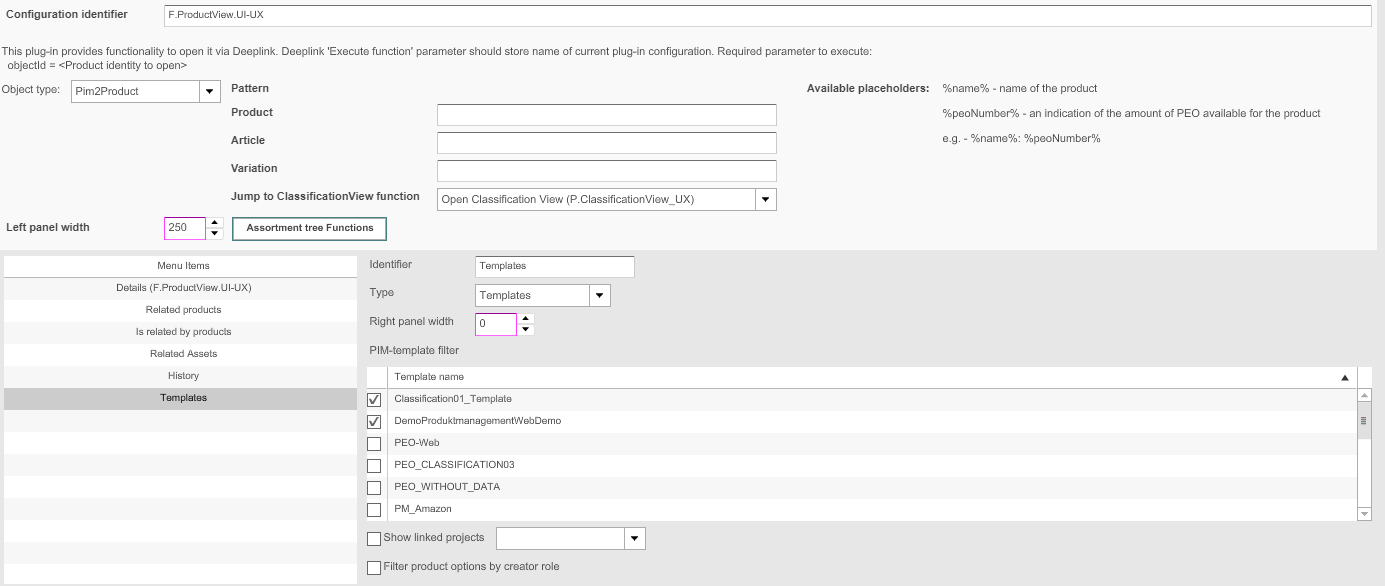
In the table below you can see the description of the corresponding configuration options:
| Field | Description | Notice |
|---|---|---|
Identifier |
Name of the specific menu item |
|
Type |
For choosing a type for the menu item: Templates |
|
Right panel width |
Width of the right area can be modified |
All values in pixels |
PIM-template name filter |
>> Activate the checkbox for the PEO templates that shall be available/displayed in the Frontend |
If no checkbox is activated, all templates will be available |
Show linked projects |
>> Activate the checkbox to show to which projects the PEO is linked.
|
|
Filter product options by creator role |
||
PEO display name pattern |
For automatically configuring the name of a PEO according to a pattern |
|
Readonly new product name |