DownloadChannel (Function Plugin)
This plug-in is a distribution channel which is used together with file preparation functions like “Download” (see "Function Plug-in "Download")
-
Access the plug-in via Mandators → <Mandator name> → Function plug-ins → DownloadChannel
You can use the plug-in as follows:
-
ShoppingCard
Here you can see how the configuration of the DownloadChannel function plugin looks like:
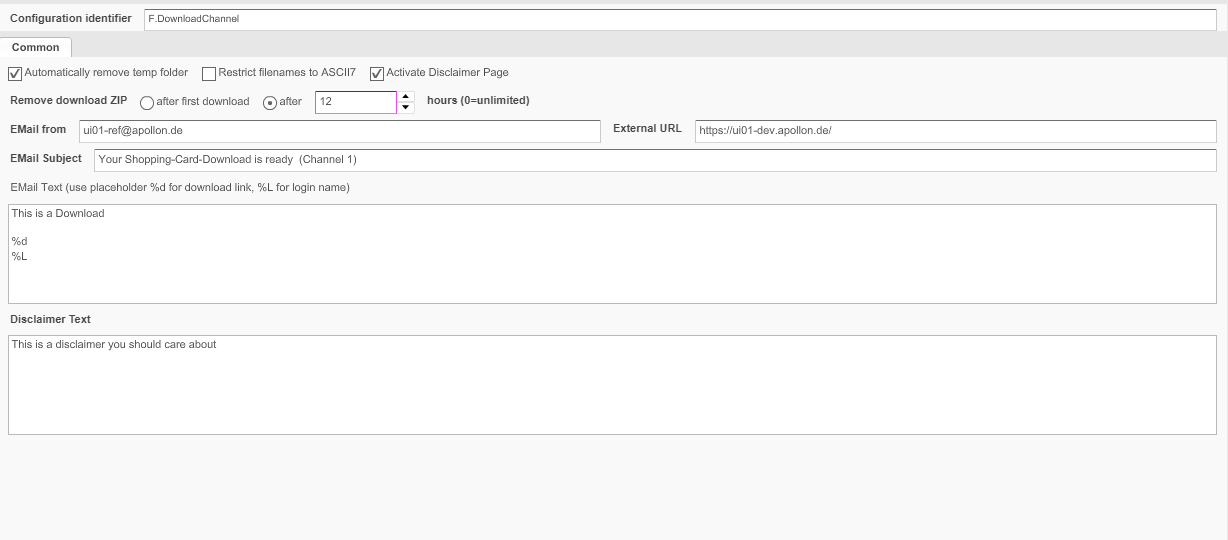
And in the table below you can find short description of the shown configuration options:
| Field | Description | Notice |
|---|---|---|
Automatically remove temp folder |
To prepare the files a temporary folder is needed. >> Activate the checkbox to remove the folder automatically when the process is finished |
|
Restrict filenames to ASCII7 |
>> Activate the checkbox to restrict file names to ASCII code |
|
Activate Disclaimer Page |
>> Activate the checkbox if a user must accept a disclaimer before preparing the ZIP archive is possible |
Enter an appropriate text in the textbox Disclaimer Text |
Remove download ZIP |
The resulting download archive in ZIP format will be removed:
|
The resulting download ZIP is created compatible to Macintosh computers using Stuffit 9 or higher. It includes resource files, so e.g. the PICT preview is available |
EMail from |
Email address from the sending system |
If no address is entered here, the email address configured in System Configuration → Mail will be used. |
External URL |
Based on the information for the external URL the Download link in the shopping cart is created. The URL must include the root path of the server |
If no URL is entered here, the URL configured in System Configuration → Mail will be used. |
EMail Subject |
If the download archive is available the user who ordered the download is informed by an email: for entering a subject for the notification email. |
Note: The recipient’s email is defined when clicking the download channel button in the Frontend |
EMail Text |
For entering the text for the notification email |
Text field can contain placeholders |
Disclaimer Text |
For entering the text for a disclaimer text |
The checkbox for Activate Disclaimer Page must be activated. |