Tabs
This page provides the possibility to configure which tabs are available in the Product View, their order and their localizations. The configured tabs are displayed as navigation tabs within the editor.
Once the page is saved, the configured tabs are shown as sub-elements of the 'Tabs' tab in the tree of the Configuration Client, represented with their icon and the configured tab name. Each tab can then be configured in detail - see the sub-pages listed below.
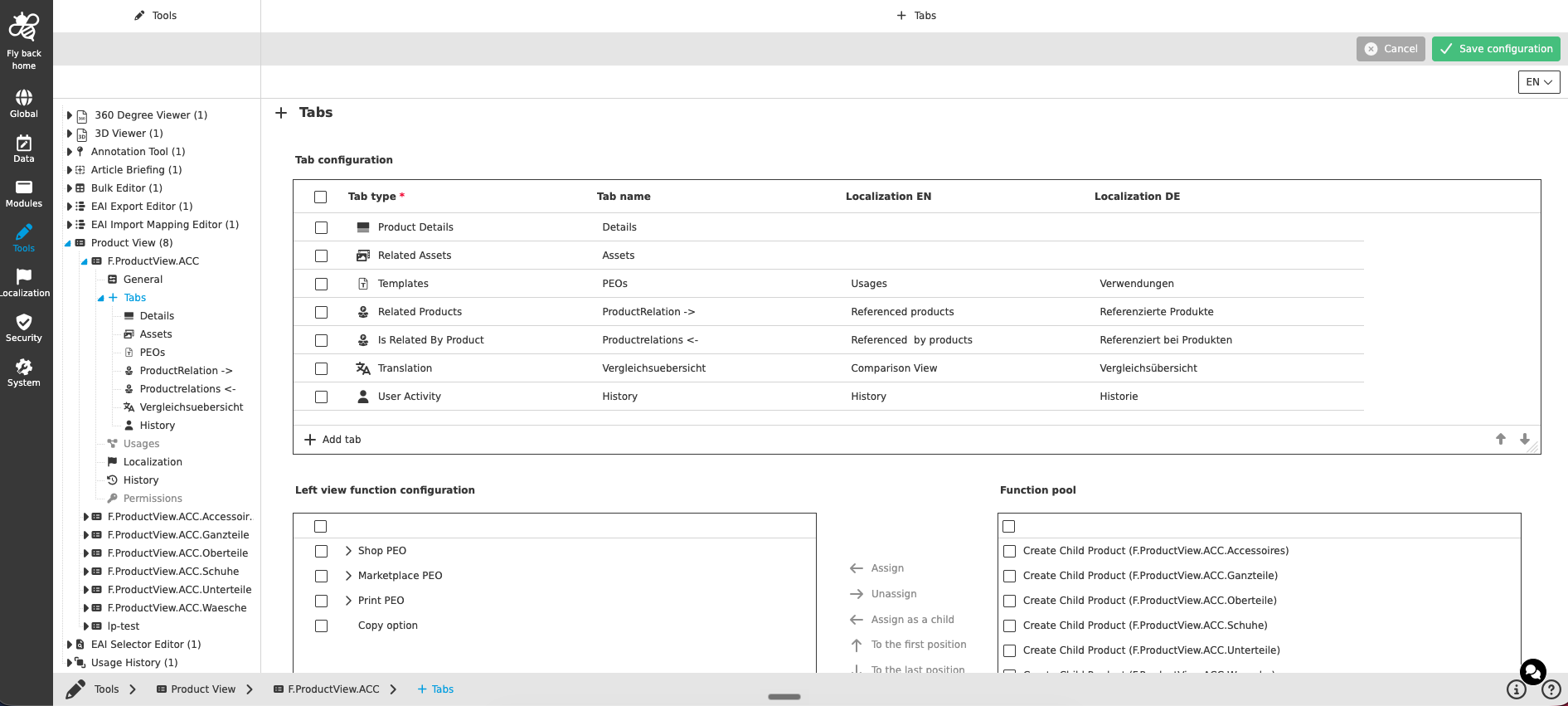
The table widget contains the following columns:
| Column name | Description | Note |
|---|---|---|
Tab type |
Contains a dropdown where the user can select one of the supported tab types: |
|
Tab name |
Input field to enter the default name for the tab type. Once the page is saved, the name is shown in the tree of the Configuration Client and as navigation tab in the UI. |
|
Localization columns |
For each enabled system language, its own localization column is shown, which can be maintained. If the language is selected in the UI, the corresponding localization is shown for the tab. |
Can be changed with inline editing |
The following functions are available:
| Function | Description | Note |
|---|---|---|
Add tab |
By clicking the function, a new table row is created and the dropdown for the tab type selection is in focus. |
Available at the bottom of the table widget |
Remove tab |
By clicking the function, a confirmation modal is shown. If the deletion is confirmed, the tab(s) and the assigned views and functions are no longer available to users in the user interface. |
The function is only displayed if at least one tab (checkbox) is selected |
Move the tab up / Move the tab down |
The arrow functions allow ordering the tabs. The order influences the order of the navigation tabs shown in the UI. |
Works also with multi-select - reordering is performed on all selected rows |
The order of the tabs can also be adjusted after saving - the tab order in the table always reflects the order of the navigation tabs in the Product View UI.
Left view function configuration
Below the tab configuration, the functions for the left view of the Product View can be configured. The functions assigned in the 'Left view function configuration' are available for the product structure shown in the left view of the Product View in the UI, e.g. functions to create child products or to copy options.
The functions are assigned from the function pool. The concept of adding functions is the same throughout the whole Configuration Client, detailed description can be found here.
Configuration of the single tab types
Each configured tab is shown as a sub-element of the 'Tabs' tab in the tree of the Configuration Client. The configuration options depend on the tab type:
| Tab type | Description |
|---|---|
Detail views for maintaining the product data. Can be configured multiple times. |
|
Views presenting the products related to the currently opened product. |
|
Views presenting the products which relate to the currently opened product. |
|
Views presenting the assets referenced to the currently opened product. |
|
Views for translating the product data. |
|
Views presenting the channel objects the product is used in. |
|
View presenting the user activities on the currently opened product. |
|
Configuration of the PEO templates available for the 'Create option' process and the channel visualization. |
|
Configuration of a Formbased or Advanced Search within the Product View. |