Javascripts
This page provides the possibility to configure Javascript snippets for the Detail View and control when they run.
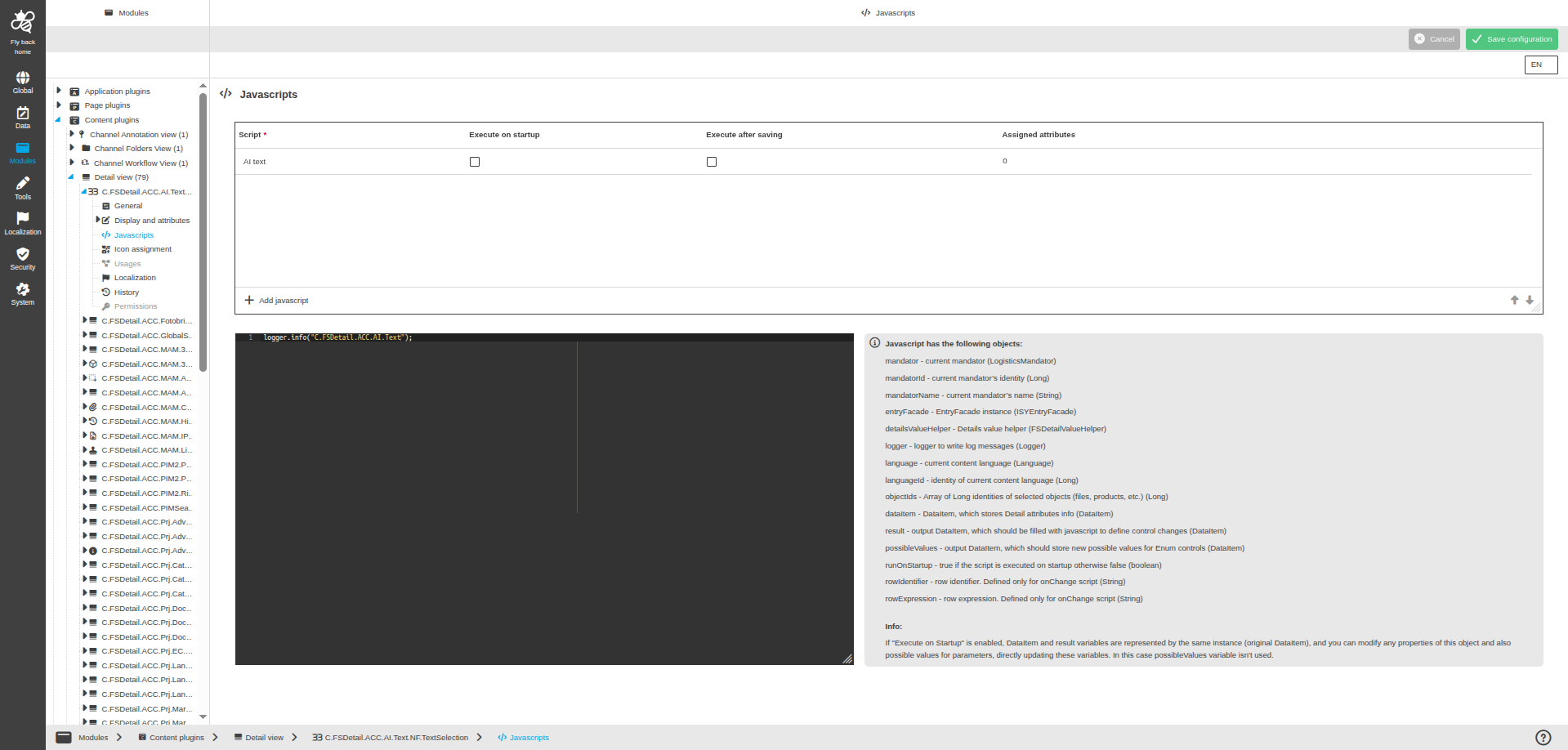
The page contains the following configuration:
Table widget
| Name of option | Description | Note |
|---|---|---|
Script |
Name of the script entry. |
The list is scoped to the current object type of the Detail View configuration. |
Execute on startup |
Runs the script when the Detail View is opened. |
Disabled by default for new scripts. |
Execute after saving |
Runs the script after the Detail View is saved. |
Disabled by default for new scripts. |
Assigned attributes |
Shows how many attributes use this script. |
This field is read-only. |
The table provides the following functions:
| Function | Description | Note |
|---|---|---|
Add javascript |
Adds a new row to configure a script. |
The first field is focused after adding. |
Delete javascript |
Deletes the selected script. |
If the script is assigned to attributes, those assignments are removed after saving the page. |
Code editor
The code editor is available when a script is selected in the table widget. This field is used to define new or edit existing script.
Javascript has the following objects:
Name of object |
Description |
mandator |
current mandator (LogisticsMandator) |
mandatorId |
current mandator’s identity (Long) |
mandatorName |
current mandator’s name (String) |
entryFacade |
EntryFacade instance (ISYEntryFacade) |
detailsValueHelper |
Details value helper (FSDetailValueHelper) |
logger |
logger to write log messages (Logger) |
language |
current content language (Language) |
languageId |
identity of current content language (Long) |
objectIds |
Array of Long identities of selected objects (files, products, etc.) (Long) |
dataItem |
DataItem, which stores Detail attributes info (DataItem) |
result |
output DataItem, which should be filled with javascript to define control changes (DataItem) |
possibleValues |
output DataItem, which should store new possible values for Enum controls (DataItem) |
runOnStartup |
true if the script is executed on startup otherwise false (boolean) |
rowIdentifier |
row identifier. Defined only for onChange script (String) |
rowExpression |
row expression. Defined only for onChange script (String) |
| If "Execute on Startup" is enabled, DataItem and result variables are represented by the same instance (original DataItem), and you can modify any properties of this object and also possible values for parameters, directly updating these variables. In this case possibleValues variable isn’t used. |