LightTable (Content Plugin)
The light table is used to show items with larger previews.It allows two additional attributes, and the user can adjust the size of the preview
-
Access the plug-in via Mandators → <Mandator name> → Content plug-ins → Lighttable
You can use the plug-in as follows:
-
Page plug-in “FSNavigation”
-
Page plug-in “ClassificationView” (AssetView)
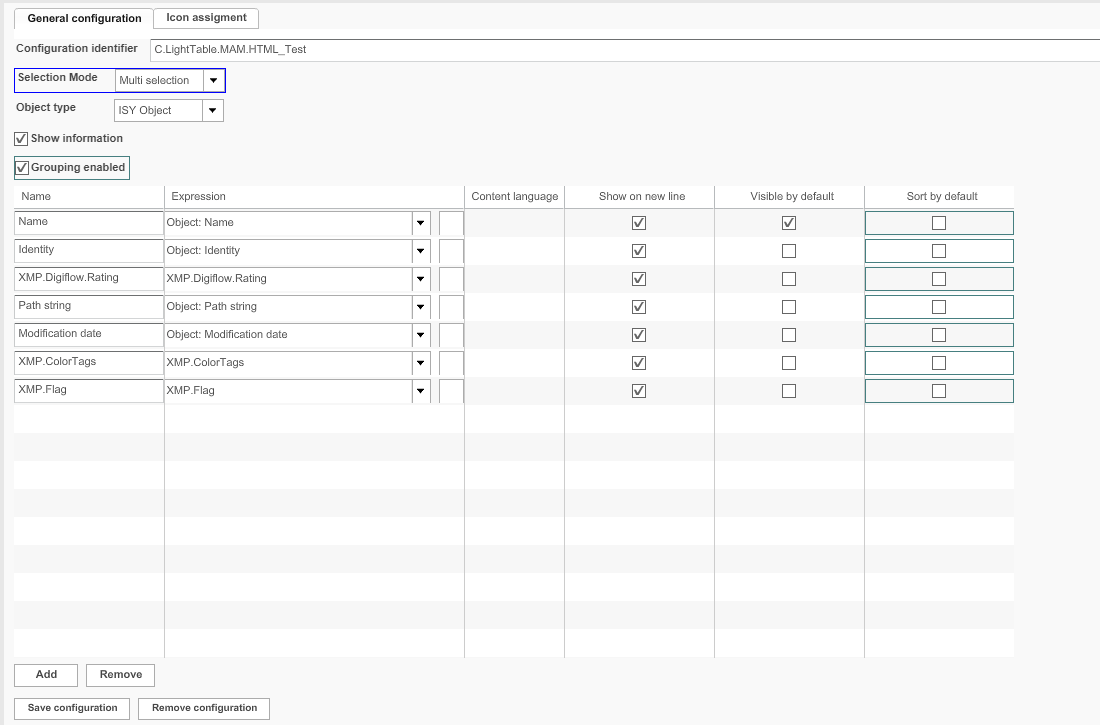
Here is the overview of configuration possibilities for LightTable content plugin:
| Field | Description | Notice |
|---|---|---|
Configuration Identifier |
Name of the specific configuration of the plug-in |
|
Icon assignment |
For assigning an icon for the plug-in |
|
Selection Mode |
|
This option is no longer supported for HTML5 Frontend |
Show information |
>> Activate the checkbox to enable displaying the metadata information in the frontend |
|
Name |
The attribute name shows by default as soon as an expression from the “Expressions” list is chosen, it can be modified |
|
Expression |
The drop-down list contains information which can show in the center area of the LightTable view |
For a complete list of available expressions and a description please pass on to the reference manual |
Content language |
For choosing a language if the attribute is multilingual. |
|
Show on new line |
>> Activate the checkbox to define if information will be shown in new line |
|
Visible by default |
>> Activate the checkbox to define if attribute information will be shown by default |
Via settings in LightTable view the user can define which attributes should be shown by default – this information will be written in user-based settings |
Sort by default |
>> Activate the checkbox for the expression that should be used as sorting criterion. All items will be sorted by default on the client. |
You can define only one expression for default sorting. The feature is supported only on HTML5 UI. |