Codeware Xactuell
Prerequisites for use
-
OMN version 6.1. or higher
-
Xactuell 11
| The old SOAP interface is no longer supported with Xactuell 11 and OMN 6. |
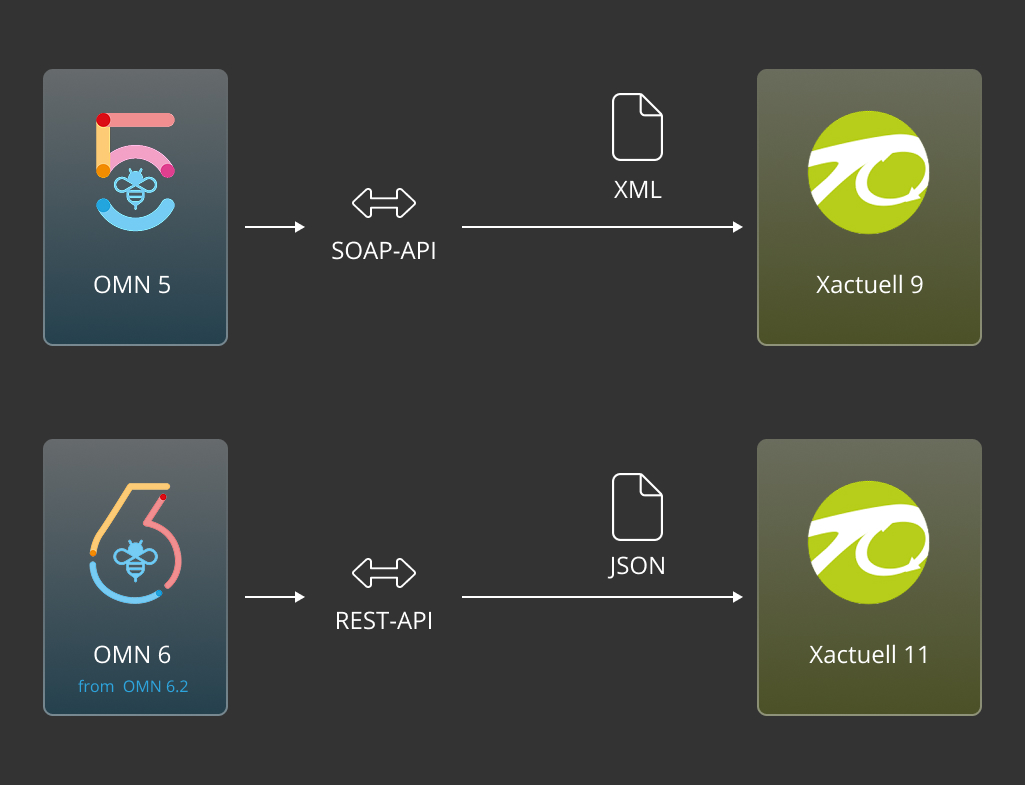
Xactuell can be used via one of the following two connections:
-
-
For details, see Working with Xactuell - Interface and usage
-
-
PIM (Product Information Management)
-
Available in a later OMN version
-
DataPublishing
DataPublishing is a solution for the professional Adobe InDesign workstation.
Adobe InDesign is enhanced with tools for data communication and processing that enable access to centrally stored product data directly from Adobe InDesign.
DataPublishing works on the basis of templates and rules.
Once product data has been placed on a page, it is available as granular, linked units in the Adobe InDesign document, which can be updated at any time if required.
Advantages of DataPublishing
-
Always correct and high-quality product presentation in a publication
-
Direct access to all approved product images, mood images, icons, etc.
-
Fast and style guide-compliant placement of product data through the use of templates and automation
-
Support of native InDesign functions for product placement (style sheets, formatting, layers, etc.)
-
Creative changes to the product presentation while maintaining the product data update (from updating individual elements to group and complete updates)
-
Access to central data storage and structure or publication-specific structure
-
Automatic language exchange
-
Can also be used in a team
Xactuell Plugin
Xactuell is delivered in various expansion stages. These are briefly explained in the following chapters.
Xactuell L
Xactuell L extends Adobe InDesign with tools required for dynamic database publishing and is suitable for all types of layouts.
It is mainly used where publications are designed to a high standard and no cross-page structure is required.
With Xactuell, text parts, text and graphic frames are linked to database fields. These links can be updated bidirectionally.
Image and text frames can be attributed. For example, it is possible to define whether an image should be fitted proportionally into the image frame or whether a text frame should be enlarged or reduced in size according to the amount of text.
Xactuell XL
Xactuell XL extends the Xactuell L version to include the option of rule-based, cross-page publication layout and project-specific customizing of workflows.
In addition to the functions contained in Xactuell L, Xactuell XL also includes the following features:
-
Management and execution of pagination scripts in the script manager
-
Template placement via scripts
-
Realization of complex layouts and rule sets
Xactuell Visual
Xactuell Visual is available on the one hand so that documents created with Xactuell can be forwarded and edited externally without the need for a full version of Xactuell. On the other hand, the connections set to the database can be made visible with Xactuell Visual.
Xactuell XL Server
Xactuell XL Server is a plugin for Adobe InDesign Server and QuarkXPress Server.
With Xactuell XL Server, workflows and jobs can be executed in the background within a server layout program. For example, PDFs can be created, InDesign documents can be generated using templates, etc.
Manual
The following manual describes and explains all menu items and dialogs for the L and XL expansion levels of Xactuell:
Xactuell manual
Application examples
On the following page, application examples for the new OMN Xactuell REST interface can be found.
System requirements
Information on the system requirements can be found on the following page Codeware Xactuell.
Support
In case of problems, users can get in touch via this Link.
A plugin license is required to use Xactuell.
For questions about prices and licenses, users can contact sales@apollon.de.