E-mail notification
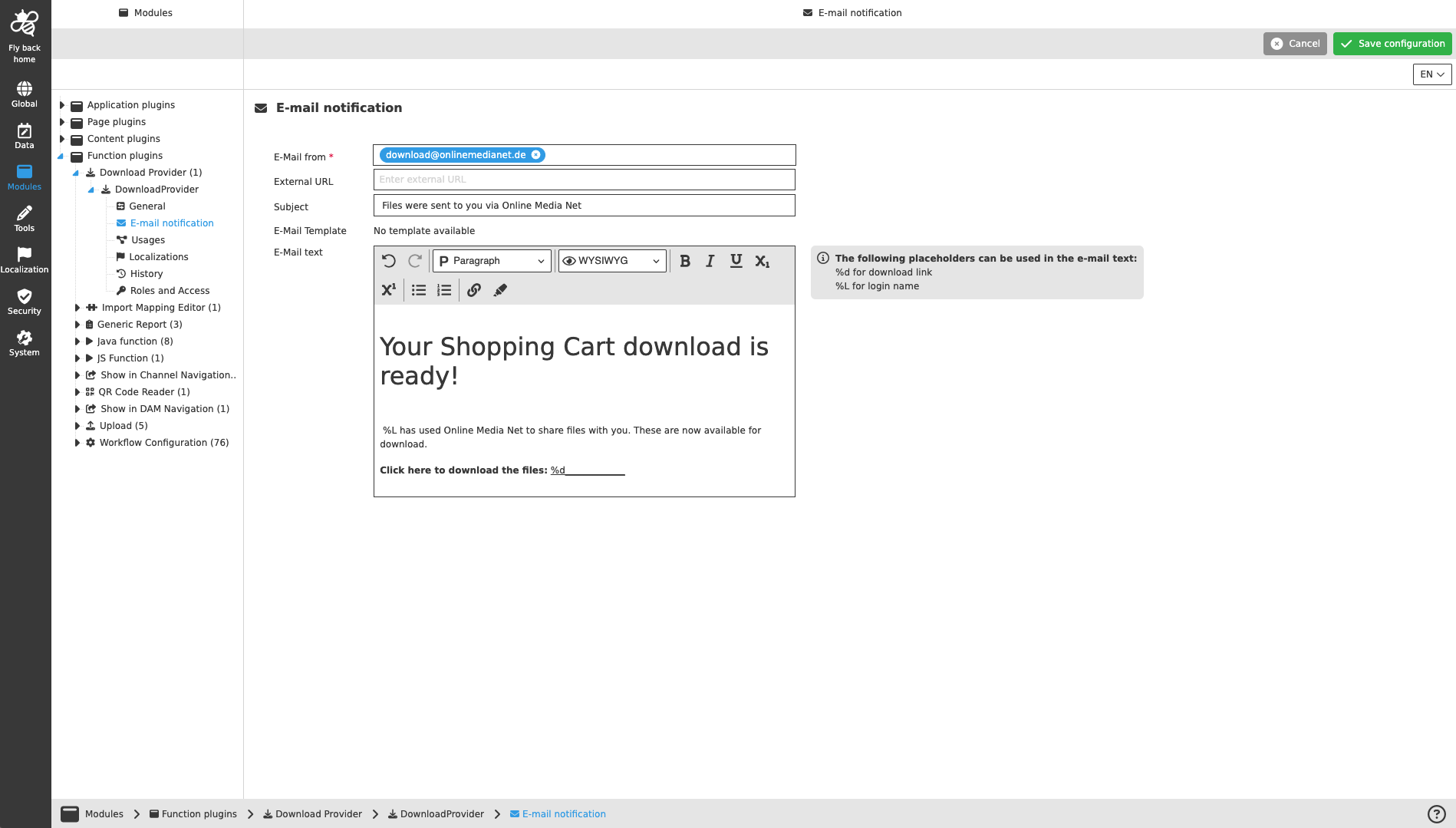
This page provides the possibility to configure the e-mail template for the recipient of the download zip. This can be done manually by entering text or by selecting an e-mail template in later version.
Name of option |
Description |
Note |
E-Mail from |
E-Mail address from the sending system |
Only one e-mail can be entered. If no e-mail is entered here, the e-mail address configured in System Configuration → Mail will be used. |
External URL |
Based on the information for the external URL the download link in the shopping cart is created. The URL must include the root path of the server. |
If no URL is entered here, the URL configured in System Configuration → Mail will be used. |
Subject |
For entering a subject for the notification e-mail. |
|
E-Mail Template |
Content coming soon … |
Templates can be added in later version |
E-Mail text |
For entering the rich text for the notification e-mail |
The editor supports the variables shown next to it in the information box. |
| The recipient’s e-mail is defined when clicking the download channel button in the frontend. |