Display and attributes
This page provides the possibility to configure the display settings and attributes which should be available in the Lighttable plugin in the UI.
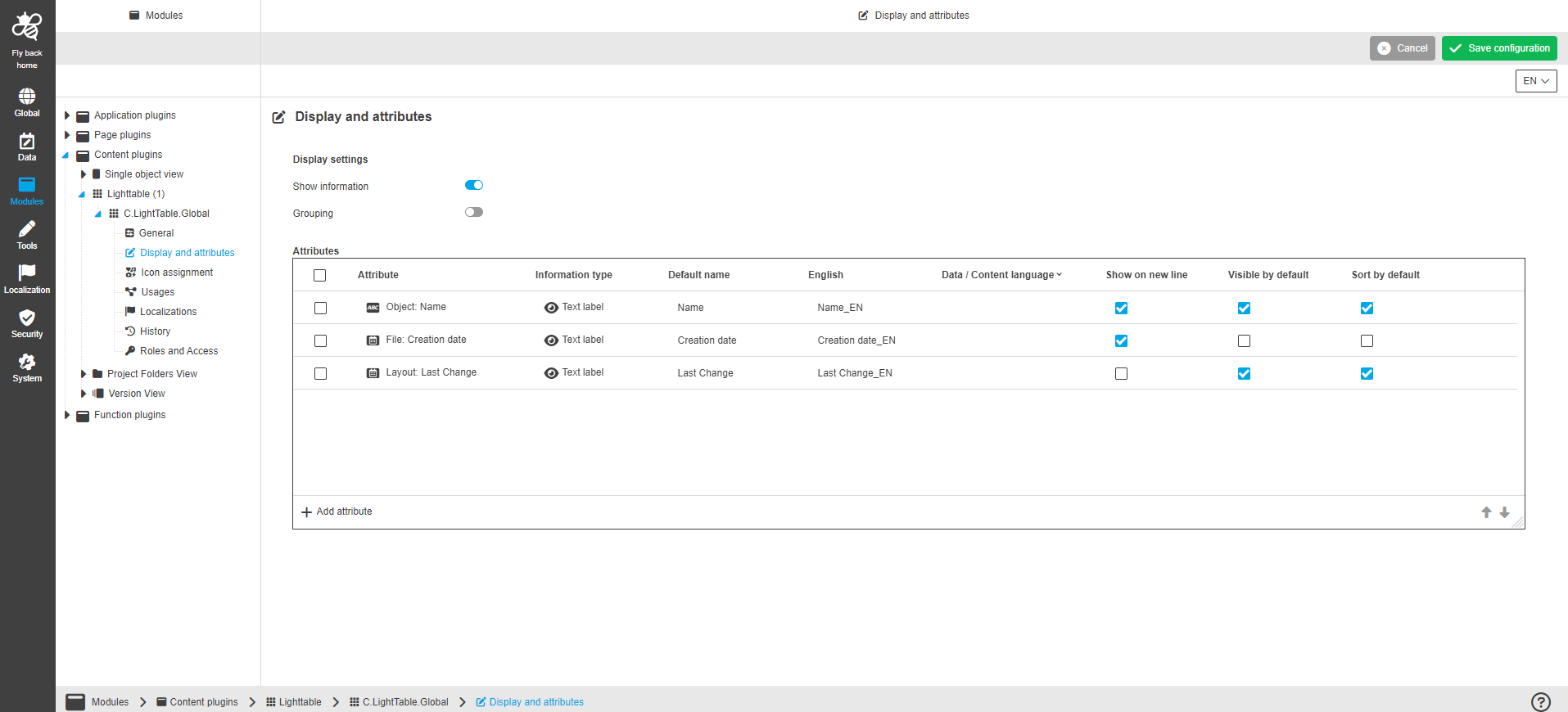
| Name of option | Description | Note |
|---|---|---|
Show information |
|
The option is turned on by default. |
Grouping |
|
|
Attributes |
|
The section is only available if "Show information" is activated. |
The following table lists the configuration options within the 'Attributes' table widget:
| Name of option | Description | Note |
|---|---|---|
Attribute |
|
|
Information type |
The dropdown contains the list of types that define how the attribute will be displayed in the UI. |
It is not possible to select none information type. |
Default name |
The option is used to enter a default attribute name, which will be shown in the UI if no localization of the set system language is available. |
The attribute name shows by default as soon as an attribute type is chosen. |
Localization columns |
The option is used to enter the attribute name for each available system language, which will be shown in the UI. |
|
Content language |
The option is used for choosing a language if the attribute is multilingual. |
No system language is selected by default. |
Show on the next line |
The option is used to define if information will be shown in new line in the UI. |
|
Visible by default |
The option is used to define if attribute information will be shown by default in the UI. |
|
Sort by default |
The option is used for the attribute types that should be used as sorting criterion. All items will be sorted by default in the UI. |