AssetView (Function Plugin)
The plug-in is needed to handle variations and versions of an asset.
Furthermore, it allows to view the history of assets, i.e. changes that have been made on assets by the user or the system.
-
Access the plug-in via Mandators → <Mandator name> → Function plug-ins → AssetView
Make sure that you have at least one of the following plug-ins available:
✓ Content plug-in “FSTable” as HistoryTable
✓ Content plug-in “AssetVariations”
✓ Content plug-in “VersionView”
You can use the plug-in as follows:
-
Page plug-in "FSNavigation"
General configuration
Here you can see how the configuration of AssetView function plugin looks like:
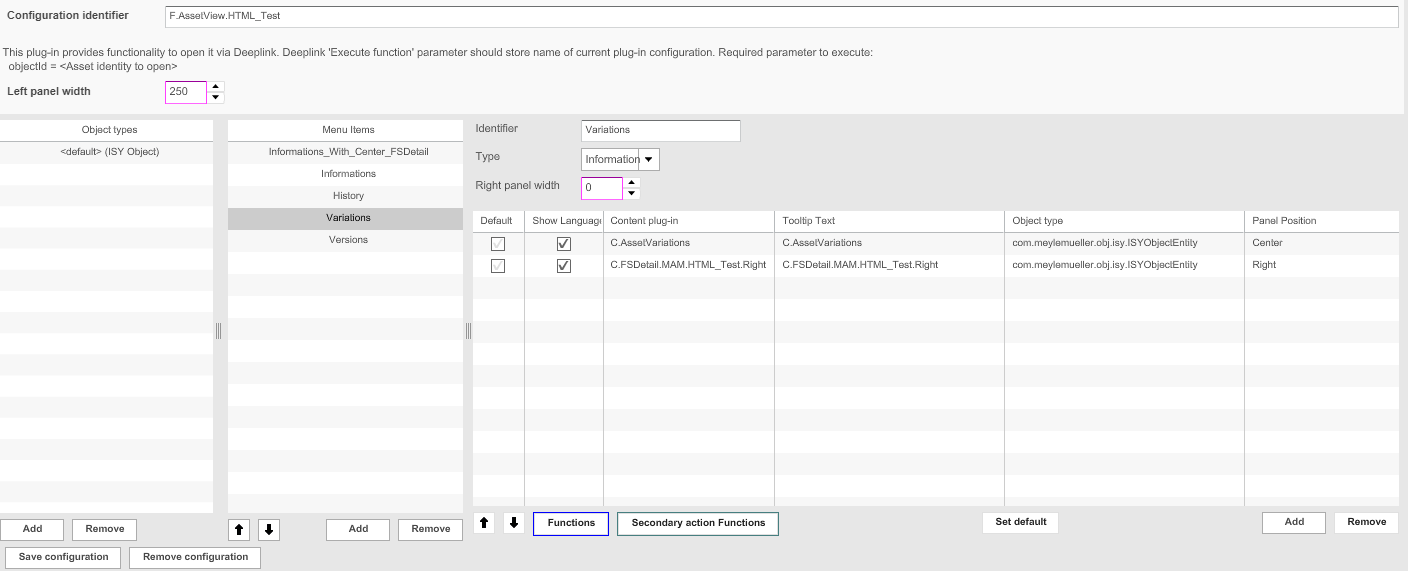
You can find descriptions of the shown configuration options in the table below:
| Field | Description | Notice |
|---|---|---|
Object types |
Available object types:
|
|
Menu items |
>> Click on add to create a new menu item and fill in the fields. |
Menu items need to have an identifier and type |
Identifier |
Name of the specific menu item |
|
Type |
Information Versions History |
The content plug-ins must be chosen according to the type |
Right panel width |
Width of the right area can be modified. |
All values in pixels |
Content plug-in |
For defining the content views available for displaying the results. |
|
Functions |
For adding functions to a content view. |