Users
The page provides the possibility to create and maintain users for the OMN system and to activate or deactivate them. On this page the user can configure OMN users and also see users, which have been configured in Keycloak and are used within OMN.
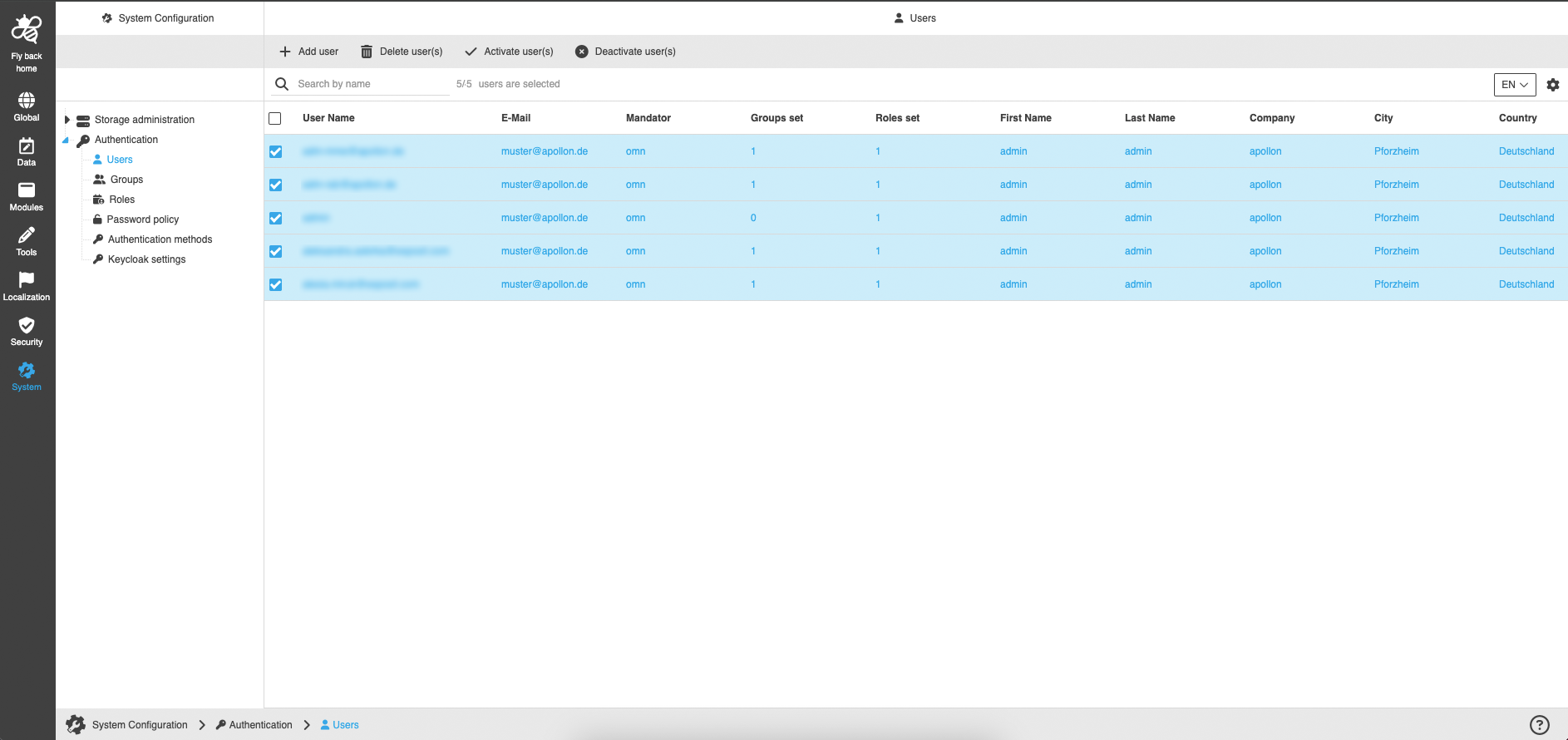
The page contains:
-
the following functions:
| Function name | Description | Note |
|---|---|---|
Add user |
Function creates a new user |
See 'Add user' |
Edit user |
Function edits created user |
The function is not available for external IDP users, see 'Edit user' |
Delete user(s) |
Function deletes selected users |
The function is not available for external IDP users, see 'Delete user(s)' |
Activate user(s) |
Function to activate selected users, so they can log in |
See 'Activate user(s)' |
Deactivate user(s) |
Function to deactivate selected users, so they cannot log in |
See 'Deactivate user(s)' |
-
the table with the following columns and information about users:
| Column name | Description | Note |
|---|---|---|
User Name |
Shows the configured name of the user |
The field must be maintained when the user is created |
Shows the configured e-mail of the user |
The field is optional |
|
Mandator |
Shows in which mandator the user is available |
Only the OMN mandator is currently available here |
Groups set |
Shows the amount of groups the user is assigned to |
|
Roles set |
Shows the amount of roles the user is assigned to |
Direct and indirect roles are counted |
First Name |
Shows the configured first name of the user |
The field is optional |
Last Name |
Shows the configured last name of the user |
The field is optional |
Company |
Shows the configured company information of the user |
The field is optional |
City |
Shows the configured city information of the user |
The field is optional |
Country |
Shows the configured country information of the user |
The field is optional |
Department |
Shows the configured department information of the user |
The field is optional |
Address |
Shows the configured address information of the user |
The field is optional |
Zip Code |
Shows the configured zip code information of the user |
The field is optional |
Phone |
Shows the configured phone number of the user |
The field is optional |
Fax |
Shows the configured fax number of the user |
The field is optional |
Activated |
Shows if the user is activated on the system |
Only activated users can log in to the frontend |
IDP |
Shows the name of the identity provider they are created with (for example AZUREAD) |
Add user
-
Click 'Add user' function
-
Enter user details in the modal and fill in all mandatory fields
-
Click on the 'Add user' button
|
Edit user
-
Select an internal user (IDP = OMN or LDAP) in the users table
-
Click 'Edit user' function
-
Enter or adjust user details in the modal and fill in all mandatory fields
-
Click on the 'Edit user' button
|
The function is only available when one internal user (IDP = OMN or LDAP) is selected. |
Delete user(s)
-
Select one or multiple internal users (IDP = OMN or LDAP) in the users table
-
Click 'Delete user(s)' function
-
Click on the 'Delete user(s)' button
|
Activate user(s)
-
Select one or multiple users in the users table
-
Click 'Activate user(s)' function
|
Deactivate user(s)
-
Select one or multiple users in the users table
-
Click 'Deactivate user(s)' function
|